Connect


Managing Windows KB updates has long been a manual, device-by-device struggle. Most IT admins lack a centralized way to see which specific Windows Knowledge Base (KB) patches are installed across their fleet. This creates a visibility gap where you might know a device is generally up to date, but you can’t quickly confirm if a critical security patch for a new zero-day vulnerability is actually present on every machine. Without this data, admins face hours of manual reporting to prove compliance during audits.
To help IT teams manage this challenge, we are excited to announce Windows KB Patch Management. This feature provides a centralized command center to track, manage, and ensure you are implementing the latest Windows update in your environment.
Why Windows KB Patch Management Matters
Microsoft releases updates every “Patch Tuesday” to address critical vulnerabilities and improve system stability. Simply knowing a device is up to date isn’t enough for a company’s security standards. Admins need to know exactly which Windows KB numbers are present, missing, or causing failures across their entire fleet.
Our new feature moves beyond simple device-level reporting to provide a centralized, actionable dashboard for every update in your environment.
Key Features and Benefits
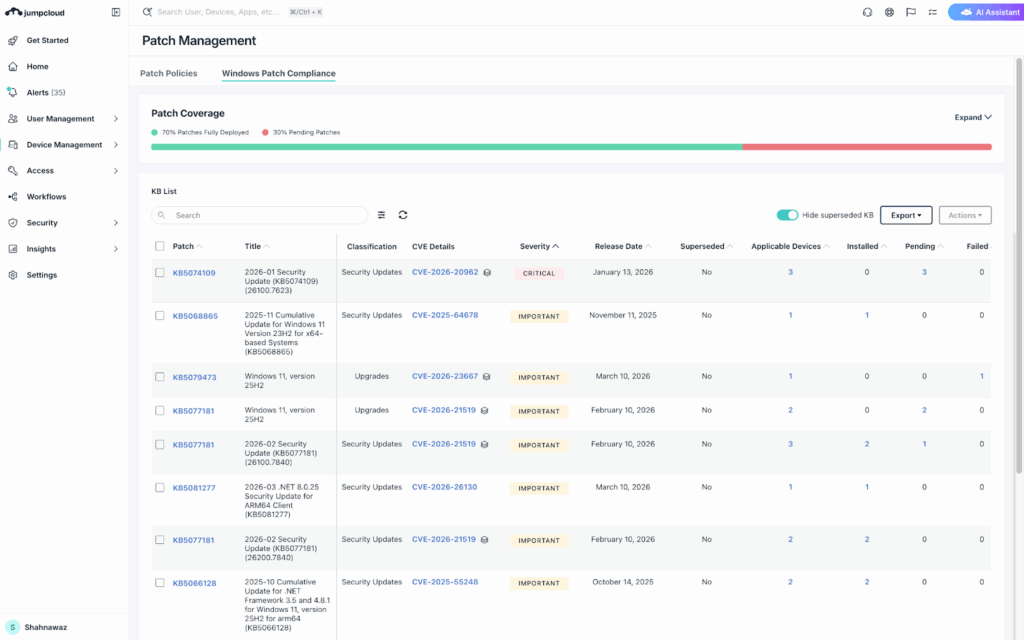
- Unified Compliance Dashboard: Get an instant, high-level overview of your fleet’s patch health with visual charts showing installation coverage, critical KB gaps, and compliance trends.
- Centralized KB Listing: View every available KB across your fleet with real-time counts for status like Installed, Pending, Failed, or Superseded.
- Severity and CVE Details: Gain insights into the CVE IDs and severity level of security patches directly in the dashboard. This allows you to prioritize the most critical vulnerabilities and understand exactly which risks each KB addresses.
- Granular Patch Control: Take precise action by approving or retrying specific KBs directly from the dashboard. You can now push critical security updates or retry failed installations with a single click.
- Drill-Down Troubleshooting: Isolate problematic updates by drilling into any specific KB to see exactly which devices are affected, helping you prioritize high-risk endpoints.
- Audit-Ready Reporting: Generate detailed exportable reports on patch success and failure to demonstrate compliance for ISO, SOC2, or other regulatory audits.
Get Started with Windows KB Patch Management Today
JumpCloud is revolutionizing IT operations by providing fleet-wide visibility and control that eliminates the need for manual correlation. By reducing the risk of outages caused by incompatible or problematic patches, JumpCloud enables our customers to achieve faster vulnerability responses and higher productivity.
Windows KB Patch Management is included at no additional cost in JumpCloud Device Management, Device Identity, Platform, Platform Essentials & Platform Prime packages.
Ready to take control of your Windows updates? Log in to your JumpCloud Admin Console to explore the new dashboard and start building a stronger compliance posture today.If you are new to JumpCloud, feel free to sign up for a free trial to experience the benefits of JumpCloud Patch Management and Application Catalog firsthand.