



The IT Professional’s Complete Guide to Calculating TCO
How to calculate TCO to drive approval and optimization
Total cost of ownership (TCO) is the only way to accurately assess the true lifetime value of your technology. As an IT professional, it may not feel like financial projection falls under your scope of work. However, making IT decisions without considering total cost can hurt productivity, growth, and your perceived ability to manage your technology stack and make sound recommendations.
When TCO is factored into IT decisions, it can be highly compelling – true TCO numbers may be pivotal evidence when it comes time to get a proposal approved. And when TCO is calculated thoroughly to account for a tool or stack’s entire lifetime, it often reveals opportunities to optimize your people, processes, and products while significantly cutting costs. All in all, TCO-informed decisions create efficient, user-friendly, and cost-effective IT environments where you and your team can thrive.
This guide offers step-by-step TCO calculation guidance that’s tailored to IT professionals. It also comes with a TCO calculation template spreadsheet with example use cases to guide you. Follow along in the spreadsheet to get the most out of this guide.
As you walk through the steps of calculating TCO, follow along on a fictitious company’s TCO journey to evaluate its infrastructure costs. “Company ABC” currently uses all on-premise infrastructure, and its IT team wants to show leadership that moving to a cloud-based infrastructure will cost less over time by calculating and comparing the TCO of both options.
Company ABC’s TCO journey will be recorded in these “TCO Example” boxes throughout this guide. You can also see the full lifetime TCO breakout in the attached spreadsheet, which has a template and built-in formulas for you to use in your own TCO calculations. Note that the numbers in the spreadsheet are fictitious estimates and not meant to represent any real-life costs. As such, you may find different prices for items we’ve listed in the spreadsheet – and that’s okay! The purpose of the numbers is to round out an illustrative example of how you might calculate TCO, not to provide actual costs of IT infrastructure.
What Factors Into TCO? | TCO Formula

At the highest level, you can break down TCO into two main components. Those components, Purchase Price (PP) and Operational Costs (OP), each contain subcategories.
Factors like time, growth, and inflation can influence TCO as well. This guide will help you identify the components and factors involved in your TCO calculations and determine their associated costs.
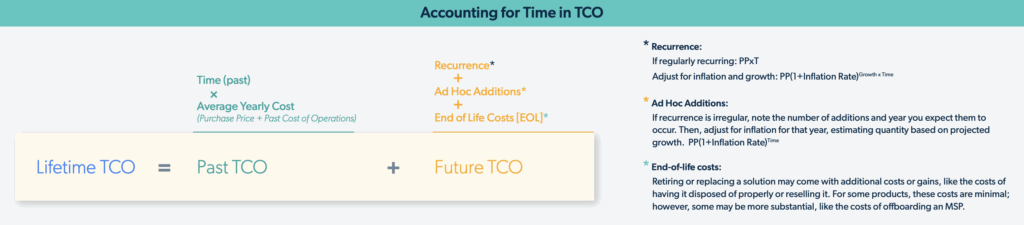
TCO can apply to a single tool, a stack, or an entire infrastructure. Lifetime TCO includes past and future costs. You can also look at past and future TCO separately to fulfill different analysis needs.
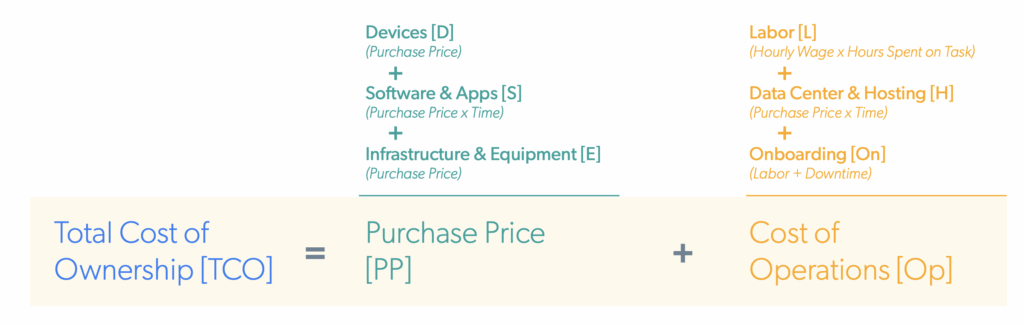
Purchase Price (PP) = the direct costs that you pay at the time of acquiring the new solution.
For legacy infrastructure, this is the initial price paid to acquire the hardware and software. For cloud-based or subscription-based items, this is the yearly cost of the solution, multiplied by the time period you are calculating for TCO. Purchase Price includes the following components:
- Infrastructure and Equipment (E)
- Software and applications (S)
- Devices (D)
Operational Costs (OP) = the costs that go into hosting, maintaining, and managing a solution.
Because Operational Costs are indirect, this is often where people forget or omit components. Operational Costs include the following components:
- Labor (L)
- Data center/hosting (H)
- Rollout (R)

Legacy systems require a significant amount of complex internal support, which factors heavily into Operational Costs. This is largely because legacy infrastructure incurs costs to host, run, manage, maintain, and support it, while most of these functions are provided by cloud vendors and baked into their monthly price.
A Microsoft Active Directory (AD) server, for example, would require licensing, real estate space (including rent, HVAC, power, physical security, and more), an IT professional to configure and manage it, updates and patches, and certifications to keep staff’s knowledge up to date. Conversely, a cloud-based alternative could skip the majority of those costs, allocating expenses to licenses instead.
What Factors Into TCO?
Time
This is the time period within which you want to make your calculation. Five years is a fairly standard length of time, but if your company is more agile or growing fast, three years may be better suited.
Lifetime TCO includes both past and future costs. However, there are reasons you may calculate just past or just future costs. For example, if you want to know how much your organization has spent on its servers, you would include the purchase price and past operational costs, but no future costs.
Rule of Thumb: When calculating the current TCO for an existing product, the time period starts at the beginning of the product or stack’s lifecycle and stretches to now.
Conversely, when comparing an existing tool or stack to a proposed alternative, focus on future costs rather than past. In this case, because your current solution has past costs while the future one does not, omitting past costs from your TCO calculations creates a more congruent comparison. For example, if you were considering moving your infrastructure to the cloud, a comparison of future costs—existing legacy versus proposed cloud alternative—would effectively answer the question, “Which will cost more over the next X years?”
Rule of Thumb: When projecting future TCO, the time period is usually now until a specified end date. Aim for at least a year if possible.
Growth
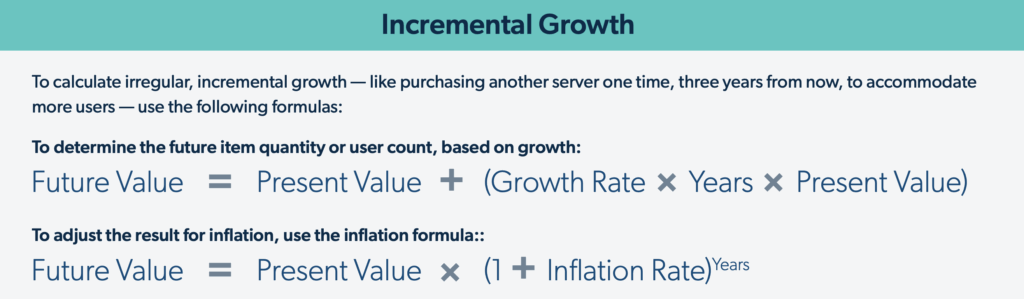
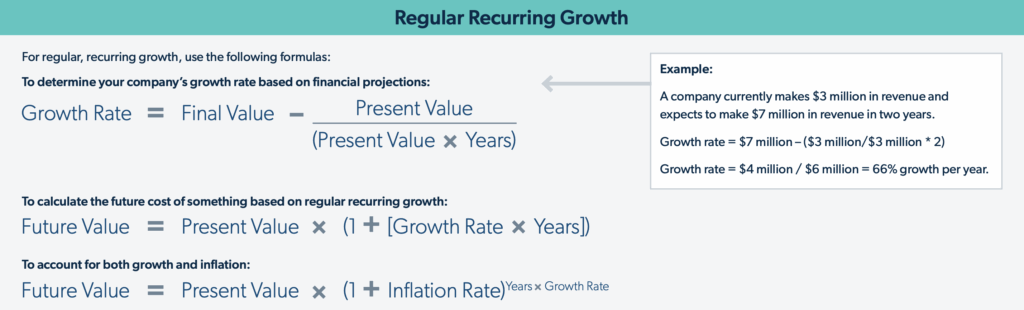
Company growth can significantly impact TCO numbers over time. Consider your company’s overarching business strategy – if it has growth projections, factor them into future calculations. For example, if a company expects to add 200 users in the next five years, and it will need to upgrade its servers in four, it may need to purchase more servers in addition to the anticipated upgrades to account for the higher load.
Note that the TCO calculator defaults to flat growth. If your company is not planning to grow, you can leave the growth factor as-is.
Inflation
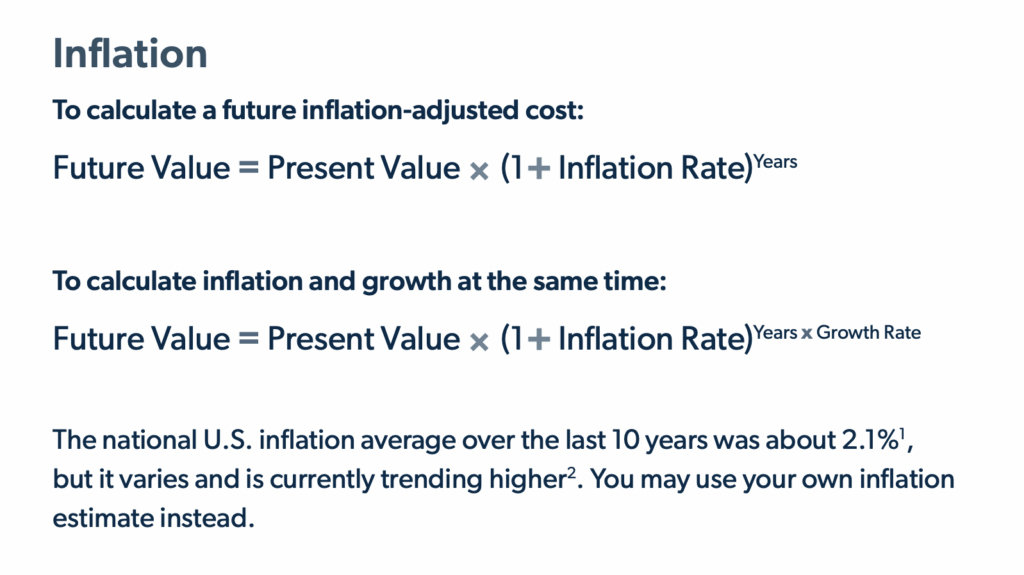
While inflation can seem insignificant or too hard to predict, it makes a notable impact on total cost over time (especially for long time periods). Further, making an informed inflation estimate (like using a historic average) usually yields more realistic projections than ignoring inflation entirely. For example, in most cases, it would be less realistic to imagine that no employee’s salary will go up in the next five years than to estimate that they may rise at the rate of average U.S. inflation.
TCO Components
Purchase Price (PP) and Cost of Operations (OP) can usually be broken into six categories, which we’ll treat as variables when calculating TCO:
- Infrastructure Equipment (I)
- Data Center/Hosting Costs (H)
- Software and Tooling (S)
- Support, Labor, and Personnel (L)
- Rollout (R)
Rule of Thumb: Because every organization is unique, your scenario may have specific contingencies not listed here.
Infrastructure Equipment (I)
Aside from networking equipment, this category typically applies only if you have on-premise infrastructure, whether you host it at your location, in a colocation center, or in a data center. Common elements of infrastructure equipment include (but may not be limited to):
- Servers
- File servers
- Directory servers
- Web hosting servers
- Server software and licensing
- Storage
- Network-attached storage (NAS)
- Storage area networks (SANs)
- Networking equipment
- Routers
- Access points
- Firewalls
- Switches
- VPN hardware
- WAN controllers
- Associated software and licensing
- Backup and recovery equipment
- Redundant servers and storage
- Associated data center/hosting costs
TCO Example
Company ABC has an IT environment that supports 250 people in one office. It hosts its own infrastructure, and has done so for the last 10 years. If it continues using this infrastructure, its TCO calculations project that it will spend about $284,000 upgrading and maintaining it. By contrast, the proposed cloud-based alternative would cost about $24,000 in that time period.
Data Center/Hosting Costs (H)
Data center and hosting costs also mainly apply to companies with on-premise infrastructure. This section includes all the costs of housing and powering infrastructure equipment. In some cases, costs associated with power, cooling, and even physical security may be baked into your monthly or annual fees; you can contact your data center provider to understand exactly where the breakdown of costs lies.
- Colocation or data center fees
- Rent
- HVAC
- Heating
- Cooling
- Ventilation
- Fire suppression
- Power
- Electricity
- Generators
- Security
- Insurance
- Cabling
- Redundant backup site costs
TCO Example
Company ABC has spent close to $600,000 on hosting its own infrastructure, and expects to pay almost $300,000 doing so over the next five years. If it were to move to the cloud, the future projection for data center/hosting costs would be eliminated. That’s close to $300,000 in savings.
Software and Tooling (S)
The software category tends to be extensive, and it varies significantly from company to company. This list is meant to be a jumping-off point for your tool audit rather than an exhaustive list of possibilities.
Often, tools can be combined for a lower overall TCO. For example, your productivity stack and collaboration platform may be provided by the same vendor, or your IAM and MDM needs may be fulfilled by your directory platform.
- Directory
- Identity and access management (IAM)
- Multi-factor authentication (MFA)
- Single sign-on
- Device management
- Mobile device management (MDM)
- Patch management
- Communication and collaboration
- Chat
- Calling/conferencing
- Phone/VoIP
- Project management
- Productivity stack
- Financial management
- HR platform
- Customer relationship management (CRM)
- Enterprise resource planning (ERP) software
- Cloud storage
- Creative suite
- Security
- Endpoint Protection
- Network scanners
TCO Example
Company ABC plans to consolidate many functions as it replaces its legacy technology with cloud-based alternatives. For example, it proposes replacing its file servers with cloud-based storage, which is offered in conjunction with productivity and collaboration tools by a cloud vendor. Similarly, it plans to replace its legacy directory with a cloud-based platform that provides MFA and MDM capabilities. This would allow Company ABC to eliminate the costs of separate MFA and MDM tools from its stack, reducing its costs associated with managing and securing devices and identities.
Employee Devices (D)
Any physical hardware and associated connectivity plans purchased by your company and issued to employees falls under this category. Device costs may include:
- Laptops
- Tablets
- Phones
- Phone plans
- Accessories (e.g. monitors, keyboards, docking stations, etc)
TCO Example
Company ABC’s device costs are fairly similar with either on-prem or cloud-based infrastructure because employees would use the same devices either way. However, Company ABC’s cloud migration plan includes the adoption of a cloud directory platform that includes MDM and patch management. This lowers the Software (S) and Labor (L) components of its TCO calculations.
Support, Labor, and Personnel (L)
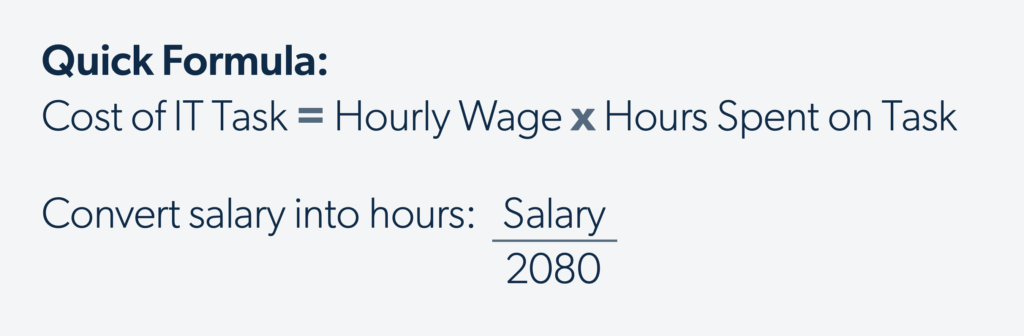
Typically, these are the labor costs associated with configuring, supporting, and managing your IT rather than the costs associated with day-to-day activities and job function. These costs are usually calculated by determining the hourly wage of the person responsible for the task. For salaried workers in the U.S., divide their yearly salary by the number of hours in a typical work week, and multiply the result by the number of working weeks in a year; a standard 40-hour work week equates to 2080 total working hours. Multiply the resulting hourly rate by the number of hours spent on the task.
Quick Formula:
Typical support and labor costs include:
- IT configuration
- IT maintenance
- IT monitoring and support
- Certifications for certain software or tools
- Professional services
- Managed service providers (MSPs) and value-added resellers (VARs)
TCO Example
Company ABC’s IT team consists of an IT Director, a Network Security Officer, and four IT Admins. About 50% of the team’s time is currently spent supporting and managing their legacy infrastructure and tools (the other half is spent serving the needs of the organization and their own initiatives). Upon switching to cloud technology, they estimate that amount of time to drop to 15% because the vendors handle the bulk of the infrastructure management. Over the next five years, Company ABC would save over $2.5 million on infrastructure support and management costs by switching to the cloud.
In addition, Company ABC’s MSP can cut the time it spends maintaining the company’s infrastructure in half, allowing the MSP to reduce their hours or reallocate them to driving more strategic and forward-thinking initiatives for Company ABC.
Rollout (R)
Introducing a new tool or stack requires time and money for implementation and configuration. Its implementation and rollout can also result in downtime. Tool or stack rollout could incur the following expenses:
- Configuration and implementation: This includes time and labor: multiply the number of hours your team will spend rolling out the new solution by their hourly rate (in the U.S., calculate hourly rate by dividing salary by 2080).
- Downtime: If the system needs to go down to facilitate implementation, factor in the costs to bring it back up using the labor formulas in the Support, Labor, and Personnel section. The costs of rectifying downtime can be tricky to get exact, especially when they involve overtime, additional parts, or emergency overage fees, which can vary widely. And in addition to the IT-related expenses of downtime, there can be significant organizational losses. For instance, 98% of people working at companies of all sizes in a 2020 IDIC study said downtime cost their organization at least $150,000 per hour.
TCO Example
While Company ABC would not have to roll out its existing infrastructure, it would have to implement and configure the upgrades it anticipates. It expects the labor costs associated with these upgrades to amount to about $19,000 in the next five years. In addition, Company ABC projects that it will spend $22,190 in the next five years on rectifying system downtime. By contrast, Company ABC wouldn’t have to pay for infrastructure upgrades nor downtime response if it migrated its infrastructure to the cloud. These savings would amount to about $7,000 over the next five years.
TCO Calculation Steps
1) Define Parameters
Before you start calculating TCO, define the following parameters:
- Identify the tool or tool group you will analyze. If comparing two options, identify both and the scope of each. For example, which tools and capabilities will you account for when calculating the TCO of a security or productivity stack?
- Determine whether you want to account for past costs, future costs, or both.
- If you plan to project future costs, define:
- Time period
- Growth Rate
- Inflation Rate
TCO Example
Company ABC is comparing the TCO of its current infrastructure to the TCO of its proposed cloud-based alternative. It will project the TCO of each for the next five years. It does not plan to increase headcount within that time period, so its growth projections will not significantly affect their IT TCO calculations. It is using the 10-year U.S. historic inflation rate average: 2.1%.
2) Audit and Record TCO Components
Next, list out all of the components associated with the tool or stack you want to evaluate in a spreadsheet. For your entire infrastructure, this includes:


If you’re comparing solutions, do this for both your current solution and the proposed alternative. See the TCO Components section for a list of the most common categories and items to get you started. In addition, we recommend using the attached example and template spreadsheet as guidance when auditing your infrastructure or solution.
Companies with mostly cloud-based infrastructure: include any networking equipment from this section, then skip ahead to Software and Tooling.
3) Record Costs.
After listing out the relevant elements, assign them costs. Be sure to keep costs in a consistent time unit. We recommend years, as many recurring charges (like licenses) occur on a yearly basis. Projecting out less than one year would omit many recurring charges as well as upgrades and other ad hoc additions.
- For Device (D) and Infrastructure and Equipment (E) costs, list the purchase price. We recommend listing any maintenance or replacement costs separately for clarity.
- For Software (S) and Data Center/Hosting (H) costs, find their rate (often monthly) and convert it to your time unit (we recommend years). Account for growth, inflation, and your future time period using the formulas on pages 7 and 8.
- For Labor (L) costs, determine the number of hours spent managing, configuring, and supporting the solution or stack as well as the cost of the labor (see page 9 for the formula).
- For Rollout (R) costs, determine the number of hours spent on rollout and multiply it by the cost of labor. Add that to the number of downtime hours multiplied by the cost of downtime—see the Rollout section for calculation help.
For each line item’s cost, consider:


- Future costs:
- Purchase Price (PP)
- Initial Price x Quantity
- Recurrence: will this cost recur yearly (i.e., software licensing)?
- If yes: See the formulas in the Growth section.
- If no: skip.
- End of life costs and gains
- Purchase Price (PP)
- Past Operational Costs
- Average Yearly Cost x Years Since Acquired
This includes the costs to uninstall, remove, dispose, or offboard items, as well as any profit made by reselling the technology. This category can often be left blank, but some cases may have significant expenditures or gains worth recording.
4) Sum and Compare.
Add up the costs for your items. If you’re calculating TCO for more than one product, compare the results – which will cost less in the future? In the past? Overall? This data quantifies and contextualizes your proposal, allowing you to make your case with hard numbers and tangible monetary gains.

TCO Example
Overall, Company ABC’s TCO comparison between on-premise and cloud-based infrastructure shows a clear winner in terms of cost. Over the next five years, moving to the cloud would save the company close to $3 million, despite the initial upfront costs associated with purchasing and rollout the new solution. The tool consolidations would streamline their environment, reduce the time IT spends working with each vendor, and secure their infrastructure via strong, native integrations that narrow their supply chain attack surface. In addition, this move to the cloud would allow Company ABC to reallocate 35% of the time IT was spending on infrastructure management toward other strategic initiatives.
Not Sure Where to Begin?
TCO is a critical bargaining chip in getting your proposals to leadership successfully. Understanding your IT TCO can also help you unlock savings, efficiencies, and better user and admin experiences.
If you have a proposal you’re ready to jump into, get started with the worksheet attached.
If you’re not sure where calculating TCO can help you identify the biggest benefits, consider some of the most common areas where businesses can reduce their TCO:
Letting go of legacy technology isn’t easy – especially when the organization has invested years of time and money into building and maintaining it. However, cloud technology is almost always more cost-efficient than legacy infrastructure in the long run. It also frees up time for you and your IT team to develop new skills, tackle strategic initiatives, and improve the employee experience. Calculating the TCO of your current legacy infrastructure versus the TCO of running it in the cloud may provide your proposal with the fuel it needs to get a stamp of approval. And for businesses that aren’t ready to fully migrate yet, TCO calculations can help back the decision to move a portion of your infrastructure – like your directory – to the cloud.
Tool and vendor sprawl are common areas where organizations overspend. Often, organizations don’t realize they’re paying multiple vendors for a combination of functionalities that one alternative vendor could have provided. Reducing sprawl by going with fewer, more robust vendors significantly and immediately reduces upfront tooling costs by cutting several licenses per month. And even while one more robust tool may cost more than one of the alternatives or existing ones you have, it rarely costs more than all the consolidated tools combined. In addition, fewer vendors means fewer integrations to build and maintain, plus less time spent talking with vendors (while forming deeper, more productive relationships with each). The result is an efficient, transparent, and secure environment.
Businesses often approach identity and device management with separate solutions. However, when combined in a UEM solution, the insights for both functions are deeper, and the capabilities of each are more robust. Further, the costs of consolidating solutions and vendors almost always lowers the cost of paying for tools separately.
UEM can be taken further to become part of a unified directory. JumpCloud, for example, is a cloud directory service that combines IAM and MDM with MFA, SSO, patch management, event monitoring, and reporting into one user-friendly platform. By unifying these tools, it creates native integrations that allow for complex and reliable policies, better visibility and security, and easily retrievable log and event data for compliance purposes.
Appendix: TCO Formulas
Reclaim Your Workday
You have better things to do than reset passwords and manually onboard new hires. JumpCloud® automates the tedious parts of IT management so you can focus on projects that actually move the needle. See how much time you can save.
Get Started for Free