Connect


Developers connect MCP servers to their local environments all the time, often without IT approval. The Model Context Protocol (MCP) is an open standard that lets AI tools plug into outside systems like databases, code repositories, and third-party services. If an engineer needs one of those connections in Cursor, Claude Code, VS Code, or Copilot CLI to ship faster, they set it up. Speed wins.
That speed creates two blind spots. IT and security teams can’t see which MCP servers are configured or how they connect AI to company systems and data. At the same time, AI token usage piles up across local tools with no central view. As AI takes on more work, governing it starts with understanding both its access and its consumption.
JumpCloud AI & SaaS Management gives you that visibility. It discovers connected public MCP servers and surfaces AI token consumption and estimated costs straight from managed devices, with no separate API integrations to build.
The AI Visibility Blind Spot on Employee Laptops
AI coding tools run on employee laptops and save their settings to the local hard drive. Network monitoring and cloud integrations often miss those files entirely.
That creates two problems:
Unseen MCP connections. Employees can connect AI to company systems and data with no request, no security review, and no record of what’s configured.
Scattered AI costs. Token usage and estimated costs build up tool by tool, laptop by laptop. IT and finance can’t see what the company is actually spending.
Both problems start at the endpoint. Solving them takes configuration and usage data from managed devices, not surveys, spreadsheets, or a separate API integration for every tool.
Find Connected MCP Servers Across Company Laptops
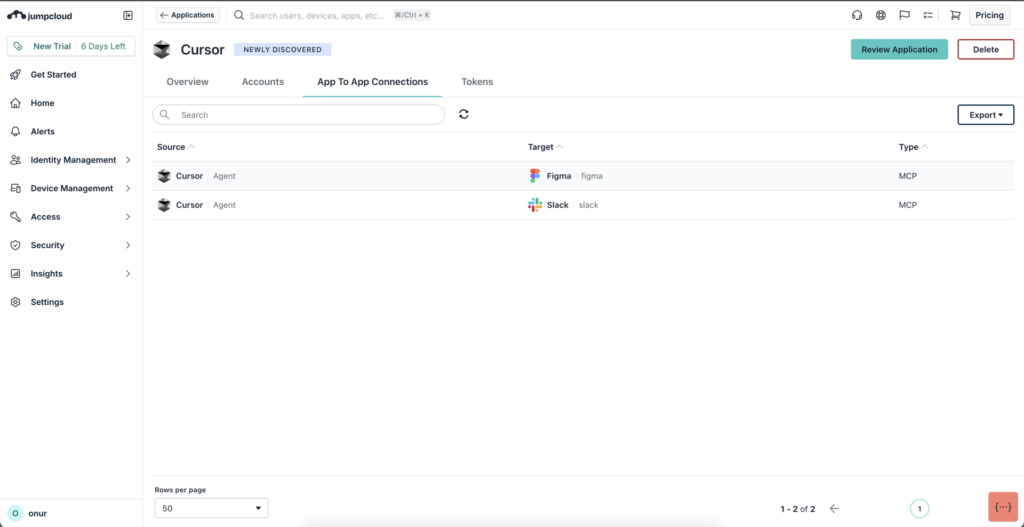
Instead of relying on surveys or manual tracking lists, JumpCloud checks standard configuration directories on employee laptops. The JumpCloud agent reads the configuration data these tools store, then shows you the public MCP servers it detects, sorted by managed device and source application. Public MCP servers are ones anyone can connect to, which means they sit outside your control by default.
You get to see where AI access paths exist before you decide which ones need review or remediation. The feature covers six common developer tools:
- Cursor
- Claude Code
- OpenCode
- Codex
- VS Code
- Copilot CLI
For a look at the other side of this, see Meet the JumpCloud Model Context Protocol (MCP) Server.
Track AI Token Costs Without Separate API Integrations
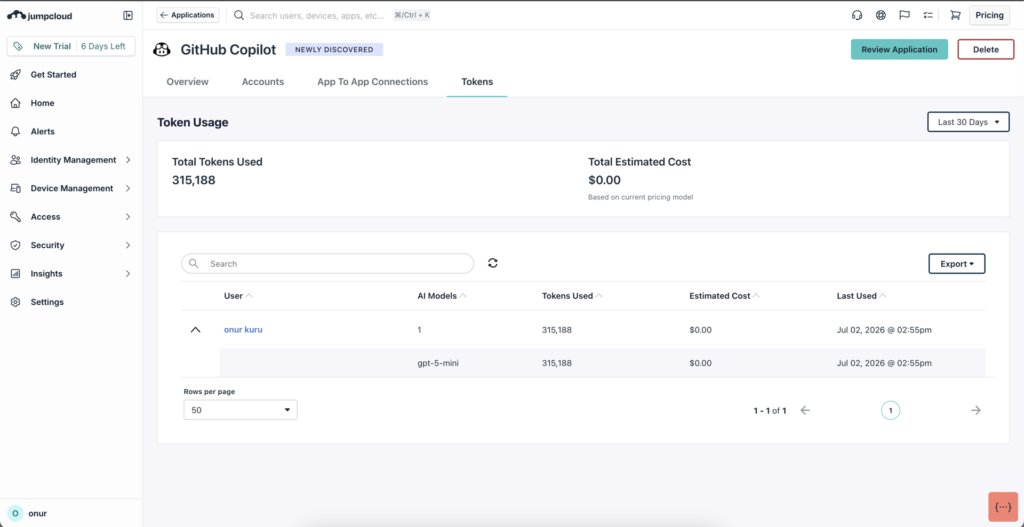
Companies are putting real budget into AI, but the spending data sits on individual laptops. That hides the overall trend right when finance teams need to see it.
JumpCloud closes the gap using usage data that’s already on your managed devices. Supported AI tools write conversation logs locally during work sessions, and those logs record how many input, output, and cache tokens each session used.
JumpCloud reads the token counts, not the contents of anyone’s conversations. It surfaces the resulting metrics centrally in AI & SaaS Management, so IT and finance get one consolidated view across supported tools without configuring an API integration for each one. How to Track Your AI Token Spend with JumpCloud walks through the reporting in more detail.
Turn On Discovery and Control What AI Can Reach
Both capabilities build on the device-based discovery your JumpCloud agent already does. There’s no new endpoint software to deploy and no extra agent to manage.
Turning on discovery and cost tracking requires just a few clicks in the admin console.
Enabling Discovery Options
- Open your JumpCloud admin console and go to Settings.
- Find the Enhanced Discovery Options section.
- Toggle the feature on to enable endpoint configuration scans and log parsing.
Note: Existing accounts need to turn this on manually. Enhanced Discovery Options are on by default for new accounts. Managed devices need JumpCloud agent version 2.148.0 or later.
Viewing Your Data
Once enabled, your data appears across two dedicated AI & SaaS Management tabs:
- App to App Connections: View discovered public MCP servers mapped directly to source applications and host workstations.
- Tokens: Analyze aggregate token consumption, monitor usage trends, and track estimated token costs across supported tools.
Additionally, you can monitor aggregate AI usage, adoption trends, and governance insights directly through the Shadow AI Dashboard, which includes widgets for:
- Device Discovered AI Apps
- Unapproved AI App Restrictions
- Top AI Powered Apps
A 3-Step Framework for IT and Security Governance
Agentic IAM begins with visibility, but it cannot end there. IT needs to see how AI is connecting to the organization, control what it can access, and give employees a secure way to adopt AI at scale.
- See AI and MCP Activity
Enable Enhanced Discovery Options to identify connected public MCP servers across managed devices. Use the Tokens tab to monitor AI token consumption and estimated costs across supported tools. Together, these insights show where supported MCP servers are configured, how AI consumption is changing, and what that usage is estimated to cost.
- Control What AI Can Reach
Review discovered MCP servers and investigate connections that do not meet your security requirements. Connect approved MCP servers to JumpCloud AI Gateway to control which tools AI can access and gain visibility into activity across those connections.
- Accelerate AI Adoption with Confidence
Give employees a trusted way to use AI through approved MCP servers instead of unverified access paths or unmanaged credentials. Continue monitoring access and consumption so your organization can expand AI adoption while maintaining security, visibility, and cost control.
Discover what is connected, understand how it is being used, and control what AI can reach. Start a free trial or book a demo to see how JumpCloud can help you bring AI adoption under governance.