Connect


We all love a clean dashboard. There is a specific kind of peace that comes from seeing your organization’s SaaS inventory neatly categorized, budget-aligned, and “green.” You have locked down the obvious risks like blocking the unauthorized AI chatbots and the video generators, and it feels like the perimeter is secure.
But with AI flooding the market, a clean dashboard might just mean you are looking at the wrong things.
The reality is that AI isn’t just storming the gates in the form of new, unknown apps. Instead, it is quietly unlocking the doors from the inside. The trusted project management tool you approved last year? It just added a generative writing assistant. That “safe” video conferencing platform? It’s now transcribing sensitive meetings by default.
If your discovery strategy relies on static categories, these changes are invisible to you. In this post, you will learn why “hidden AI” is slipping past standard defenses and how you can use the AI App Labels in JumpCloud’s AI & SaaS Management solution to have a crystal-clear, fully lit-up shadow AI dashboard, so your team can keep using AI safely.
The Hidden AI Surge
There is a structural evolution of the software market. Vendors are aggressively embedding AI into their existing products to drive revenue and retention, effectively turning standard SaaS into AI platforms.
According to recent industry data, the scale of this transformation is massive:
- 92% of SaaS vendors plan to increase their use of AI in the coming year.
- 60%+ of enterprise SaaS products already have embedded AI features.
- Organizations now use an average of 7.3 SaaS apps with AI functionality—a number that is climbing daily.
This means your standard enterprise stack is becoming intelligent without your explicit involvement. When a project management tool adds a generative writing assistant, or a customer support platform starts analyzing sentiment automatically, the application’s identity doesn’t change, but its behavior does.
The Disconnect Between Category and Capability
The core issue is that AI is no longer a distinct category of software. It is a feature set distributed across the entire ecosystem.
Relying on primary categories may lead to false negatives in risk reporting. An administrator filtering for “AI Tools” will successfully identify dedicated applications like ChatGPT or Jasper, but they will likely miss the “Hidden AI” embedded in standard productivity suites, design tools, and communication platforms.
To capture this usage without disrupting the existing budget-focused category structure, discovery tools require a secondary classification system.
The Solution: A Secondary Metadata Layer
The AI App Labels update adds system-defined tags that sit alongside existing categories in the SaaS App Catalog. This allows the JumpCloud platform to automatically flag specific functional attributes without altering the application’s primary classification.
This update introduces two specific labels designed to improve discovery precision.
Labels are system-defined and applied consistently across the SaaS App Catalog.
1. Identifying Embedded GenAI with The “AI Powered” Label
The AI Powered label is your tool for flagging the “Trojan Horse” apps in your stack.
This label is automatically applied to any application in the catalog that contains embedded generative AI features. By separating this attribute from the category, the system enables multi-dimensional filtering. You can now view an application as belonging to the “Marketing” department (Category) while simultaneously identifying it as “AI Powered” (Label).
This eliminates the need for manual research. You no longer need to check release notes for hundreds of apps to see if a specific tool has introduced AI capabilities. The system updates the label automatically as capabilities are detected in the catalog.
2. The “MCP Supported” Label
While identifying GenAI addresses current data leakage risks, the MCP Supported label addresses the infrastructure of the future.
The Model Context Protocol (MCP) is the emerging standard for connecting AI models to data sources. Applications that support this protocol are technically architected to allow AI agents to connect, read data, and execute actions.
For security teams, the MCP Supported label functions as a map of potential autonomy. Identifying these apps now creates a “watch list” of tools that are Agent-Ready. This allows you to assess API controls and integration permissions before agentic workflows become standard, mitigating the risk of future “Shadow Automation.”
The 5-Minute Shadow AI Audit with JumpCloud
With these labels populated in the JumpCloud Shadow AI Dashboard, administrators can perform a rapid audit to uncover the hidden AI in their environment.
Note that these labels provide visibility only. They do not indicate whether employees are actively using AI features or MCP capabilities within those applications.
Step 1: Access the Dedicated Shadow AI Dashboard
Navigate directly to the Shadow AI Dashboard. Unlike standard discovery views, this dashboard is purpose-built to aggregate every AI-related application in your environment, regardless of its primary category.
Step 2: Review the “AI Powered Apps” Card
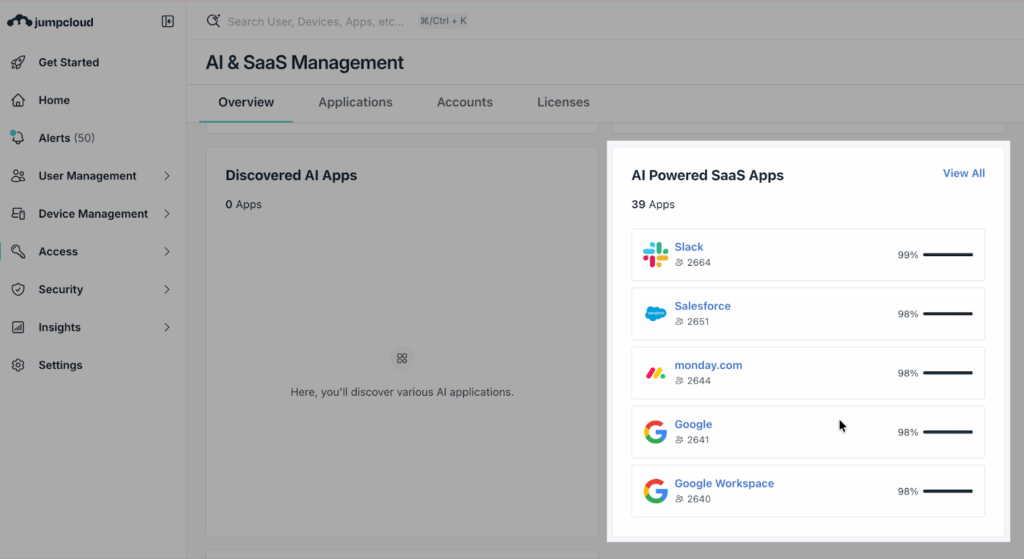
On the dashboard, locate the new AI Powered Apps card view. This widget specifically aggregates all applications tagged with the AI Powered label.
See the Impact: At a glance, you can view the total number of AI-labeled apps, the number of users engaging with them, and their usage percentage relative to your total stack.
Step 3: Drill Down into App Details
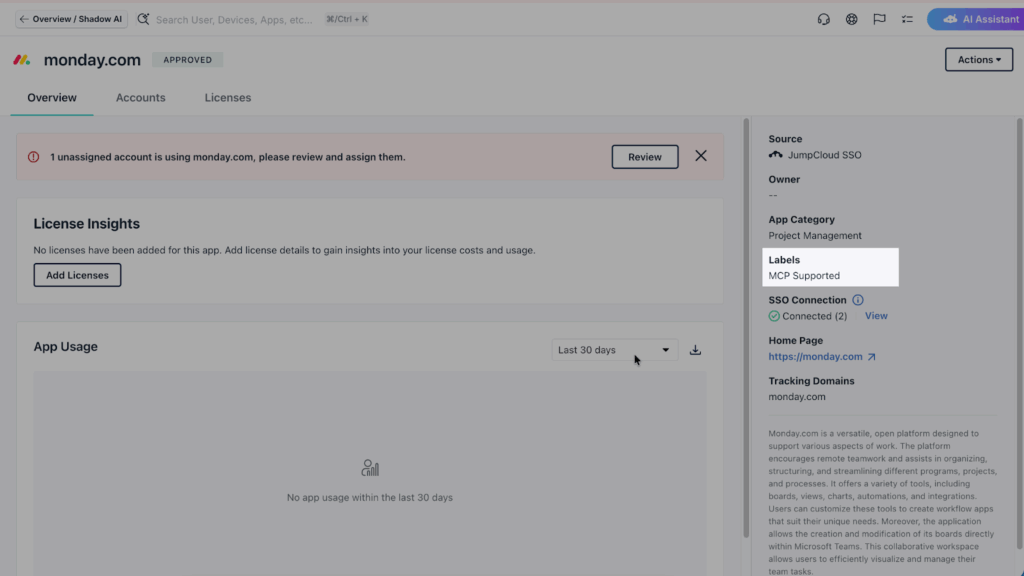
Click on any application in the card to open its App Detail page. Look below the app category on the right-hand side. You will see the specific labels applied—AI Powered or MCP Supported—giving you immediate context on why this app is flagged.
Step 4: Filter Your Views
Finally, leverage the new Filterable UI. You can now filter labels directly in both the App List and App Detail views. This allows you to instantly slice your entire software inventory to show only Label: MCP Supported apps, helping you plan for future machine-to-machine integration risks.
Did you know that you can use the JumpCloud MCP server with your favorite AI tool to query your environment? See the details.
Visibility is the Prerequisite for Governance
It is important to distinguish between capability and usage.
The presence of an AI Powered label indicates that the application has the feature. It does not necessarily mean a specific user engaged with that feature today. However, capability is the critical first step for governance. An organization cannot set an Acceptable Use Policy (AUP) for a tool if it does not know the tool has AI capabilities.
By surfacing the capability, IT can make informed decisions. A security lead might decide that the AI features in the corporate “Productivity” suite are acceptable because they are covered by an enterprise data agreement, while the AI features in a free-tier “Design” tool pose an unacceptable risk to intellectual property.
Adapting Discovery to the Speed of AI
The definition of a software application is expanding. SaaS tools are evolving from single-purpose utilities into multi-functional platforms. If a discovery process relies solely on categories defined five years ago, it is effectively obsolete.
Modern governance requires a system that adapts as fast as the software it monitors. With AI App Labels, JumpCloud ensures the Shadow AI Dashboard reflects the actual technical reality of the environment, removing the blind spots caused by rigid categories and providing the data necessary to secure the stack.
The labels are available now in the JumpCloud Console. Run the audit filter today to verify the actual AI inventory.

Are You Ready To Scale with AI?
Take this assessment to learn how ready you are to scale your AI use based on the six dimensions of AI Readiness.