Connect


IT leadership is currently facing a crisis of perception. While 61% of organizations maintain high confidence in their governance, shadow AI continues to overshadow those efforts, quietly expanding behind the scenes. Many leaders remain focused on the narrow risk of employees pasting data into public chatbots, but the real threat is far more systemic: the unofficial AI stack your team built without you.
AI usage can never be effectively managed through a single lens. It is a high-stakes web of complex access paths, identities, and device postures that bypass traditional network perimeters. We are witnessing an evolution of Shadow IT, magnified by the speed of autonomous tools that legacy systems are ill-equipped to handle.
To prevent data exfiltration and compliance nightmares, CIOs must stop policing applications and start governing the entire identity ecosystem.

Where Shadow AI Actually Hides: The Access Path Threat
Your traditional security stack is completely blind to shadow AI, and for a very simple reason: these tools don’t act like malware. They don’t drop suspicious payloads, trigger endpoint alarms, or ping known malicious IP addresses. Instead, they piggyback on the legitimate access paths you explicitly built for your employees.
Shadow AI hides in plain sight by wearing your users’ valid identities, riding on their active session cookies, and operating directly inside SaaS platforms. Because this activity looks exactly like normal, day-to-day employee productivity, it easily bypasses legacy perimeter defenses.
To actually uncover these vulnerabilities, you have to stop looking at network traffic and start interrogating the granular connections between your devices, browsers, and applications.
The unofficial AI stack your employees built without you:
Browser Extensions Reading the DOM
Employees frequently install “helpful” AI extensions designed to summarize web pages or assist with writing. These extensions often require permissions to read and write data across all websites, meaning they can quietly scrape highly sensitive data directly from your approved, secure SaaS applications like Salesforce or Microsoft 365.
IT info bit: Why do AI extensions want the Document Object Model? For an AI browser extension to be “helpful” (like summarizing a long article, translating a page, or auto-completing an email), it must be able to read the DOM. It needs to see what text is on your screen to process it. Think of how risky that would be if an employee opens a confidential doc on their browser.
Over-Permissioned OAuth Applications
When employees sign up for new cloud-based AI services, they routinely bypass IT by granting these third-party SaaS apps direct API access to your core environment via OAuth. An external AI meeting summarizer or generative data analysis tool might request incredibly broad scopes—like persistent, offline access to read, write, and delete files across your Google Workspace or Microsoft 365 tenant.
Because these are direct SaaS-to-SaaS connections, they don’t live on the device and cannot be caught by endpoint security agents. Without centralized visibility into admin and user consents, these persistent API connections remain active in the cloud long after the employee stops using the tool, creating a ticking time bomb of unmonitored access to your corporate data.
Agentic Browsers Redefining Web Interaction
A new breed of web browsers is emerging with built-in, autonomous AI agents capable of navigating pages, clicking links, and executing workflows on the user’s behalf. While these promise significant productivity gains, they introduce severe visibility gaps.
How? When an agentic browser executes actions inside your SaaS environment, traditional monitoring tools struggle to distinguish between legitimate human activity and automated scraping, making it incredibly difficult to enforce access controls or detect unauthorized data movement.
Also read: Agentic Browsers: The Newest (and Fastest) Insider Threat on Your Employee’s Laptop
Personal AI Accounts for Corporate Workloads
The lines between personal and corporate technology continue to blur. When an employee uploads proprietary financial data or source code to a consumer-grade AI account—one lacking enterprise privacy agreements and data retention controls—that data effectively leaves your organization’s secure perimeter permanently.
Built-in AI Features Inside Approved SaaS
Many established SaaS vendors are rapidly pushing native AI capabilities into their platforms. While the host application might be approved, these new embedded AI features often process data in ways that bypass your initial IT vetting and security standards, introducing hidden risks within sanctioned tools.
Autonomous Agentic Tools
The next frontier of AI involves agents that do not just converse, but act. These tools operate on behalf of the user or leverage service accounts to execute tasks across multiple platforms. If an autonomous agent inherits high-level privileges without strict boundaries, the potential for rapid, automated data exposure is massive.
Watch the JumpCloudLand webinar on-demand to hear more about shadow AI from industry experts.

Key Signals of Shadow AI and What You Should Do
You cannot manage or secure what remains invisible. The foundation of controlling your environment is robust shadow AI discovery. However, merely scanning for known AI URLs is insufficient.
True shadow AI discovery requires a synthesis of inventory, access, and context.
Without all three of these pillars, your AI security policy is essentially guesswork, leading to a disjointed, frustrating experience that feels more like trying to play a few rounds of Tetris where the pieces don’t fit.
“Without inventory, access, and context, AI security feels like trying to play a few rounds of Tetris where the pieces don’t fit.”
Capture signals for the right shadow AI queue:
- AI and SaaS App Inventory: You need continuous, automated discovery of both your explicitly approved applications and the unknown, unsanctioned tools actively running in your environment.
- Granular Usage Data: Visibility into exactly who is using what. Understanding which specific users and departments are adopting certain tools is critical for tailoring training and access policies.
- OAuth Scopes and Admin Consents: A clear audit trail of the permissions being requested by third-party apps and which administrators or users have consented to them.
- Identity Posture: Deep visibility into the security of the accounts accessing these tools. Are they protected by Multi-Factor Authentication (MFA), which has become a must-have for cyber insurance compliance? Are there risky, shared accounts in use?
- Device Posture: The ability to instantly verify whether the endpoint initiating the access request is a managed, trusted corporate device or an unmanaged, potentially compromised personal device.
By centralizing these signals, IT teams can transform overwhelming log data into a prioritized shadow AI queue. This allows you to:
- Identify rogue AI usage in minutes
- Prioritize responses based on hard risk factors (like broad OAuth scopes tied to unmanaged devices)
- Make immediate, informed decisions to allow, step-up authentication, block, or replace the tool.
Consider a practical risk signal: If the system detects an unknown AI app requesting high-level OAuth scopes from an unmanaged device, the automated response should be an immediate block or a forced step-up authentication challenge.
Enforce a Policy Pattern for AI Tools
The objective of managing shadow AI is not to blindly stifle innovation. High security that generates too much friction ends up creating risk, as frustrated users will inevitably find workarounds that lead to human error. Instead, IT must offer a clear, sanctioned path for AI adoption, backed by rigorous Conditional Access Policies.
Leaders must establish a definitive executive standard across the organization: “Access to any AI tool requires a managed device, mandatory MFA, and connection from an approved network (or step-up authentication).”
This standard translates into a strict, programmatic policy logic founded on Zero Trust principles:
- Identity Verification: Is the user known, active, and authenticated securely? If no → Deny access.
- Device Trust Check: Is the device enrolled in your Mobile Device Management (MDM) solution, healthy, and compliant with corporate policies? If no → Deny access or require step-up authentication.
- Contextual Risk Assessment: Is the context of the request risky (e.g., an unfamiliar location or an unrecognized network)? If yes → Require immediate MFA.
- Application Authorization: Is the requested app vetted and approved for corporate AI use? If no → Block access and redirect to a request workflow.
To enable this secure adoption, CIOs must standardize policies across the entire application catalog. This means:
- Enforcing conditional access universally
- Utilizing cross-platform MDM to validate trusted device signals across Windows, macOS, and Linux
- Making approved AI tools exceptionally easy for employees to request and adopt, thereby eliminating the incentive to seek out unsanctioned alternatives.
Know Everything About Your AI Usage with JumpCloud
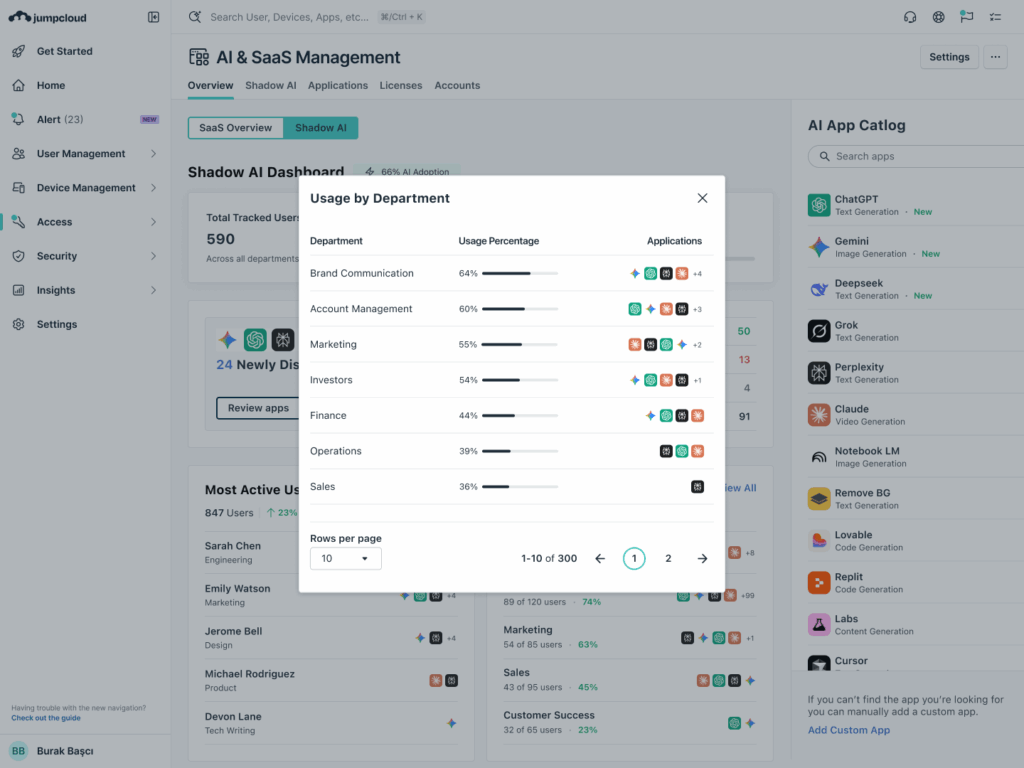
Managing the complexities of the modern, domainless enterprise requires a comprehensive approach. JumpCloud is specifically designed to help IT teams unify and secure their stack against emerging threats like shadow AI and deliver Intelligent, Secure IT.
JumpCloud empowers you to:
- Connect: Seamlessly integrate your identity and SaaS signals, providing centralized visibility across your entire heterogeneous IT environment.
- Discover: Automatically inventory AI apps, detect rogue AI usage, and monitor complex OAuth scopes to uncover hidden access paths.
- Act: Immediately enforce stringent access controls, revoke risky permissions, and streamline your operational processes.
By automating these complex security tasks, you free up your IT staff from mundane firefighting, allowing them to focus on higher-value strategic activities that drive the organization forward.
Are you ready to regain control of your infrastructure and mitigate the risks of shadow AI? Let’s discuss how JumpCloud AI & SaaS Management can help your organization with safe AI adoption.