Connect


You probably have a solid grasp on the laptops and desktops deployed across your fleet. But what about the docking stations, dual monitors, mechanical keyboards, high-end headsets, and other peripherals connected to managed devices and scattered across your remote and hybrid workforce?
For most IT teams and MSPs, keeping track of these peripheral assets is a continuous, manual headache. You either find yourself updating outdated spreadsheets that go stale the minute you save them, or you simply accept the inventory blind spot and treat lost accessories as an unavoidable cost of doing business.
Failing to track these connected assets leads to a partial hardware inventory and leaves you unable to confidently answer what your organization actually owns. To eliminate this operational gap, JumpCloud has launched automated accessory and peripheral discovery within JumpCloud IT Asset Management.
By leveraging the existing JumpCloud Agent already installed on your managed endpoints, you can now automatically discover, track, and classify connected accessories without manual data entry or clunky third-party tools.
Stop Guessing What Peripherals Your Organization Owns
When an employee departs or a hardware refresh cycle comes around, the focus is naturally on returning the laptop. However, the associated accessories, such as monitors, docks, and premium peripherals, frequently slip through the cracks. Over time, these unmanaged assets create a quiet drain on your IT budget as you purchase duplicate equipment that you technically already own.
The root of this issue is that traditional asset management tools only capture primary, managed device-level hardware. Tracking the smaller connected components has historically required:
- Self-reporting from employees
- Physical audits by IT staff
Automating this process is the key to scaling your operations. By extending discovery to connected accessories, you get a complete, reliable picture of your organizational hardware with zero administrative overhead.
Pro Tip: Spot Hidden Assets During Offboarding
Before sending out an offboarding checklist, review the historical connected hardware log for that user’s laptop. You can easily verify if they have a company-issued docking station or monitor plugged in, ensuring you request the return of all high-value peripherals alongside the primary computer.
Do you know if your organization’s IT framework is ready for growth? Read When IT Hits A Wall to find out.
Capture Connected Hardware Automatically via Your Existing JumpCloud Agent
Instead of forcing you to deploy new software or run network-wide scans, JumpCloud IT Asset Management utilizes the JumpCloud agent you already have running on your Windows and macOS endpoints. The agent automatically detects hardware connected to your managed machines through standard interfaces:
- USB
- Bluetooth
- Connected displays
Whether an employee plugs in a new display over HDMI or pairs a wireless headset over Bluetooth, the agent identifies the device and reports the data back to your JumpCloud console.
The system populates as much metadata as the hardware provides, including:
- Accessory name
- Type
- Serial number
Then, it cleanly associates each peripheral with its primary source device. Even if an accessory has incomplete metadata, JumpCloud surfaces the record with the available fields rather than dropping the entry, ensuring you never lose visibility.
Also read the Build to Scale ebook if your organization is looking for an IT framework that grows with you without breaking.
Sift Through the Noise with Smart Peripherals Classification
Not every connected USB device is a company-owned asset that needs to be tracked. If every personal thumb drive or consumer mouse flooded your inventory dashboard, your queue would quickly become unusable. To prevent this noise, you can quickly review and classify all newly discovered accessories into three clear categories:
- Company Owned: Transition these items into your tracked inventory to manage their lifecycle, track history, and associate them with specific users.
- BYOD (Bring Your Own Device): Label personal employee accessories as BYOD to acknowledge their presence on your endpoints without cluttering your active company asset registry.
- Ignored: Filter out personal charging dongles, consumer peripherals, or temporary devices. Once you mark an accessory as Ignored, it is removed from your Newly Discovered view and will not reappear to request your attention.
To streamline this process further, you can manage these classifications individually or perform bulk actions when reviewing a large batch of newly connected hardware.
Pro Tip: Filter Out the Keyboard Clutter
If you only care about tracking high-cost assets like displays and docking stations, you can disable discovery for specific accessory categories, such as keyboards or mice, using the check-box settings in your console. This immediately stops the Agent from collecting that specific data, ensuring your dashboard remains focused only on the high-value assets you want to govern.
Build a Complete Hardware Lifecycle
A unified IT visibility platform only works if the data is easy to parse and act upon. To make this information practical for your daily workflow, JumpCloud integrates your discovered accessories directly into your existing Asset Management dashboard and detail pages:
- The Newly Discovered View: Quickly see a list of unclassified peripherals, showing you exactly which managed device each accessory was found on.
- The Device Detail Page: Open any laptop or desktop record to view a live tab of all connected, discovered accessories currently plugged into that machine.
- The Accessory Detail Page: Review an individual accessory’s history to see which managed devices it has been connected to over time, establishing a reliable audit trail.
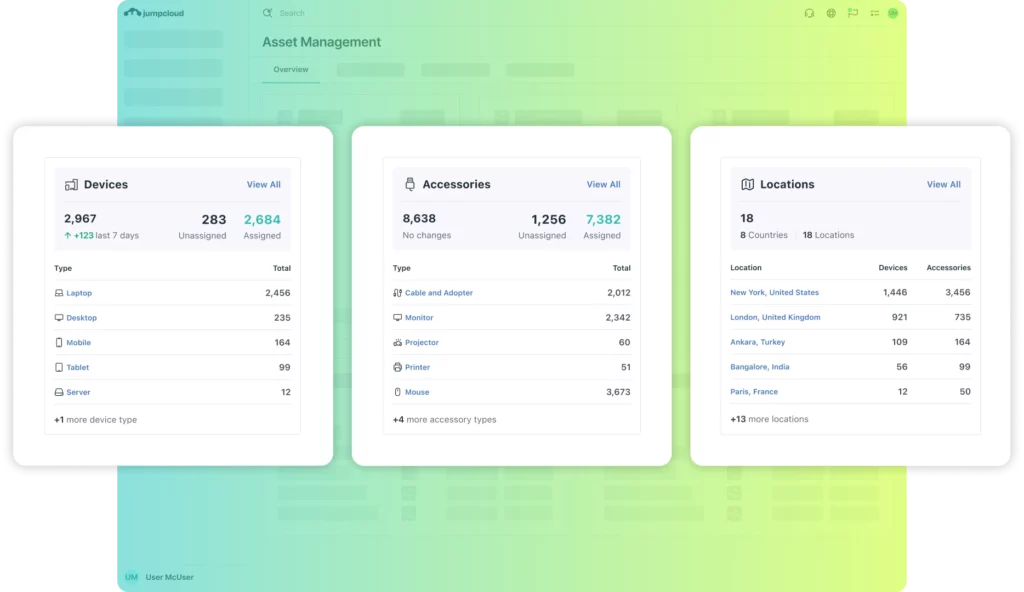
- The Accessories Dashboard Widget: View high-level metrics of your tracked and unclassified peripherals at a glance, keeping asset health front and center.
If you ever decide to disable peripheral discovery entirely, a warning dialog will prompt you to confirm the action, as disabling the feature will clean up and delete previously collected accessory data to protect database hygiene.
Suggested reading: JumpCloud ITAM is Moving into the Field
Redefine Your Approach to IT Asset Management
Securing and tracking your hardware footprint shouldn’t stop at the operating system. By automating peripheral discovery, you eliminate the tedious spreadsheets, reduce manual inventory tracking, and gain complete control over the physical assets keeping your team productive.
The data you need to optimize your hardware spend is already connected to your endpoints. JumpCloud agent simply brings it to your fingertips.
To build an Intelligent, Secure IT environment with complete visibility over your hardware footprint, simply log into your JumpCloud Admin Console to activate automatic peripheral discovery today, or get started with JumpCloud Asset Management to experience the power of automated hardware tracking.