Connect


Answering critical audit questions, like identifying which users have access to specific applications on their laptops, often means navigating multiple disconnected systems. Standard reports typically focus on a single domain, forcing you to manually reconcile data or wait for custom engineering scripts.
This manual correlation is a major source of operational friction, turning routine compliance checks into hours of tedious work. According to A-LIGN’s Compliance Benchmark Report, 14% of mid-sized organizations consider fragmented data a top challenge to their compliance strategy.
JumpCloud eliminates this hurdle with the Custom Query Builder. It enables you to generate cross-entity reporting that links identities, devices, and applications in a single, unified view of your IT environment.
Why Prebuilt Reports Fall Short in Modern IT
Standard report templates track single entities in isolation, but modern IT operates across connected systems. Real operational and security questions require cross-domain context. Relying on manual gathering and spreadsheet-matching eats up critical time during active investigations and increases the risk of error.
Without built-in relational reporting, IT teams are dependent on friction-heavy workarounds like custom API scripts that create operational bottlenecks and require specialized maintenance.
Introducing JumpCloud’s Custom Query Builder for Reports
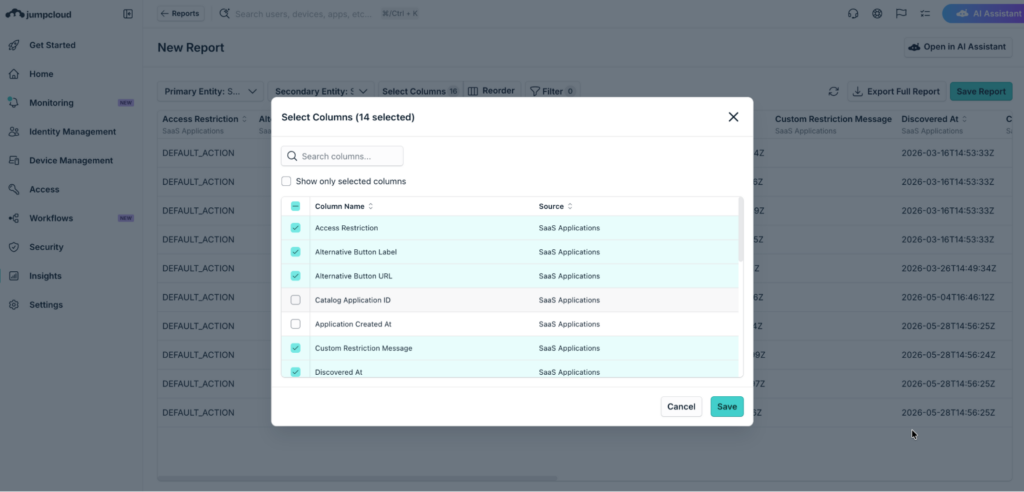
The Custom Query Builder for Reports cuts audit preparation from hours to minutes by linking distinct entities directly within the platform. Instead of analyzing users, endpoints, and applications in separate views, you can query across connected platform areas in a single console for true self-service reporting.
Creating a custom report query starts by selecting a primary entity as the starting point of your dataset. The builder supports nine core platform entities:
- Users
- Groups
- Devices
- Device Groups
- Applications
- Policy Groups
- Commands
- Installed Software
- Assets
Natural Language AI Assistant for Rapid Report Creation
During active investigations, manually configuring filter rules takes up precious time. The Custom Query Builder for Reports integrates with the AI Assistant, allowing you to build cross-entity reporting layouts using plain natural language prompts.
Simply describe your reporting goal in plain text. The AI Assistant interprets your prompt, selects the correct entities, and displays the report layout instantly. This AI-powered generation allows you to refine outputs using natural chat follow-ups within your IT environment.
Pro tip: Ask the AI Assistant to generate your initial multi-entity query layout in seconds, then refine your exact output columns and filter parameters.
Suggested reading: Meet JumpCloud AI Assistant: IT Admins’ New Right Hand
Manual Query Builder for Precise Report Parameters
For structured audits and detailed asset inventories, the Manual Query Builder provides precision for complex audits.
- After choosing your primary entity, you attach related secondary entities to broaden your report scope. For example, anchoring a query on users allows you to map outward to assigned devices, installed software packages, and assigned applications within one unified layout.
- A live preview pane updates automatically as you adjust attribute filters, select secondary entities, or reorder table columns.
- You can apply filter logic using Match All or Match Any conditions. This live preview lets you refine your search logic and verify data accuracy before exporting final report files.
It offers explicit control over every report parameter, ensuring you can isolate exact administrative criteria. By selecting a specific starting point and utilizing the live preview, you can verify data accuracy across your entire IT environment before finalizing outputs.
This manual approach ensures that cross-entity reporting meets the most stringent compliance and governance standards by allowing for granular attribute filtering and custom layout configurations.
High-Impact Custom Reports for Security and Governance
Relational report generation transforms how IT, security, and compliance teams execute daily governance tasks across their IT environment. Key use cases include:
Inactive User and Stale Access Reports
To identify inactive user accounts and manage stale access across your organization, select users as your primary query anchor. Reviewing user activity alongside assigned resources is essential for maintaining strong access controls.
By joining user entities with last login dates, assigned devices, and assigned applications, you can pinpoint inactive accounts holding active access. The generated report provides clear visibility into accounts that require administrative review, replacing manual spreadsheet matching with a single query execution.
Software Access and Exposure Reports
When evaluating software usage across your fleet, linking installed software with devices and users answers critical access questions. Specifically, you can identify exactly which users have access to devices running select software applications.
By linking installed software entities to device records and user groups, you gain direct visibility into software exposure. This query pinpoints affected user accounts and machines without relying on guesswork or incomplete asset tracking.
Command Execution and System Accountability Reports
Tracking administrative actions and script execution requires choosing commands as your foundational starting point. Auditing system changes requires combining command logs with endpoint and user details.
By connecting command entities with devices and users, you can generate reports that reveal who executed specific scripts or system tasks across machines. This detailed view gives your security team complete accountability over system modifications and task execution history.
Automating Recurring Reports and Compliance Delivery
Custom queries deliver lasting value when built directly into your daily operational workflows. Once you finalize a report layout, you can save the query configuration as a reusable report template within your central console. Report reusability allows any authorized administrator to run identical reports on demand without reconfiguring search parameters.
Standardizing recurring compliance reports is easy with the ability to schedule custom reports to run automatically on a recurring schedule. Scheduled report outputs deliver directly to key stakeholders through configured notification channels. This keeps your security, IT, and leadership teams informed through automated report delivery.
Transforming Modern IT Governance Through Custom Reporting
Bringing relational query building directly into your central console provides the reporting visibility needed to manage modern identity, device, and application ecosystems efficiently. Eliminating manual work lets your team focus on proactive security and strategic initiatives across your IT environment.
Ready to streamline your fleet reporting? Log into your JumpCloud console today to explore the Custom Query Builder for Reports.
New to JumpCloud? Start a free trial to test the platform in your environment, or schedule a live demo with our product experts to see cross-entity reporting in action.