Connect


You assign an asset to an employee, record its owner, and keep details up to date. But if your employee can’t see that assignment or confirm receipt, a simple question can still trigger a long email thread: Did this person actually receive their device?
JumpCloud Asset Management closes that gap. Your employees can view assigned assets and respond to acknowledgment requests in the User Portal. You can see every request and response in Asset Management, so the employee experience connects directly to the controls you already use.
Your employees get a clear view of their assigned devices. You spend less time chasing confirmations and keep an audit-ready record of every response.
Why Asset Accountability Often Stops With IT
You typically track asset ownership on the admin side. You know which laptop, monitor, or managed asset is assigned to an employee, but that employee often can’t see your record. When a question comes up during troubleshooting, an audit, or offboarding, you both end up confirming the same basic details by hand.
Receipt is another common blind spot. An assignment shows who should have an asset.It doesn’t confirm whether they actually received it. Without a simple way to respond, you have to manually follow up over email and log the outcome in a different spreadsheet.
User Portal Asset Visibility and Asset Acknowledgment fixes both the problems.
Give Employees Visibility Into Their Assigned Assets
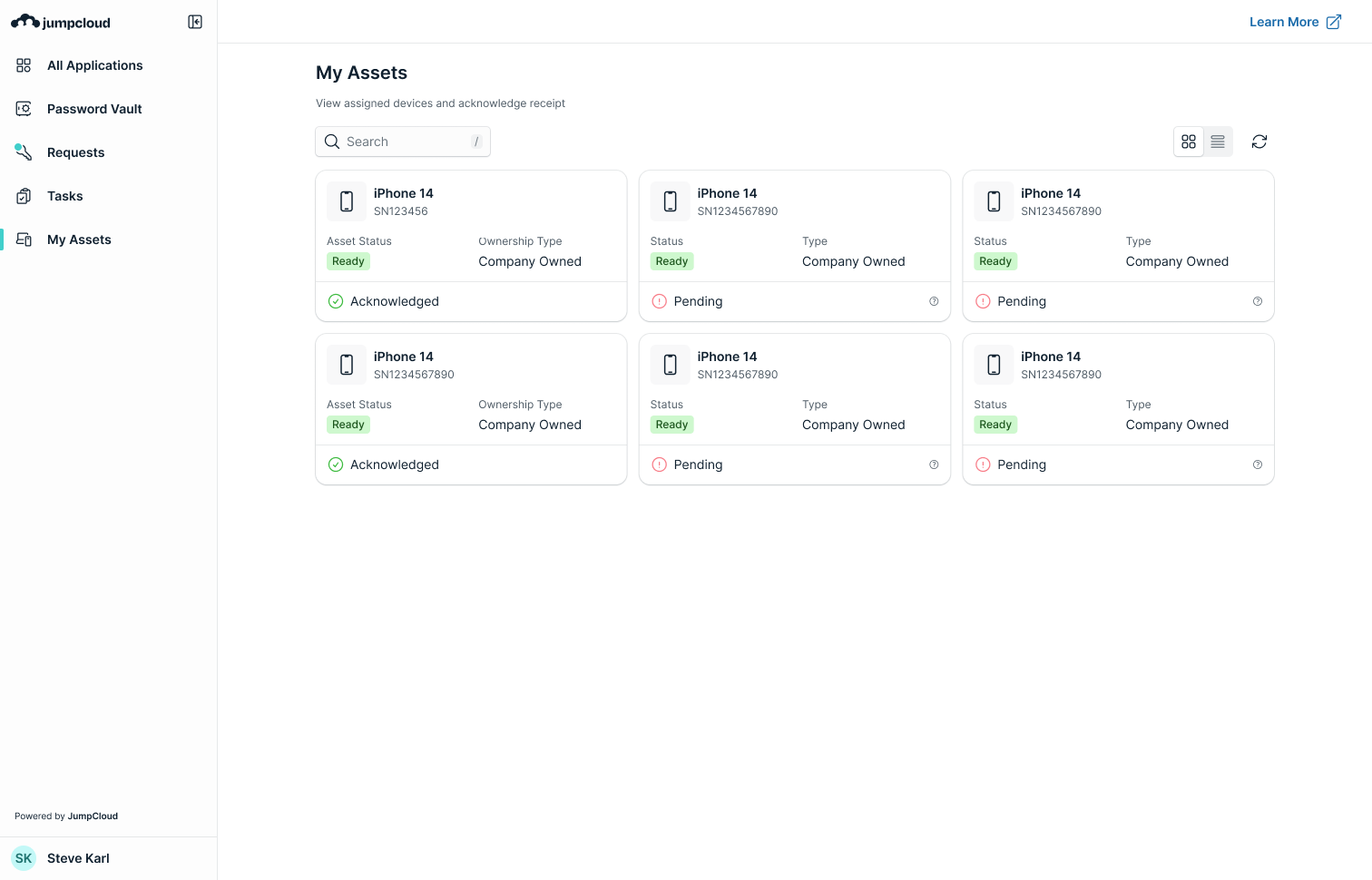
When you enable User Portal Asset Visibility, your employees can see their assigned assets directly in the JumpCloud User Portal. Each asset displays key information to help them quickly identify it:
- Asset name
- Serial number
- Status
- Ownership type
This gives your employees a single place to answer self-service questions like “Which device is assigned to me?” or “Is this serial number the one IT has on record?” It also gives you and your employees a shared point of reference whenever you need to troubleshoot or discuss an asset.
The view is focused by design: employees see only the assets assigned to them, while you maintain full operational control over asset records and assignments in Asset Management.
Request and Track Asset Acknowledgment
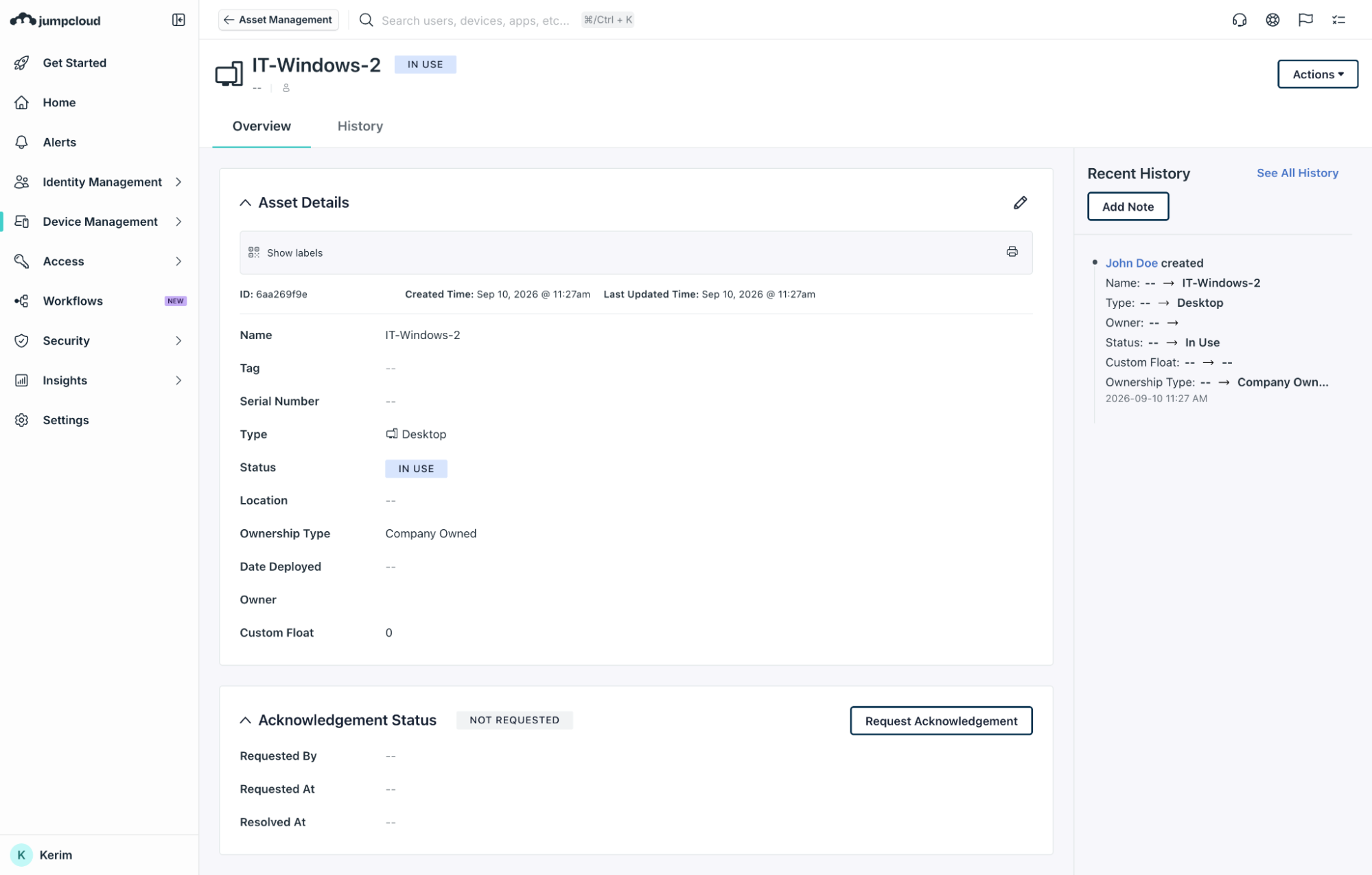
Asset Acknowledgement lets you ask the current Owner of an asset to confirm receipt. Employees can acknowledge or deny the request from their User Portal.
Every request goes to the asset Owner. If an asset has no Owner, you can’t send a request. If someone else needs to confirm receipt, update the Owner first. That way, the request always reaches the person responsible for the hardware.
Once the employee responds, the status updates in Asset Management. You can see who acknowledged the asset and when. The request and response are also logged in Asset History, which answers three audit questions:
- Was an acknowledgment requested?
- Who responded?
- When did they respond?
Employees can deny a request as easily as they can acknowledge it. A denial is useful when the assignment in your inventory doesn’t match what was delivered. It tells you right away that the assignment needs review.
You can also resend a request for the same asset whenever you need the current Owner to reconfirm receipt. This helps during periodic audits or inventory reviews, and you don’t need to build recurring campaigns. When hardware changes hands, update the Owner and send a new request to the right person.
Also read: JumpCloud ITAM Is Moving Into The Field.
Resend Requests When Ownership Needs to Be Reconfirmed
Acknowledgment isn’t limited to a one-time setup. You can resend an acknowledgment request for the same asset whenever you need the current Owner to re-confirm receipt.
This streamlines manual re-confirmation during periodic asset audits or inventory reviews without forcing you to build complex recurring campaigns. Because requests always go to the current owner, you can update the assignment whenever hardware changes hands and instantly trigger a new confirmation request to the right user.
Suggested reading: The Hidden Costs of Poor IT Asset Management.
Keep Admins and Employees Informed by Email
The acknowledgment process keeps both you and your employees informed via automated email notifications. When you send a request, the asset Owner gets an email prompting them to respond, and the request appears under Tasks > Requests in their User Portal.
After the employee acknowledges or denies the request, you receive an automated email alert. You can then instantly review the updated status and full audit trail in Asset Management.
This seamlessly closes the loop between visibility, action, and recordkeeping. Your employees respond directly, while you maintain complete oversight and automated history in Asset Management.
How Asset Visibility and Acknowledgment Work
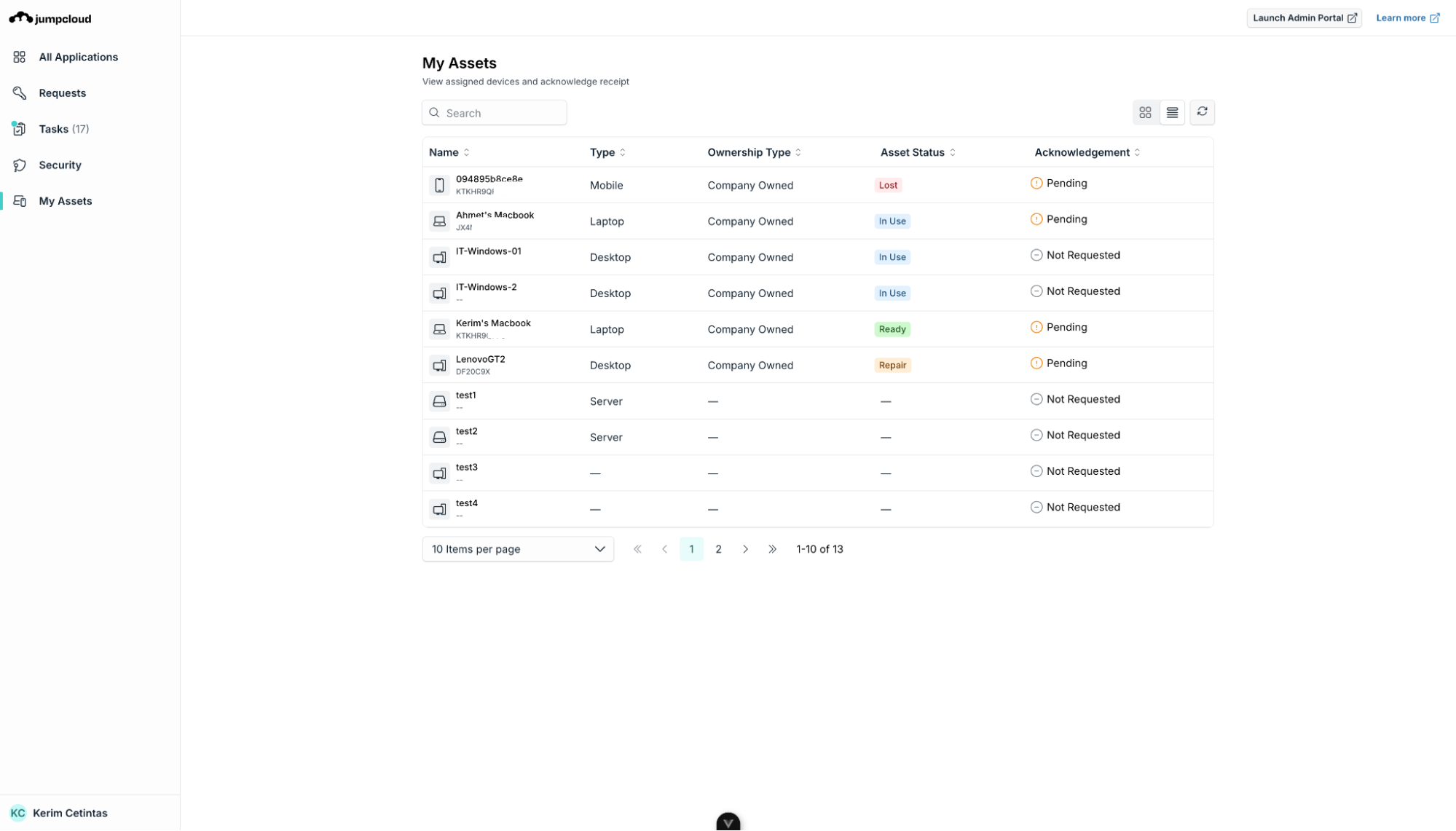
For Admins
You control the entire rollout through two independent settings: User Portal Asset Visibility and Asset Acknowledgment. Once enabled, you can:
- Allow employees to view their assigned assets in the User Portal.
- Open any Asset Detail view and send an acknowledgment request directly to the current Owner.
- Track real-time acknowledgment status inside Asset Management.
- See exactly who acknowledged each asset and when.
- Audit complete request and response logs in Asset History.
- Resend requests whenever manual re-confirmation is required for audits or re-assignments.
Both settings are disabled by default for organizations already using Asset Management. If you’re enabling Asset Management for the first time, both settings will be enabled for you by default.
For Employees
Employees can review assigned assets in the User Portal and access acknowledgment requests under Tasks > Requests.
From there, your employees can acknowledge or deny receipt. Their responses immediately feed into Asset Management, where you can review status and history.
See: Get Started: Asset Management for details.
Add Accountability Without Added Complexity
Your employees gain clarity over the devices assigned to them and can quickly confirm receipt when requested. You stay in complete control of every request while building an automated Asset History for audits, troubleshooting, offboarding, and everyday management.
Get Started With User Portal Asset Visibility and Asset Acknowledgment
User Portal Asset Visibility and Asset Acknowledgment are available in JumpCloud Asset Management.
To begin, enable the settings that fit your workflow. Ensure each asset has the correct Owner assigned before sending requests, as notifications are delivered directly to the current Owner.
Once enabled, your employees gain clear visibility into their assigned devices, while you maintain an accurate confirmation history—giving you connected asset management without added complexity.
See how JumpCloud brings asset visibility and accountability into one unified platform for managing identities, access, devices, and agents. Explore JumpCloud Asset Management.