



How PAM and Access Request Workflows Drive Zero Trust
Did you know that 86% of security breaches involve the misuse of privileged credentials?
The risk is hiding in plain sight in almost every organization today… Standing privilege!
For years, the standard approach was to create super user accounts and leave them active all day, every day. You handed out the keys to the kingdom and let people keep them forever. This model is broken. It is far too dangerous for modern business.
Here, we will explore a better way. We call it just-in-time privileged access. This means you get permissions only when you need them. Those permissions vanish the second the work is done. This approach makes security invisible and automated.
The Privileged Access Problem
What exactly is the problem we are solving? It comes down to the concept of standing privilege.
In many organizations, administrators have accounts with full access rights 24 hours a day. Whether you are sleeping, on vacation, or checking email, your account is always on.
This creates a huge gap in your security. Think like a hacker for a second. If a hacker steals a password, the damage is limited. If they steal an admin password that is always active, it is game over. They have total control right away. This is the danger of standing privilege. It creates a target that is always available.
The problem is not that admin accounts exist. You need them to do your jobs. The problem is that they are always active. If a hacker steals a credential at 3:00 a.m. on a Sunday, they should not be able to use it. Right now they can. The solution is just-in-time access. With this model, you are a standard user most of the time. You only get admin rights for the exact time you need them.
Examples of Standing Privileges
Standing privileges exist across every layer of your IT environment. These are the highly powerful accounts your team uses to manage critical systems. You need these accounts to keep the business running. The danger arises when you leave them active all the time.
Here are common examples of standing privileges found in modern IT environments:
Cloud Infrastructure
- AWS Root Accounts: These hold the master keys to your entire Amazon Web Services setup.
- Cloud Platform Admin Accounts: These include resource owners and contributors who control vital cloud assets.
Identity and Directory Services
- Microsoft Global Admins: These accounts have full control over your Microsoft environment.
- Active Directory Admins: This group includes domain and enterprise admins who manage user access and network security.
Operating Systems
- Linux Root Accounts: These provide total control over your Linux servers and architecture.
- Windows Administrator Accounts: These allow unrestricted access to Windows machines and local network settings.
Data Systems
- Database Administrators: DBA accounts hold your most sensitive company data and production tables.
Why do these accounts pose such a high risk?
An attacker who compromises one of these accounts gains immediate access to your core systems. They do not have to waste time trying to elevate their permissions. This creates a massive attack surface that is always open.
The Status Quo vs. Just-in-Time PAM

Right now, the standard approach in many IT environments relies heavily on standing privileges. This “always on” access expands your attack surface. If an attacker compromises a standing credential, they gain immediate and total control over your environment.
You need a way to secure your infrastructure without slowing down your daily operations. The answer is Just-in-Time Privileged Access Management, or simply JIT PAM. This approach serves as a core Zero Trust control for modern IT security.
Instead of leaving powerful accounts active all year, JIT PAM grants access only when a user specifically needs it. Furthermore, it grants that access only for the exact duration of the task. Once the work is complete, the access is revoked. You close the gate securely and eliminate the constant risk. This method protects your data while keeping your team agile and efficient.
The Workflow Process
The practical implementation of Zero Trust for privileged accounts happens in three simple steps: request, control, and automation.
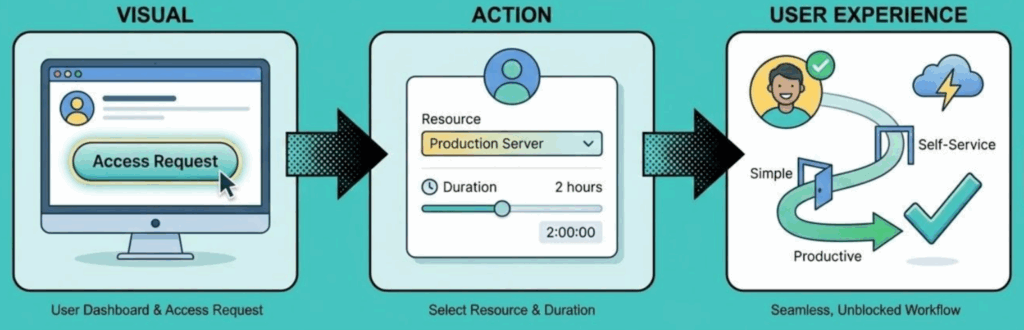
The Request
With JIT PAM, the request process is simplified. You no longer have to wait on help desk tickets. The user simply asks for what they need. For example, imagine a developer needs to fix a bug in a production database. They go to their dashboard, find the database, and click connect. It is fast and keeps them working. High-risk resources trigger a fast approval flow for managers to review.
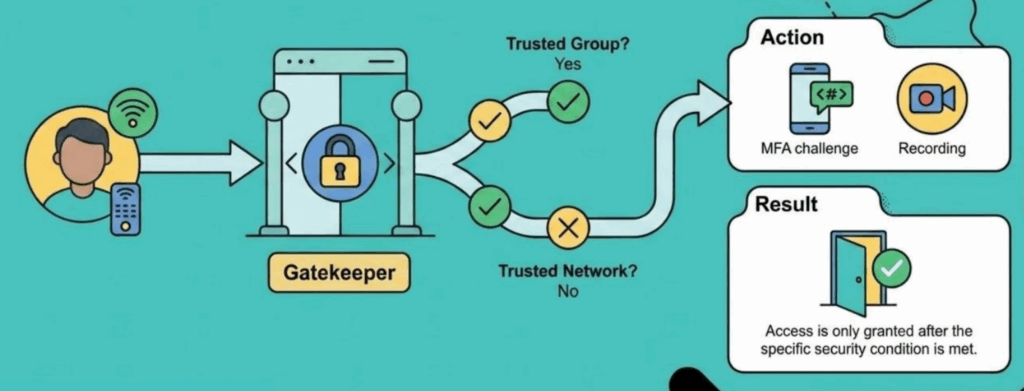
The Control
This step acts as the gatekeeper. It looks at the context before granting access. The system validates if the user is on a secure laptop. It checks if they are on a corporate VPN. It also reviews environmental context like geolocation. If you try to log in from a personal laptop at a coffee shop, you get blocked. If you are on a secure network, you get approved. The gatekeeper handles all these security checks instantly.
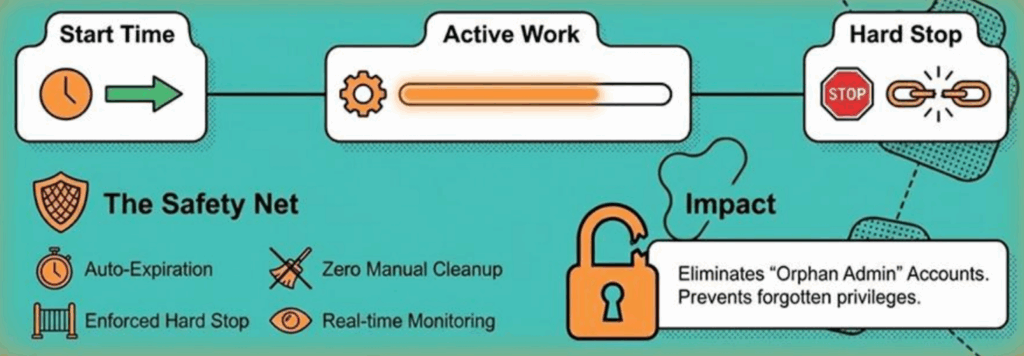
The Automation
This is the safety net. When the approved time runs out, access is revoked automatically. You broker a secure connection and inject credentials from a vault. The user never handles the actual password. When the timer hits zero, the system executes a hard stop. It terminates active sessions immediately. This eliminates the problem of orphan accounts entirely.
You can also use Remote Browser Isolation. The session renders on a secure server instead of your local browser. It delivers a stream of pixels to your computer. Nothing is stored on your browser. After the session ends, there is no trace on your computer. Admins can even disable file transfers or block delete commands during these sessions.
Auditing and Compliance
Preparing for an IT audit often feels like a painful obligation. Traditionally, manual audits are error-prone and incredibly stressful. Your team wastes valuable hours digging through fragmented systems just to prove who had access to specific resources. It is a messy process that drains your time and pulls you away from critical projects.
You deserve a platform that turns this heavy burden into a streamlined, automated advantage. That is exactly what the Just-in-Time (JIT) advantage delivers. By integrating JIT Privileged Access Management into your workflows, you completely transform how you handle security and reporting.
Here’s how JIT access simplifies your operations and strengthens your security posture:
You no longer have to piece together what happened during an admin session. Every access request, manager approval, and automated revocation is logged automatically in real time.
Security requires absolute trust in your data. Your session logs are completely immutable, which ensures total data integrity. No one can alter or delete the history of their actions.
Gathering evidence becomes an effortless task. The system automatically structures your data to simplify compliance for major regulatory standards, including SOC 2, ISO 27001, and HIPAA.
Instead of scrambling to prepare for an audit, you simply pull a reliable, perfectly formatted report. This proactive approach ensures robust compliance and lets your IT team stay focused on the high-level work that actually moves your business forward.
Key Takeaways
If you want to enhance your organization’s security and make access management a true business enabler, focus on three essential actions:
Start by auditing your current landscape. Do not try to address every single asset at once. Instead, zero in on the systems and resources that are most vital to your business. This approach lets you make the biggest impact with your security improvements and reduces risk right from the start.
Move beyond basic password protection. Context is king. Use conditional access to manage privileged accounts dynamically. Set rules that account for device health, user context, and level of risk rather than relying on static permissions. By establishing these detailed policies, you make sure that only the right people get access, only under the right circumstances.
Automate the entire request-grant-revoke cycle. Integrate your processes so users can request access, have it granted or denied based on real-time rules, and see access revoked the moment the timer expires. This removes the classic bottleneck of help desk tickets. The result is that security no longer slows your team down. Access is fast, while risk is kept in check.
This proactive, streamlined approach gives you the control your business needs, without sacrificing efficiency or compliance.
Unifying PAM for a Zero Trust Future

Standing privileges are a thing of the past. Leaving admin accounts open all day is a risk you cannot afford. Just-in-time access is the path forward for IT teams.
Integrating PAM and access requests solves the most critical vulnerability in the IT stack. It provides the control required to navigate complex threats. Security should be a silent and powerful enabler for your business.
Take the three steps discussed today: find your critical targets, set your rules, and start closing your security gaps.
See JIT PAM in Action
To see exactly how these workflows operate in a live environment, you can watch the full session on Integrating PAM and Access Request Workflows for Zero Trust at JumpCloudLand, hosted by Leonardo Cooper.
Watch the Full Session