


 Subscribe to Help Center RSS Feed
You must set up an insights rule to select the events for which notifications will be sent via notification channels.
To create an Insights Rule, follow these steps:
- Login to the JumpCloud Admin portal.

If your data is stored outside of the US, check which login URL you should be using depending on your region. If your organization uses LDAP, RADIUS, or requires firewall allow list configuration, the Fully Qualified Domain Names (FQDNs) will also be region specific. See JumpCloud Data Centers for the URLs, FQDNs, and IP addresses.
- Go to Monitoring > Alerts to view the alerts console.
- Click Rules to view the dashboard.
- Click +Rule. This will take you to the Rule Management section with all the predefined rule templates.

- Go to the Insights tab and click Directory Insights Event Monitoring. You can also type the rule name in the Search bar.
- Leave the Enabled button as is to activate the rule immediately after saving. You can switch the button to Disable if you prefer.
- Provide Rule Details:
- Rule Name: Enter a clear and concise name for your rule.
- Description: Document the purpose of the rule in the description field.
- Use the Rule Priority dropdown to assign a priority level to the rule. This helps prioritize alerts and manage responses according to the severity of the issue. These options are available:
- Low - Select this for alerts that are neither urgent nor highly important. They should receive fewer resources and can usually wait until they become more urgent.
- Medium- Select this for alerts that are urgent but less important. They should receive a moderate allocation of resources.
- High - Select this for alerts that are important and require immediate attention. They should receive the most resources to ensure they are addressed promptly.
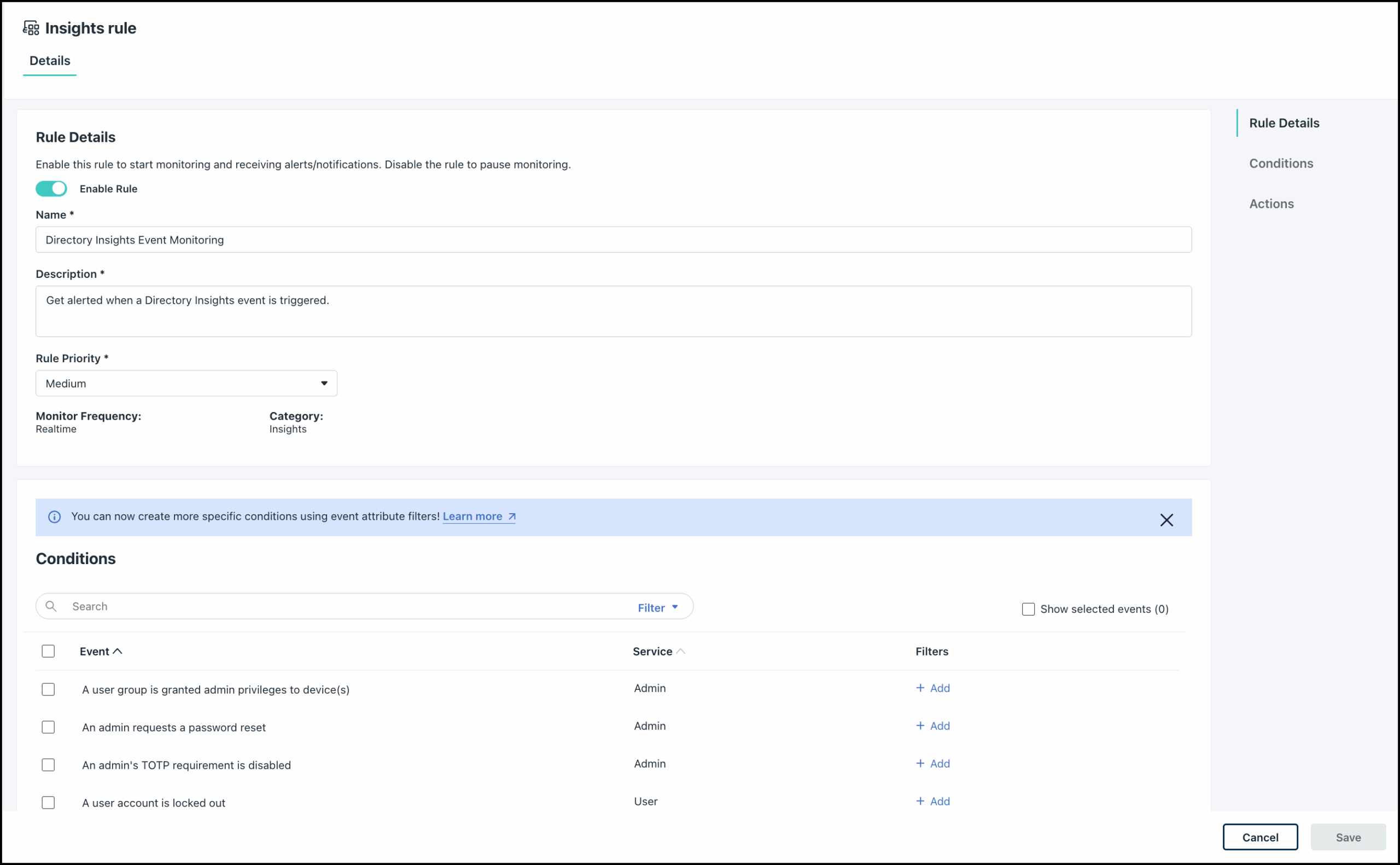
- In the Conditions section, select the events for which you want to send notifications.
- You can use the Show Selected Events checkbox to view all the selected events at one go.
- You can also Add additional attribute filters for each event to enhance your rule conditions. See Configure Event Attribute Filters to learn more.
- The Alert Trigger Conditions section lets you configure frequency-based alerting. Instead of generating an alert every time an event occurs, you can require an event to occur for a specified number of times within a defined time period before an alert is generated.
To add an alert trigger condition, configure the following options:
- Threshold Value: The number of event occurrences required before an alert is triggered.
- Monitoring Window: The time period over which event occurrences are counted (for example, 10 minutes, 1 hour, or 7 days).
- Apply Threshold Per Resource (optional): Controls whether occurrences are counted organization-wide or separately for each affected resource.
How Event Occurrences are Counted
By default (Apply Threshold Per Resource disabled), occurrences are counted across your entire organization for each selected event type.
For example, if you configure:
- Event: Device Login Failed
- Threshold Value: 5
- Monitoring Window: 10 minutes
The alert is triggered after five failed device login events anywhere in the organization within 10 minutes, regardless of which devices or users generated the events.
When Apply Threshold Per Resource is enabled, the threshold is evaluated independently for each resource associated with the event. The alert is generated only when a single resource reaches the configured threshold.
For example:
- Five failed logins on Device A trigger an alert.
- Three failed logins on Device A and two on Device B do not trigger an alert because neither device individually reached the threshold.

The resource used for counting depends on the event type. For device-related events, the resource is typically the device. For user-related events, the resource is the user. Other event types use the primary resource associated with that event.
This setting relies on a specific target resource identifier provided in the event payload (such as a System ID or User ID). For org-level administrative actions or platform lifecycle events that lack a granular entity identifier (such as Policy Creation/Deletion, Directory Settings Updates, or Admin Role Changes), the system automatically falls back to Org-wide threshold evaluation, even if the per-resource toggle is enabled.
Example:
For example, consider this event: a policy is created or user is deleted (Threshold = 2, Per Resource toggle button is turned on)
- Action: Administrator creates Policy A, then creates Policy B.
- Result: 1 combined alert is triggered (Org-wide behavior) instead of separate alerts per policy, as global lifecycle events do not bind to individual entity resources during creation/deletion.
- You can configure the Actions section to either generate alerts, send notifications via configured channels, or both. You must configure at least one of these options to create a rule.
- (Optional) Use the Generate Alerts toggle to enable/disable alert generation in the JumpCloud console. When enabled this will generate alerts along with complete lifecycle tracking.
- (Optional) Use the toggle button to Enable/Disable existing conditions. See Understanding Existing Conditions to learn more.
- (Optional) Use the Send Notifications toggle to configure sending notifications to your pre-configured notification channels (webhook, email, Slack). See Get Started: Notifications to learn more.
- Use the Search bar to search and select the channels that you want to send notifications to.
- In the Additional Notifications section, select the checkbox for each action to enable notifications to the selected channels. This option is only available when both Generate Alerts and Send Notifications are enabled.
- Alert Resolution: Notify all users in the selected channels when an alert from this rule is resolved.
- Alert Acknowledgement: Email all users in the selected channels when an alert from this rule is acknowledged.
- Click Save.
The rule will be activated and added to the Rules dashboard. If you want to Disable the rule or make any other modifications, see Use the Rules Dashboard to learn more.
Once the rule is saved, every time the event selected in the Condition section occurs, an alert will be generated and the selected channels will receive notifications. You can view the alerts in the Alerts Dashboard. See Use the Alerts Dashboard to learn more about alerts.
Events: Insight Alerts
There are a number of events recorded in Directory Insights related to alerts and webhooks. Reference the table below for the Event Type and Description of the event as captured in Directory Insights. For more information on using Directory Insights, see View the Directory Insights Data Activity Log.
The following is a list of events that you see related to Insight Alerts.
Insight Alert Events
| Event Type | Description |
| access_management_access_request | An Access Management request is created |
| admin_create | An admin account is created |
| admin_delete | An admin account is deleted |
| admin_lockout | An admin account is locked due to multiple login failures |
| admin_login_attempt | An admin attempted to login |
| admin_password_change | An admin's password is changed |
| admin_password_reset_request | An admin requests a password reset |
| admin_suspended | An admin account is suspended |
| admin_totp_disable | An admin's TOTP requirement is disabled |
| admin_totp_finish_enrollment | An admin's TOTP enrollment is completed |
| admin_totp_start_enrollment | An admin's TOTP enrollment is initiated |
| admin_unlocked | An admin's account is unlocked |
| admin_unsuspend | An admin account is unsuspended |
| admin_update | An admin's account is updated |
| application_create | An application is added |
| application_delete | An application is removed |
| application_update | An application is updated |
| association_change | A user or device association / membership is updated |
| authnpolicy_create | A conditional access policy is created |
| authnpolicy_delete | A conditional access policy is deleted |
| authpolicy_update | A conditional access policy is updated |
| command_create | A command is created |
| command_delete | A command is deleted |
| command_update | A command is updated |
| configuration_file_download | A Microsoft MDM configuration file is downloaded |
| device_command | An admin ran a command on the device |
| device_enrollment | A device is enrolled with Microsoft MDM |
| group_create | A device or user group is created |
| group_delete | A device or user group is deleted |
| group_update | A device or user group is updated |
| iplist_create | An IP address list is created |
| iplist_delete | The IP address list is deleted |
| iplist_update | The IP address list is updated |
| mdm_command_result | A command execution result from MDM enrolled device |
| msp_ticket_create | A ticket for a partner integration is created |
| os_major_rollback | A major operating system (OS) rollback is applied to the device |
| os_major_upgrade | A major operating system (OS) upgrade is applied to the device |
| os_minor_rollback | A minor operating system (OS) rollback is applied to the device |
| os_minor_upgrade | A minor operating system (OS) upgrade is applied to the device |
| passwordmanager_backup_create | A user created a Password Manager cloud backup |
| passwordmanager_backup_disable | A user disabled a Password Manager cloud backup |
| passwordmanager_backup_key_regenerate | A new backup key is generated |
| passwordmanager_backup_request | A cloud backup request is created |
| passwordmanager_backup_request_approve | A cloud backup request is approved |
| passwordmanager_backup_request_cancel | A cloud backup request is canceled |
| passwordmanager_backup_request_reject | A cloud backup request is rejected |
| passwordmanager_backup_request_restore | An approved cloud backup request is restored |
| passwordmanager_disable | Password Manager is disabled for an organization |
| passwordmanager_enable | Password Manager is enabled for an organization |
| passwordmanager_item_copy | A user copied an item in Password Manager app/browser extension |
| passwordmanager_item_reveal | A user revealed an item in the Password Manager app/browser extension |
| passwordmanager_items_export | A user exported items in the Password Manager app/browser extension |
| passwordmanager_local_backup_create | A user created a Password Manager local backup |
| passwordmanager_local_backup_path_update | A user updated the Password Manager local backup path |
| passwordmanager_user_activate | A user activated Password Manager |
| passwordmanager_user_deactivate | A user deactivated Password Manager |
| passwordmanager_user_device_pair | A user paired a new device |
| passwordmanager_user_device_unpair | A user unpaired an existing device |
| passwordmanager_user_disable | Password Manager is disabled for a user |
| passwordmanager_user_enable | Password Manager is enabled for a user |
| passwordmanager_user_reactivate | A user reactivated Password Manager |
| policy_create | A policy is created |
| policy_delete | A policy is deleted |
| policy_update | A policy is updated |
| provider_update | An admin updated the billing information |
| remote_session_end | An admin ended a remote assist session |
| remote_session_join | A user joined a remote assist session |
| remote_session_start | An admin started a remote assist session |
| saas_management_application_access_restriction_update | A SaaS Management application's access restriction is updated |
| saas_management_application_discover | A SaaS Management application is discovered |
| saas_management_application_license_update | A SaaS Management application's license is updated |
| saas_management_application_update | A SaaS Management application is updated |
| saas_management_disable | SaaS Management is disabled |
| saas_management_enable | SaaS Management is enabled |
| saas_management_event_application_review | A SaaS Management application event is reviewed |
| saas_management_settings_update | SaaS Management settings are updated |
| software_add | A new software is added |
| software_add_request | A software is added from admin portal |
| software_change | A software is updated |
| software_change_request | A software is updated from admin portal |
| software_remove | An existing software is removed |
| software_remove_request | A software is removed from admin portal |
| sso_auth | A user authenticated to an SSO application |
| system_create | A device is added |
| system_delete | A device is deleted |
| system_fde_key_decrypt | A device's full disk encryption key is decrypted |
| system_fde_key_update | A device's full disk encryption key is updated |
| system_update | A device is updated |
| totp_delete_enrollment | A user's TOTP enrollment is deleted |
| totp_finish_enrollment | A user's TOTP enrollment is completed |
| totp_start_enrollment | A user's TOTP enrollment is initiated |
| user_activated | A user account is activated |
| user_admin_granted | A user is granted admin sudo privileges to device(s) |
| user_admin_revoked | A user's admin access is revoked |
| user_create | A user account is created |
| user_create_provision | User creation in an external application has failed |
| user_delete | A user account is deleted |
| user_delete_provision | User deletion in an external application has failed |
| user_deprovision | User deprovisioning in an external application has failed |
| user_group_admin_grant | A user group is granted admin privileges to device(s) |
| user_group_admin_revoke | A user group's admin access is revoked |
| user_lockout | A user account is locked out |
| user_login_attempt | A user attempted to login |
| user_mfa_exclusion_expired | A user's MFA enrollment has expired |
| user_password_change | A user's password is updated |
| user_password_expired | A user's password has expired |
| user_password_reset_request | A user requests a password reset |
| user_password_set | A user sets their password |
| user_suspended | A user account is suspended |
| user_unlocked | A user's account is unlocked |
| user_update | A user account is updated |
| user_update_provision | User update in an external application has failed |
| user_password_expired | A user's password has expired |
| admin_apikey_expired | An admin's API key has expired |
| user_password_reset_request | A user requested to reset their password |
| user_password_change | A user changed their password |
Any modification to the connections (associations) between resources in JumpCloud, such as users to groups, or policies to devices are recorded under the single base event - association_change. While a list of prefiltered events is available for you to select from in the Conditions section of the Insights rule, the JSON data in the Directory Insights displays these changes (listed in the table below) under the single association_change event type.

In the JSON data, the type field within the association_change event payload is the key to identifying the specific action that took place.
association_change Events
| Event Type | Description |
| association_change | A command is applied to a device or device group |
| association_change | A command is removed from a device or device group |
| association_change | A device is added to a device group |
| association_change | A device is removed from a device group |
| association_change | A password policy is assigned to a user group |
| association_change | A password policy is unassigned from a user group |
| association_change | A policy group is assigned to a device or device group |
| association_change | A policy group is unassigned from a device or device group |
| association_change | A policy group is updated |
| association_change | A policy is assigned to a device or device group |
| association_change | A policy is unassigned from a device or device group |
| association_change | A software is added to a device or device group |
| association_change | A software is removed from a device or device group |
| association_change | A user is added to a user group |
| association_change | A user is removed from a user group |
| association_change | A user or device association / membership is updated |
| association_change | A user or user group is granted access to Active Directory |
| association_change | A user or user group is granted access to an application |
| association_change | A user or user group is granted access to a device |
| association_change | A user or user group is granted access to G Suite |
| association_change | A user or user group is granted access to LDAP server |
| association_change | A user or user group is granted access to Microsoft 365 |
| association_change | A user or user group is granted access to RADIUS server |
| association_change | A user or user group's access to Active Directory is revoked |
| association_change | A user or user group's access to an application is revoked |
| association_change | A user or user group's access to a device is revoked |
| association_change | A user or user group's access to GSuite is revoked |
| association_change | A user or user group's access to LDAP server is revoked |
| association_change | A user or user group's access to Microsoft 365 is revoked |
| association_change | A user or user group's access to RADIUS server is revoked |
FAQ: Alert Trigger Conditions
Alerts can trigger more than once. Health Monitoring keeps a rolling count of matching events inside the rule’s monitoring window (for example, 5 events within 15 minutes). The alert is created only when that threshold is met.
The alert is triggered once. After an alert is created, any new event after the threshold is reached, updates the existing alert. After the threshold is reached, a new notification is generated through the configured notification channel for every new event occurring during the monitoring window.
For example, consider the following event:
Event: An admin account is locked due to multiple login failures
- Threshold Value: 10
- Monitoring Window: 15 minutes
- Apply Threshold Per Resource: Disabled

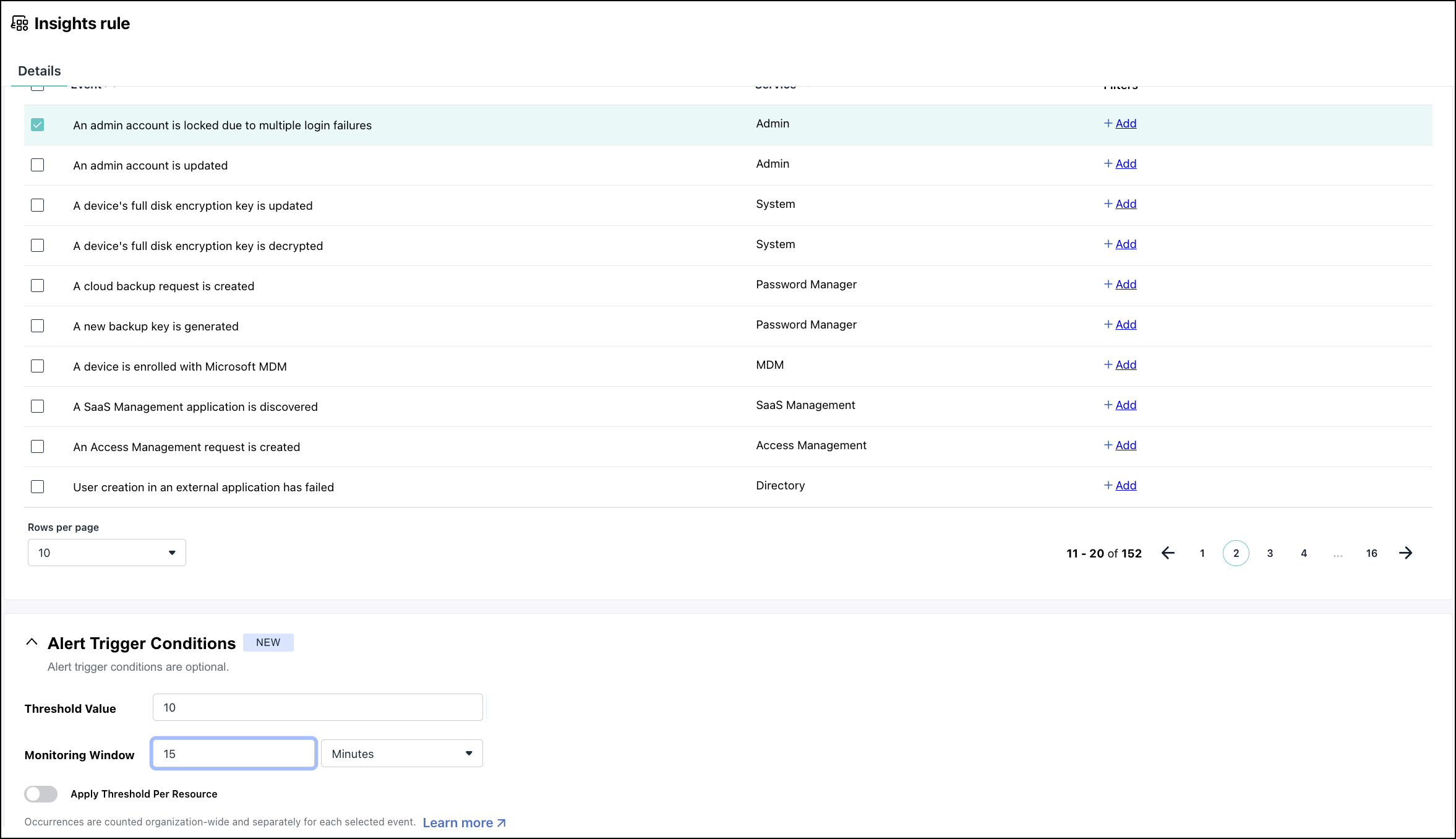
Result:
- During the monitoring window of 15 minutes, an alert will be generated after the 10th failed login attempt.
- If the Admin attempts more failed logins during the monitoring window, a single alert is generated for subsequent attempts but a notification is sent for each failed attempt.
- After 15 minutes of inactivity, the threshold counter is reset again.
Only events occurring inside the configured monitoring window are counted. Out-of-window events are excluded. The threshold is reset after the monitoring window has elapsed. Note that resolving an alert does not reset the counter; the counter is reset when the monitoring window expires.
If an alert monitors multiple event types, then each event has its own threshold.
Here are a few examples of resources being mapped to event types.
| Event type | Resource used when Apply Threshold Per Resource is turned on |
| Device Login Failed | Device |
| Device Login Successful | Device |
| Device is added to a device group | Device |
| Admins is suspended | Admin |
| User Locked Out | User |
| User Password Changed | User |
Here is an example for Directory Insights (DI).
Example: Detect repeated user logins in to user portal
Configure the following fields:
- Event: A user attempted to log in to user portal
- Threshold Value: 10
- Monitoring Window: 15 minutes
- Apply Threshold Per Resource: Enabled

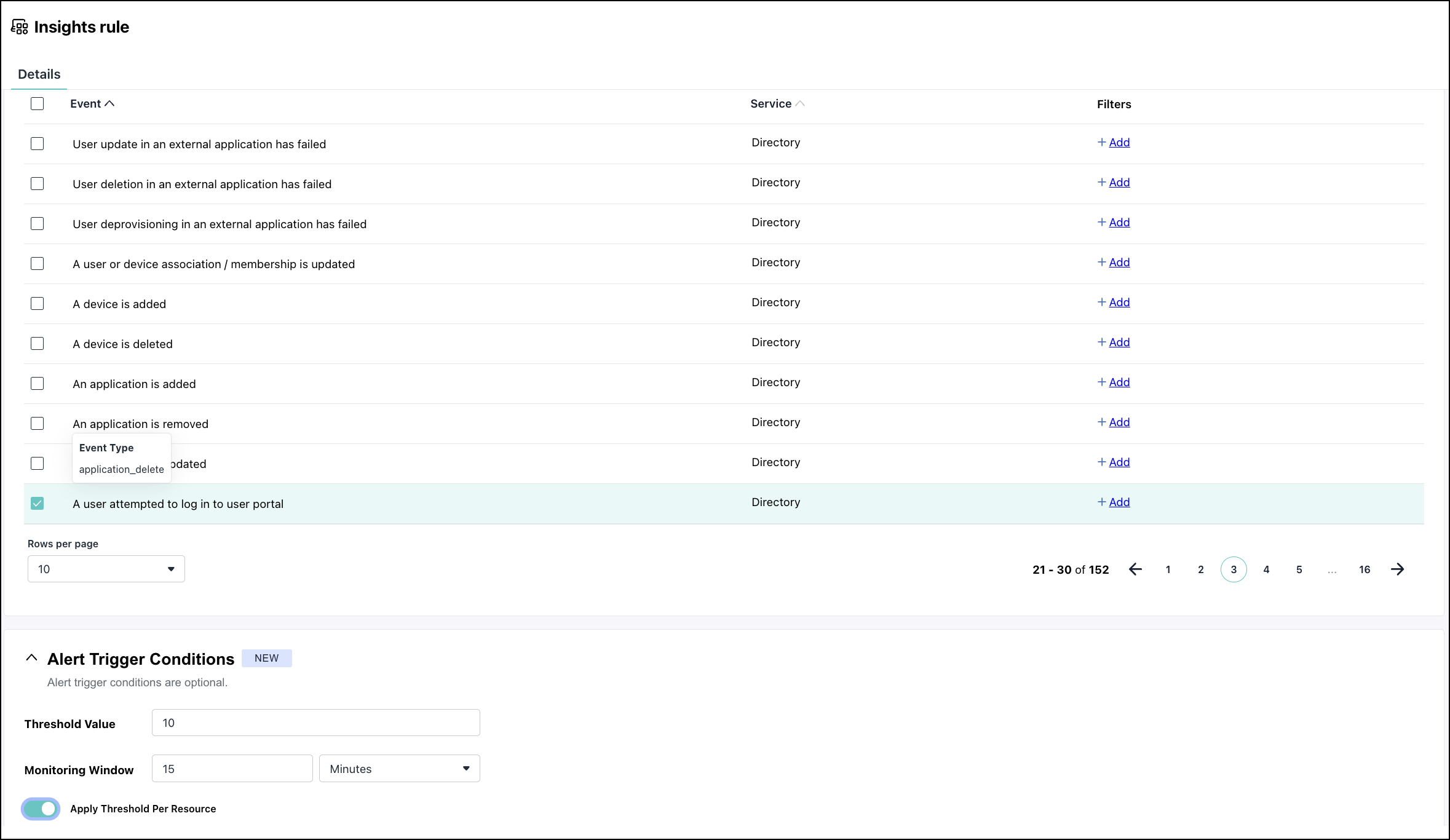
Result:
- A single user that generates 10 login events within 15 minutes triggers an alert.
- Five failed logins by one user and five failed logins in to the user portal by another user do not trigger an alert because each user is evaluated independently.
 In this Article
 Learn More