Connect


An employee can meet every sign-in requirement and still have access their job no longer calls for. Authentication is working exactly as intended, but those leftover permissions can still expose business data. Maintaining least privilege means paying attention to the access people keep long after it’s granted.
That’s why we’re introducing JumpCloud Access Certification. It brings identity governance and administration (IGA) into the platform you already use to manage identities, access, devices, and agents. It helps you maintain least privilege, make decisions with the right business owners, and make compliance part of everyday IT.
The Four Identity Governance Gaps Slowing You Down
For many IT and security teams, granting access and reviewing it happen in separate places. You provision access through your directory and identity systems, then coordinate reviews through spreadsheets and email threads. In the Ponemon Institute’s 2025 State of IAM Maturity report, 34% of respondents reported using spreadsheets for periodic access reviews.
That separation creates four gaps that make reviews harder to complete and harder to verify.
1. The Access Visibility Gap
As employees take on new responsibilities, their earlier permissions often stay in place. Before a review begins, you need a current picture of who has access to what. Static exports and separate files make it harder to see which permissions still fit.
2. The Accountability Gap
IT may manage access to an application without knowing whether each person still needs it for their work.
Managers and resource owners have that business context. Your review process needs a clear role for them in deciding whether access should stay.
3. The Remediation Gap
A Revoke decision needs to lead to an access change. In manual review cycles, decisions can stall in spreadsheets or helpdesk queues, leaving access active after the review ends.
4. The Audit Evidence Gap
Access reviews that support SOC 2, ISO 27001, SOX, and similar audits need evidence of who reviewed access, what they decided, and how changes were handled. In manual workflows, you may have to rebuild that evidence from email archives, ticket histories, and static files after the review ends. That adds work just as audit deadlines approach.
Native Governance for Your Unified IT Foundation
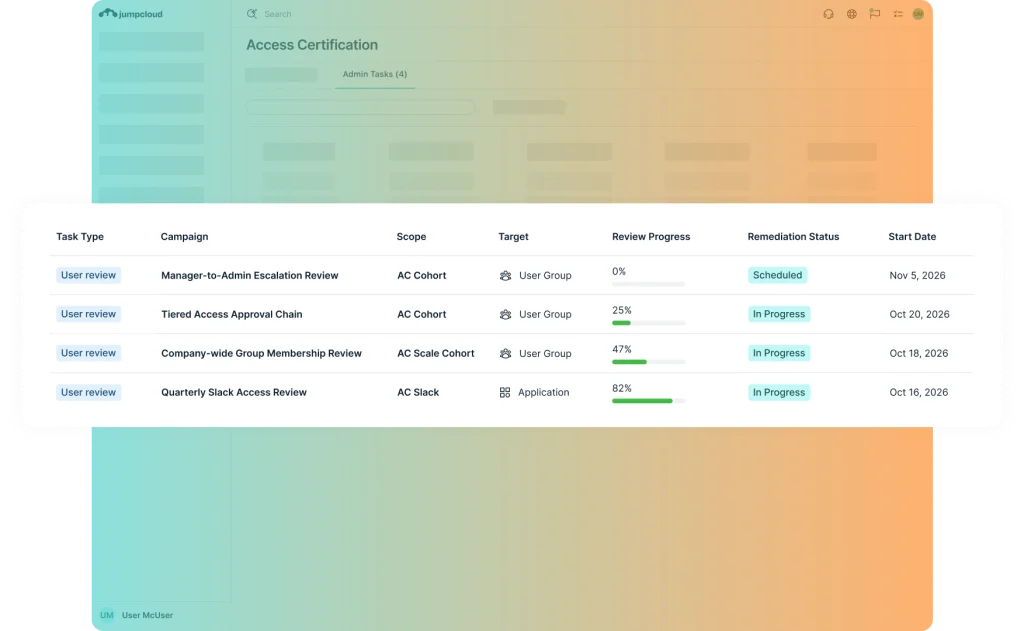
JumpCloud brings identity, access, device, and agent management together in one unified platform, giving you an intelligent, secure IT foundation.
Access Certification builds directly on this foundation by adding recurring oversight after access is granted. Reviews stay within the platform that already manages your identities and groups.
This unified approach creates a complete governance loop:
- Enable Access: Provision user access through Cloud Directory, automated provisioning, and single sign-on (SSO).
- Review Access: Run scheduled certification campaigns with structured reviewer assignments.
- Remediate Changes: Apply configured remediation after final Revoke decisions and track system execution.
- Preserve Evidence: Keep read-only campaign records and tamper-evident reports that document the outcome.
Access Certification brings native Identity Governance and Administration (IGA) to the same JumpCloud platform where your identities and access already live.
Core Capabilities of JumpCloud Access Certification
Each campaign defines what needs review and who is responsible. IT then tracks decisions and any resulting remediation.
Application and Group Reviews
One-time and recurring campaigns each cover a single user group, with two review targets:
- SSO Applications: Review access to a selected SSO application for users in an associated group.
- User Groups: Review memberships within user groups that manage access to systems, networks, and shared assets.
Scheduled, Active, and Closed views organize campaigns throughout their lifecycle. Campaign details show review progress, responsible reviewers, and outstanding work.
Business Owners as Reviewers
Assign reviews to people who understand whether access is still needed. Reviewer options include:
- Administrators
- A user’s direct manager
- Dedicated resource owners
- Specific user groups
Multi-step reviews bring managers, resource owners, and reviewer groups into different stages of the review. Campaign settings determine whether reviewers must explain their decisions and whether reassignment is available.
Administrators retain oversight throughout the campaign, with reassignment and override controls available where permitted.
Non-admin reviewers complete their assignments directly within the JumpCloud User Portal. Reviewers see details about the person and the application or group under review.
Reviewers record Keep or Revoke decisions individually or in bulk, with reassignment available when enabled.
From Review Decisions to Access Changes
JumpCloud Access Certification connects final Revoke decisions to configured remediation workflows. When remediation removes a user from the in-scope group, it affects access granted through that membership.
Remediation settings define how review outcomes are handled:
- Revoke Actions: Apply remediation immediately after a final Revoke decision or on a configured schedule after the review phase closes.
- No-Response Handling: Choose whether to retain access or apply configured remediation when a review receives no response.
- Execution Tracking: Track remediation status and recorded outcomes to see whether changes are scheduled or completed.
Email notifications and reminders prompt reviewers to complete their assignments. The JumpCloud Admin Queue consolidates pending review and remediation tasks assigned to an administrator.
You can extend remediation with JumpCloud Workflows, using an Access Certification event in Directory Insights to trigger additional actions. This lets you build follow-up automation around review outcomes to match your organization’s processes.
Access Review Evidence for Audit Preparation
Access Certification captures review activity and remediation outcomes as the campaign progresses, helping your team document how access was reviewed and what happened afterward.
- Read-Only Campaign Records: Closed campaigns preserve decisions, recorded justifications, timestamps, access snapshots, and remediation outcomes.
- Tamper-Evident PDF Reports: Export reports documenting your organization’s access review decisions and attestations, with administrator sign-off.
- Directory Insights Integration: Governance events support investigations and compliance reviews. Events are retained for 90 days, so export those needed as audit evidence before that window expires.
These records help support access review aspects of SOC 2, ISO 27001, and SOX reviews. They document your organization’s attestations rather than compliance certifications issued by JumpCloud. Using Access Certification does not automatically establish compliance with any standard.
Retain exported campaign reports and required event evidence according to your organization’s audit and retention requirements.
Where Access Certification Fits
Recurring audits, software renewals, and organizational changes all give you reasons to revisit access. Here’s where campaigns help most.
1. Recurring Compliance Reviews
In A-LIGN’s 2026 Compliance Benchmark Report, 97% of respondents reported conducting at least two audits a year. If your audits cover access controls, that means producing access review evidence at least that often.
Recurring quarterly or semi-annual campaigns turn that work into a routine. Match the schedule to your compliance requirements, so managers and resource owners know when their input is due. When an audit comes around, campaign records and exported reports show how access was reviewed and what changed.
2. Scoped Internal Audits
When your security team runs an internal audit or inspects a high-risk resources, they need rapid answers. A targeted, one-time campaign focuses the review on the applications or groups in question. Resource owners supply the business context for that specific request, while IT tracks completion.
3. Application Budget and License Reviews
Software renewals often surface accounts assigned to departed, transferred, or inactive workers. Before renewal commitments, certification campaigns give department managers a structured way to validate who still needs access.
That review gives IT and department managers a documented access list to bring into the renewal discussion.
4. Offboarding and Role Transfers
Departures trigger standard offboarding, but internal moves often don’t trigger anything. People take on new responsibilities without giving up old access, and permissions pile up.
A scoped campaign focuses on the applications and groups affected by an organizational change. Reviewers can check access against each person’s current role and flag group memberships to remove.
Continuous Compliance as an Everyday Standard
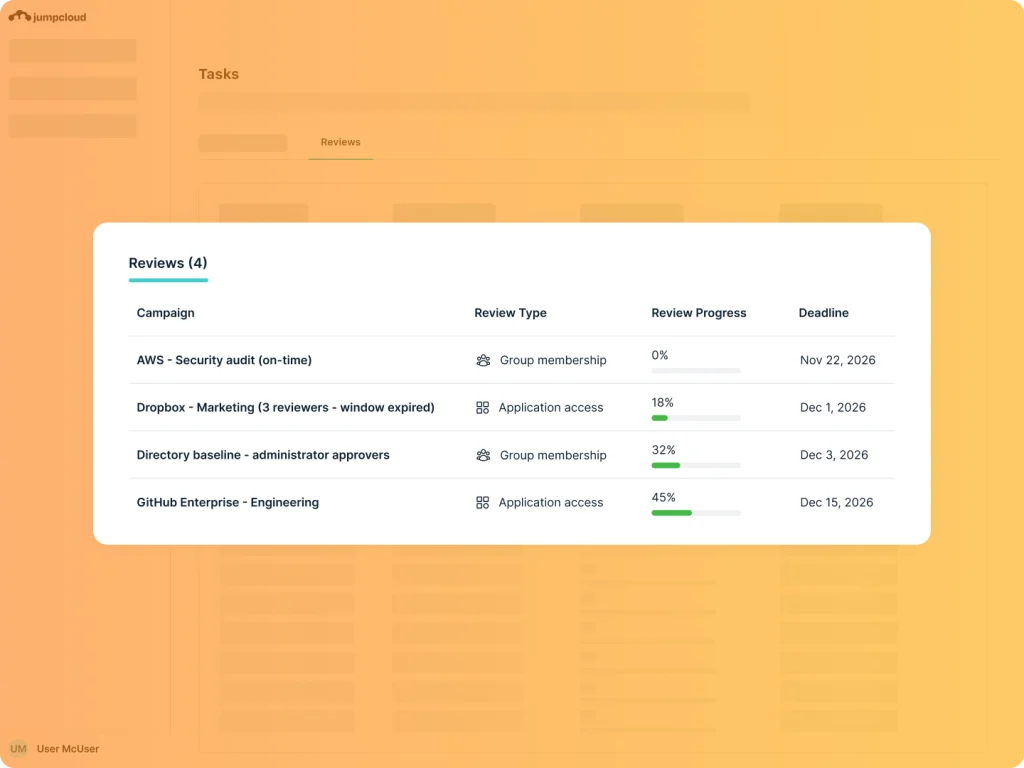
A-LIGN’s 2026 Compliance Benchmark Report found that 97% of surveyed organizations conduct at least two audits a year.
Continuous compliance makes access oversight a recurring responsibility as people, projects, and business needs change. A defined review cadence gives managers and resource owners regular opportunities to reassess access, with IT responsible for tracking the follow-through.
Campaign records and retained exports help your team explain how access was reviewed and what changed when preparing for an audit.
Get Started with Access Certification
Start with an SSO application or user group that already needs a review, and identify the managers or resource owners who should participate.
Contact your JumpCloud Account Executive or Account Manager to review platform availability and configure your first campaign.