Connect


For too many IT teams, managing hardware is a fragmented mess. Procurement happens in one portal, device management in another. The “source of truth” is often a fragile spreadsheet that hasn’t been updated since last quarter.
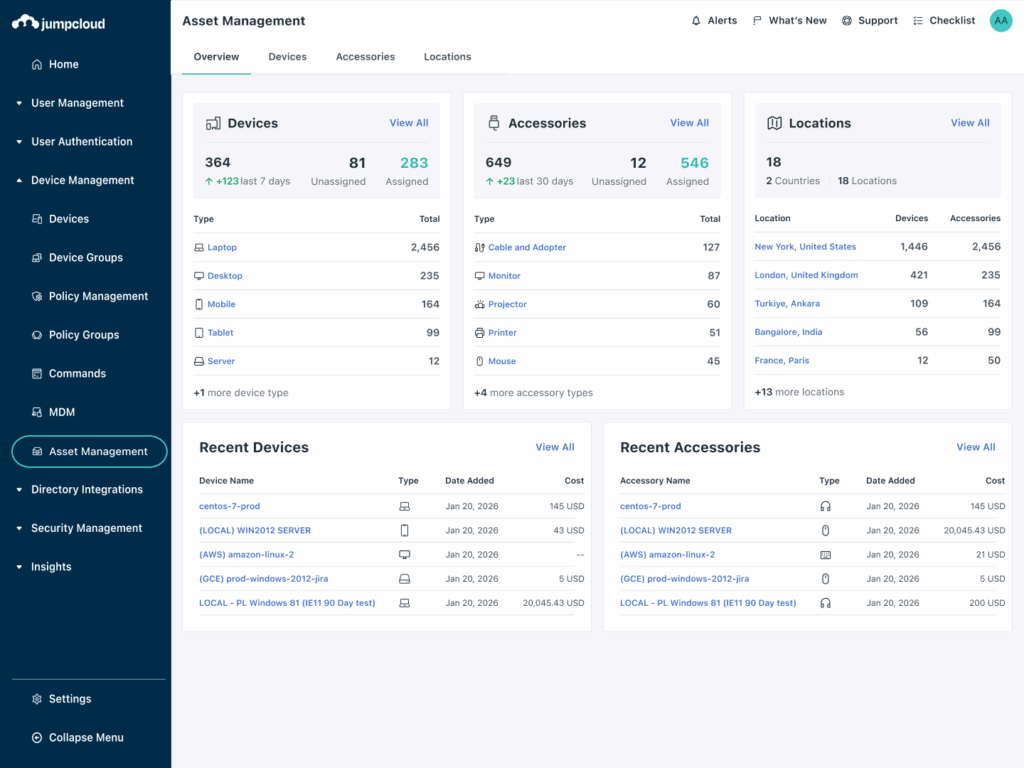
It doesn’t have to be this way. JumpCloud Asset Management replaces those static sheets with a dynamic inventory that lives right next to users and devices. Now, that experience is even faster.
With the new Apple Business Manager (ABM) integration and expanded AI capabilities, including Global AI Search support and a new AI-powered filtering widget, asset management transforms from a manual chore into a reliable, automated process.
Here is how the latest updates make inventory smarter, faster, and audit-ready.
1. Automate Apple Inventory and Speed Up Data Entry
The biggest challenge in asset management is often “Day One” visibility. There is usually a delay between buying a device and a user enrolling it. This creates visibility gaps where assets sit in limbo, and your inventory records fall behind.
The Apple Business Manager (ABM) integration solves this for Apple environments. The integration syncs procurement data directly into JumpCloud as soon as a device is purchased.
You get a verified record of your fleet, including serial numbers and models, before the box is even opened. This:
- Prevents “phantom” inventory.
- Ensures tracking begins from the very start.
For unmanaged hardware like monitors or docks, the new Clone Asset feature eliminates repetitive data entry. Instead of typing out the same specs for 50 new items, you can duplicate an existing record instantly. Simply set up the details once and update the unique serial numbers for the rest.
Suggested reading: Why Growth Outpaces Traditional Asset Management
2. Find Any Asset Instantly with AI-Powered Search & Filtering
As inventory grows, finding the right data usually involves a tedious process. You have to navigate the app, open column menus, and manually configure logic.
Two AI enhancements remove this friction: Global AI Search support and a new AI-powered filtering widget.
Search from Anywhere (Even Custom Fields):
Asset Management data is now fully supported within JumpCloud’s Global AI Search. There is no need to navigate specifically to the Asset Management application to find a device.
Let’s say you want to search for a specific asset tag or custom attribute. You can use a natural language query in the main search bar to find relevant asset records surface instantly alongside other data types. This significantly reduces the time it takes to answer questions during audits or inventory checks.
Simplify Filtering with Natural Language:
A new AI-powered filtering widget is now available within the Asset Management experience. This widget lets you build complex asset lists without the need to select multiple fields or understand filter logic.
Instead, admins can describe requirements in plain language. For example:
“All Windows devices with an active warranty located in Canada”
The AI automatically interprets the description and generates the appropriate filters. This makes it much easier to build advanced combinations, especially when working with custom attributes.
Note: The AI-powered filtering widget is available to organizations that have AI Search enabled.
3. Centralize Documentation to Support Compliance
Preparing for regulatory reviews like SOX or ISO takes a lot of work. It often requires gathering scattered proof of ownership. With the new File Upload capability, you can support these efforts by attaching relevant financial documentation, such as invoices, purchase orders, and warranty certificates, directly to the asset record.
This consolidates your data in one place. You help reduce the time it takes to retrieve necessary information when an auditor requests proof of purchase.
4. Prevent Hardware Loss During Offboarding
Employee turnover is another area where expensive hardware often slips through the cracks. The new Owned Assets view tightens this process by aggregating every assigned item, such as laptops, monitors, and peripherals, directly on the User Detail page.
It provides a consolidated recovery checklist for IT admins, so you can verify exactly what needs to be returned before an employee’s final day.
Also read Build to Scale to understand how IT asset management is foundational for your company’s growth.
Build a System You Can Trust
Ultimately, asset management comes down to one simple question: Do you know exactly what your company owns?
If you are relying on manual spreadsheets, the answer is probably “no.” Spreadsheets break, people forget to update them, and data gets old fast.
These updates fix that problem by removing the manual work.
- ABM Integration logs new Apple devices automatically.
- Global AI Search & Filtering allows equipment discovery using natural language.
- File Uploads keep your receipts and warranties right where you need them.
JumpCloud Asset Management gives you a clear, reliable view of your inventory, so you can stop guessing and start trusting your data.
Ready to ditch the spreadsheet? Log in to your JumpCloud console today to explore the new Dashboard, set up your ABM sync, and experience a smarter way to manage your assets.