Use AD Import with RADIUS
Prerequisites:
- A domain configured with the JumpCloud AD Import Agent is required.
- You also need a configured JumpCloud RADIUS server and a JumpCloud RADIUS connected Wireless Access Point (WAP).
About JumpCloud AD Import and JumpCloud RADIUS
You can create users in Active Directory Domain Services (AD-DS) and use the JumpCloud AD Import Agent to sync them to JumpCloud RADIUS. For example, the following screenshot displays a user and group in AD-DS:
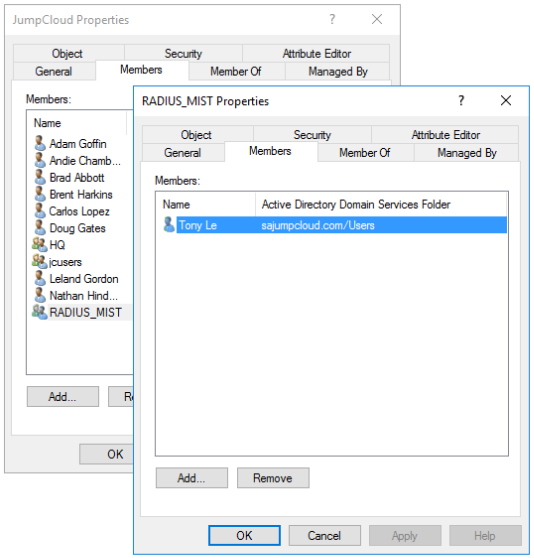
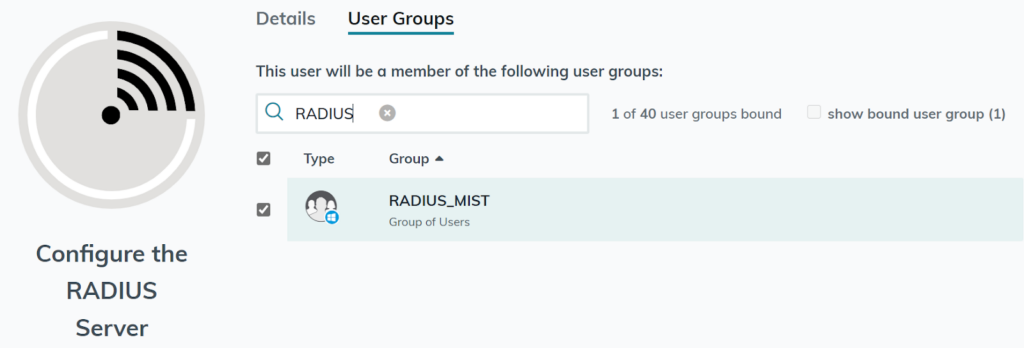
- The JumpCloud AD Import Agent syncs that user information in JumpCloud, then you can connect the user to a user group in JumpCloud to grant access to the RADIUS Server.
Disabling or Re-enabling a User’s Access
To disable a user’s access, select Disable Account in Active Directory Domain Services.
- Wait 90 seconds for the user’s account is suspended in JumpCloud, and the user can no longer connect to the wireless network.
- When re-enabling, the user's account status will be active within 90 seconds, and the user will once again be able to connect to the wireless network.
Was this information helpful?