Connect


JumpCloud is moving your IT Asset Management (ITAM) directly into the field to bridge the gap between your physical hardware and digital records.
Physical touchpoints define your hardware management. Every hand-off, such as receiving a shipment or recovering equipment, carries a risk that your digital inventory will drift from physical reality.
Maintaining an accurate system of record requires a workflow that functions at the point of contact to ensure your data is captured and verified the moment a device changes hands.
JumpCloud now enables this through standardized QR and barcode generation and automated Lenovo warranty intelligence. Linking physical labels directly to your digital records streamlines your entire asset lifecycle, including initial intake, onsite audits, device hand-offs, and eventual disposal.
Physical Verification with QR and Barcode Generation
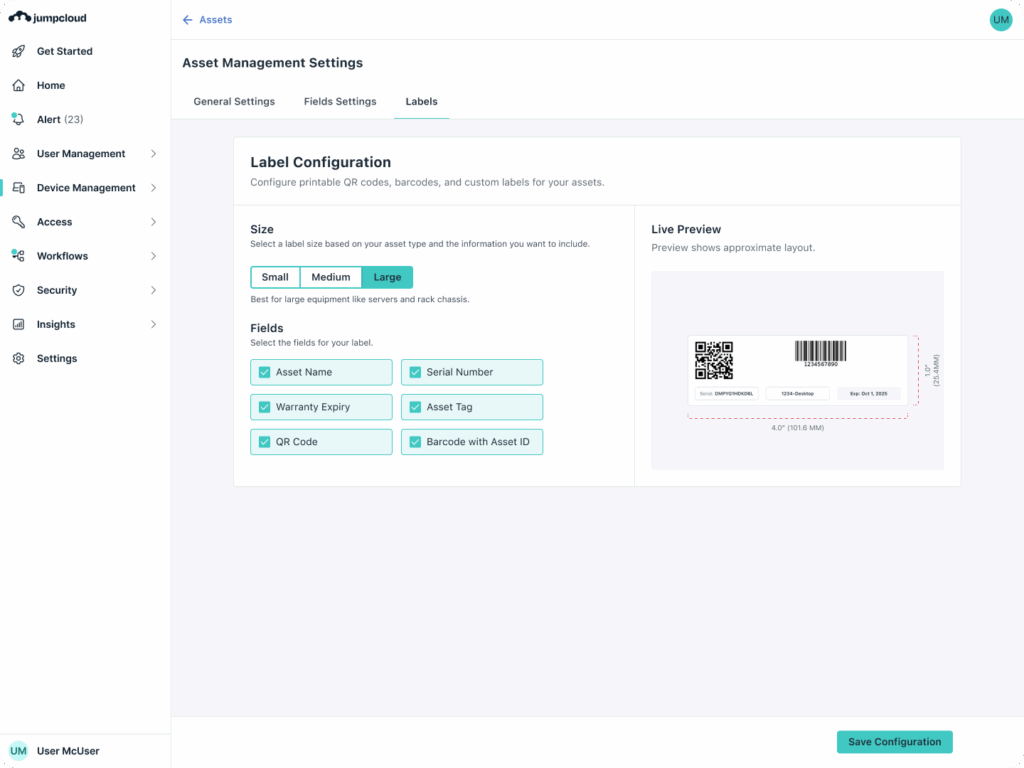
You can now generate, configure, and print integrated asset labels directly from the JumpCloud console. With built-in QR and barcode generation, you can standardize how physical assets are labeled and identified across your offices, warehouses, and remote locations.
Scanning a JumpCloud-generated hardware label:
- Gives you instant access to the correct asset record
- Eliminates manual searches
- Reduces the risk of mismatched or duplicate records.
This standardization ensures that whether a device is in your hands or sitting on a shelf, its digital identity is only a scan away.
Configuration and Customization
Every IT environment has unique requirements. A label for a desktop requires different data than a label for a peripheral like a high-end monitor or a docking station. JumpCloud Asset Management provides three distinct sizes to accommodate different hardware:
- Small: Designed for compact devices or peripherals where space is limited.
- Medium: The standard size for laptops and tablets.
- Large: High visibility for monitors or server rack equipment.
You can choose specific fields to display, such as the Asset ID, Serial Number, or Model. This ensures physical tags match internal naming conventions and provide the necessary context at a glance.
The Power of Bulk Deployment
The biggest hurdle to adopting a new asset management strategy is the initial setup. Printing dozens of labels one by one is an inefficient use of technical talent. To solve this, you can use the Bulk Selection and Printing options.
Select an entire inventory and generate print-ready sheets in seconds. This allows a team to standardize an entire office or warehouse in a single afternoon.
Field-Ready Workflows
Standardized labeling strengthens the connection between your physical devices and their digital records. Whether you are prepping for a new hire or conducting a quarterly warehouse audit, a scan provides the necessary context to move forward.
You can validate assets through scans, which reduces discrepancies, improves your audit readiness, and creates a more reliable system of record. You can scan a label to instantly access:
- Assignment History: Verify the current or previous user to reconcile personnel records and ensure the right gear is in the right hands during a hand-off.
- Lifecycle Status: Update status fields from the point of contact. You can move an item to “Repair,” “In Stock,” or “Disposal” instantly, ensuring your database reflects physical reality in real-time.
Automated Warranty Intelligence: The Lenovo Connector
Warranty status is a moving target. Unlike hardware specs that remain the same for the life of a machine, coverage is a ticking clock. Tracking these dates manually often falls to the bottom of the to-do list, which leads to a common headache: discovering a device is out of warranty only after it breaks.
JumpCloud Asset Management now supports automated warranty lookups for Lenovo devices through a dedicated connector. This integration retrieves warranty status, coverage dates, and support details directly from Lenovo systems and syncs them into your asset records.
Reduced Manual Warranty Tracking
Automated lookups remove your need for manual OEM portal checks and spreadsheet tracking. Warranty status, coverage dates, and expiry details are automatically retrieved and synced. By reducing manual data collection, you minimize errors and ensure that your refresh planning and support escalations are based on accurate information.
- Verified Coverage Windows: Your start and end dates are synced directly, ensuring your refresh reports are accurate to the day.
- Service Level Visibility: You can see the distinction between onsite support and depot repair at a glance. Knowing this prevents you from paying a third-party shop for a repair that is already covered by the manufacturer.
Stronger Lifecycle Visibility
With easier identification and real-time warranty insight, you can better support proactive lifecycle planning. Access to real-time data allows you to take a more strategic approach to your hardware management:
- Anticipate Renewals: Track device status to identify which units are nearing the end of their coverage, allowing you to plan for timely renewals or replacements.
- Informed Investments: Make data-backed decisions about hardware expenditures across your distributed environments by identifying exactly which assets require a refresh.
Start Managing Your IT Assets. Holistically.
JumpCloud provides a centralized system where your identity, access, and devices are interconnected. Managing your fleet through a single platform ensures your hardware records remain accurate without the burden of additional administrative overhead.
- Identity-Centric Context: When you link hardware directly to your JumpCloud user directory, you simplify recovery and transition processes. Every asset record gives you a clear view of the specific tool assigned to an individual.
- Integrated Data Integrity: For your JumpCloud-managed endpoints, hardware specifications populate automatically via the agent. For all other assets, your QR label serves as a physical shortcut to the digital records you have centralized in the console, providing immediate access to the data you need.
- Audit Readiness: Physical-to-digital alignment ensures that the hardware you have in the field matches your system of record. You can validate your assets through quick scans and export comprehensive reports without the need to reconcile multiple databases.
Log in to your JumpCloud console to configure your label templates or start a free trial to experience unified IT asset management.