Connect


It’s another normal Tuesday morning. A support rep takes a sip of coffee, logs in, and asks an AI assistant to summarize her overnight tickets.
Creating this summary isn’t a simple exercise. The assistant logs into the CRM to pull customer records, checks order histories, and even drafts replies. With the right connections, it can also send emails and update tickets.
This is all happening, but nobody in IT bought a new application. Nobody filed a procurement request. Yet AI tools that can read sensitive data and take action across other systems are now working alongside your human employees.
The rep didn’t do anything wrong here. She’s using the publicly available tools at her disposal. No one told her not to do this, and she didn’t run into any security alerts along the way. But IT now has a question it didn’t have last week. What can this thing reach?
AI security has become an IT problem. That’s why today we’re launching a new course, Foundations of Workplace AI Security, built for the IT and security professionals navigating this new area of responsibility. You can click the link directly to enroll in the course via your JumpCloud admin account. Or, keep reading to see the three challenges AI creates for IT and get a preview of what the course teaches.
Nobody Bought It, but Three Challenges Came With It
AI reaches your environment through multiple doors. Someone buys an AI service. A vendor adds an AI feature to an app you already run. An internal team builds a workflow on a model’s API. An employee signs up for a tool or installs one locally. A team connects an AI client to a business system.
Most routes skip the usual procurement path. Financial records show what you paid for, identity logs show who signed in, network and device data show what ran…but each is showing a different slice of data. And for IT teams, piecing this information together across multiple sources can be difficult.
Our Q4 2026 Pulse Report found that 30% of surveyed organizations had encountered shadow AI their IT teams couldn’t fully monitor. Underlying this truth is a harsher reality: if you can’t see it, you can’t secure it. Visibility is only the first challenge. An AI tool that sits idle is a license problem. An AI tool that can read records and change systems is a security problem.
The next challenge is access. Every AI connection reaches your systems through an account. That account’s permissions decide what the AI can read and do. A tool built for one task can end up with access to far more, especially when it runs on a shared account or an employee’s login.
The third is continuous oversight. Access that fits at launch can stop fitting as things change, so every connection needs a review process and, eventually, a retirement method.
Together, these three challenges are the right way to size up AI in your environment. They’re also the three areas this course is built around: discovering AI and its connections, examining access and permissions, and reviewing activity and agent lifecycles.
Course Overview: What You’ll Learn
Foundations of Workplace AI Security is a 45-minute introductory course for IT and security teams running headfirst into these challenges. It walks through all three areas with real workplace examples.
It includes short videos, interactive activities, and quizzes at the end of each section. To get value from this course, you don’t need AI engineering experience. You need familiarity with users, applications, and access. In other words, you need the IT context you already have.
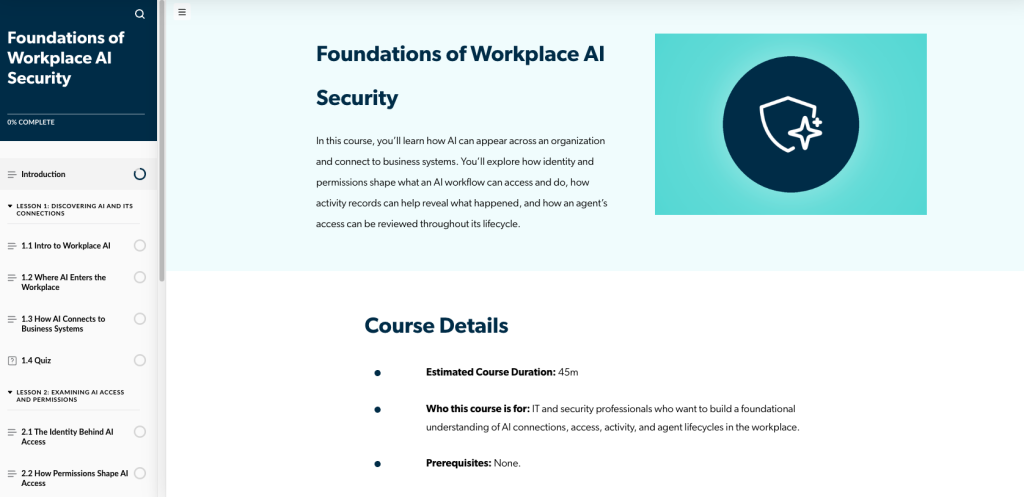
By the end, you’ll be able to:
- Recognize how AI appears in your workplace and connects to business systems, including through Model Context Protocol (MCP) and direct API connections
- Explain how identity, permissions, and other restrictions shape what an AI workflow can access and do
- Describe what activity records can and can’t show about AI actions and the identities behind them
- Identify considerations for reviewing an agent’s access and activity from deployment through retirement
Along the way, you’ll see how the account behind a connection changes what an AI can access and how its activity is attributed. That could be a person’s login, a shared service account, or an agent’s own identity. You’ll also work through how access and autonomy shape the impact of an unexpected action.
Build the Foundation Now
AI will keep showing up in new places, and some of those places will touch real data. You don’t need to master every tool to handle that. You need a shared foundation: a clear view of what’s connected, what it can reach, and what it’s doing. With that in place, every new AI request gets easier to evaluate.
The course ends with questions you can take back to your organization on connections, identity, permissions, activity records, ownership, and access removal. Bring them to your next conversation about AI access and oversight. Ready to learn? Enrollment is open to anyone with a JumpCloud admin account. Get started with the course here.