Connect


IT professionals are the enablers of the modern workplace, balancing the constant need for speed with a non-negotiable mandate for security. As environments grow and become more sophisti cated, the scope of the day-to-day work expands right along with them.
In a traditional workflow, managing this growth requires a series of precise steps: navigating to the right section, locating the specific resource, and executing the update. It’s effective, but in a fast-paced environment, every second counts.
JumpCloud AI Assistant is designed to streamline that journey. It acts as a dedicated partner within the portal, offering a direct path to execution. Simply describe what you need, and the assistant handles the heavy lifting and prepares the action for your final approval.
What is JumpCloud AI Assistant?
JumpCloud AI Assistant provides a conversational, chat-driven way to manage your IT environment directly within the JumpCloud Admin Portal. It integrates across the resources you manage daily, allowing you to use natural language to get instant answers, retrieve information, and carry out administrative tasks from a single interface.
Research indicates that AI tools enable employees to reclaim more than 40% of their workday, with IT professionals specifically recovering up to 45% of their time through the automation of routine responsibilities.
By understanding your intent, the assistant prepares the appropriate actions across users, devices, applications, assets and events. You can query, configure, and troubleshoot without switching context, ensuring you benefit from a faster and more efficient way to manage IT.
Reduce Friction in Everyday Tasks
High-frequency tasks, such as resetting MFA or auditing access, often require specific sequences of actions. JumpCloud AI Assistant turns these multi-step processes into a single conversation, allowing you to move from an inquiry to an outcome in seconds.
By bypassing manual lookups, you can verify data and trigger changes through direct prompts:
- “Show me all inactive users from the last 30 days and suspend their access.”
The assistant returns the specific list and prepares the suspension for your final verification. - “Lock [Username]’s device.”
The assistant presents the device information and asks for approval before completing the action.
This shift allows you to manage the “now” of IT operations without pausing your broader workflow.
Use Case in Practice: The Friday Afternoon Offboard
To understand how JumpCloud AI Assistant acts as a true right hand, let’s look at a common scenario: a time-sensitive offboarding.
The Situation: It’s late on a Friday. Sarah, an IT admin, receives an urgent request from HR. A sales representative is leaving the company. His access must be revoked and his device secured before he leaves the building in 20 minutes.
The Traditional Flow: Sarah would successfully manage this by moving through a series of sequential steps. She would navigate to the User module to suspend the account, switch to the Device module to locate and lock the laptop, and then pivot to Directory Insights to verify recent activity. It’s an effective process, but it requires her full attention across multiple screens during a high-pressure window.
The AI Assistant Flow: Using the AI Assistant, Sarah manages the entire event from a single, calm interface.
Step 1: Sarah types: “Find Marcus Chen and show me his account details, assigned devices, and any activity from the last hour.“
Step 2: The assistant delivers a fast, instant answer in the chat, pulling his account status, his MacBook’s location, and a clean activity log into one view.
Step 3: Sarah follows up: “Suspend his account, lock his device, and remove him from the Sales-EMEA and Sales-NA user groups.“
Step 4: The assistant surfaces a clear summary of all three actions. Sarah reviews the details, clicks “Confirm,” and the execution is finished in one shot.
To stay ahead of the curve for Monday morning’s audit, Sarah performs two final steps without ever leaving the window:
Audit Trail: She asks the assistant to pull a list of all commands run on that device in the last 30 days.
Proactive Reporting: She asks the assistant to draft a Directory Insights query for Marcus’s login events for the week.
What used to be a 15-minute multi-tab coordination becomes a two-minute conversation. Sarah remains composed, the data remains secure, and the task is handled with absolute precision.
From Intelligent Insights to Global Execution
While Sarah’s story shows the speed of a single event, the real power lies in how these insights scale across your entire fleet. JumpCloud AI Assistant acts as a unified intelligence layer that understands the unique context of your environment. It doesn’t just surface data; it provides the intelligent guidance needed to take AI to the next level.
Leverage Artifacts
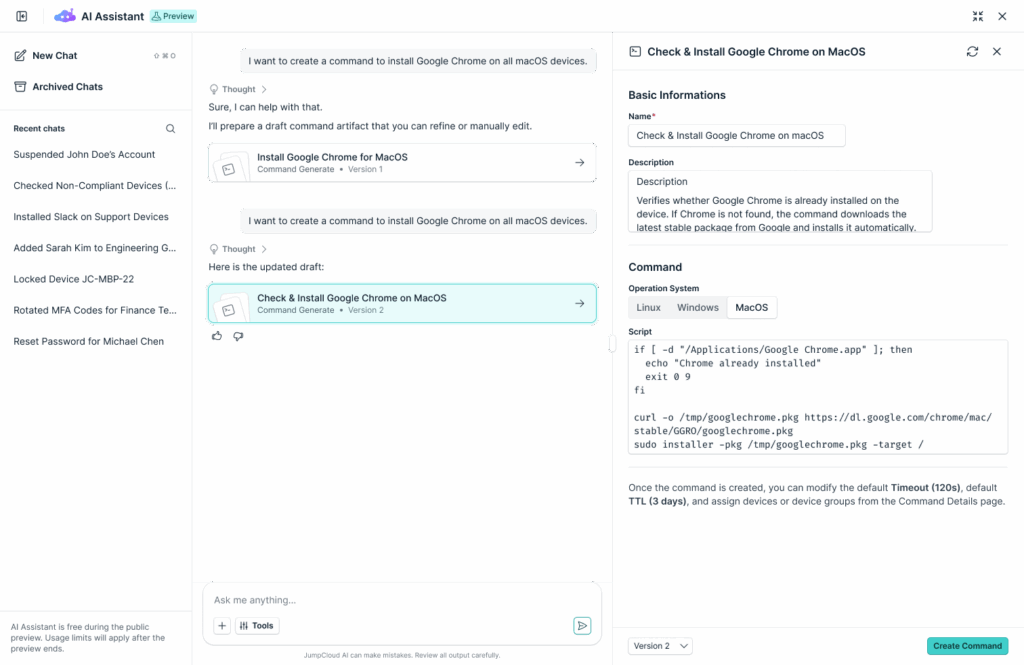
Artifacts are interactive side panels that let you review and edit details without losing your place in the chat. When the assistant identifies an optimization opportunity or generates a complex action, it creates an Artifact so you can verify or modify the data before execution.
These purpose-built, AI-supported actions ensure that your workflow remains predictable and precise.
Given below are some of the tasks that the assistant can handle seamlessly: :
- Editable Command Generation: Move beyond simple text. The assistant can generate complex device commands as artifacts. Simply open the panel to edit the script, test the logic, and ensure it’s perfect before deployment.
- Dynamic Group Creation: Transition from a conversation to a configuration. The assistant can prepare the logic for Dynamic User and Device Groups. Review the membership rules in the artifact panel and create automated, attribute-driven groups with a single click.
- Instant Detail Views: Get instant answers with deep context. Currently, you can jump directly into User and Device detail artifacts to view deep-link configurations, status updates, and resource associations, all from within the AI Assistant interface.
Bulk Actions
Aside from the “see, edit, and execute” process, you can also move from a single insight to a fleet-wide execution through coordinated bulk actions, including:
Updating multiple users simultaneously to ensure directory consistency.
Running commands across targeted groups of devices for rapid deployment.
Managing access across applications to streamline provisioning workflows.
What Can JumpCloud AI Assistant Do?
JumpCloud AI Assistant supports you across these key areas of the Admin Portal:
- User Management: List, create, get details for, suspend, reactivate, and manage passwords and MFA for users.
- Device Management: List, get details for, lock, erase, restart, and update devices; bind and unbind users.
- Admin Controls: List, update, reactivate, and reset MFA for administrators.
- Group Management: List, create, delete, and manage user and device groups.
- Applications & Access: List and get details for applications; manage access and SSO configurations.
- Policies: List and get details for device policies.
- Commands: List and run commands to get results and manage device associations.
- Assets: List, view, update, and delete assets.
- SaaS Management: Discover shadow AI and SaaS.
- Audit & Visibility: Get Directory Insights events and track all activity.
You’re In Control with Built-In Security Guardrails
Speed matters, but control matters more. JumpCloud AI Assistant is designed to be predictable, ensuring that AI never acts autonomously in your environment. We’ve built in strict human-in-the-loop safeguards:
Explicit Approval: Every action requires admin approval before execution.
Clear Summaries: The assistant shows exactly what will happen and which objects are affected.
Full Transparency: Audit logs capture all activity through Directory Insights.
This ensures that even as you move faster, you retain human-in-the-loop approval and complete visibility into changes across your environment.
Designed to Fit How Admins Actually Work
JumpCloud AI Assistant supports both guided workflows and open-ended interactions, depending on your preference. Its permissions mirror your administrator role. If your role limits access to a specific feature, AI Assistant cannot access or assist with that feature.
When you first open AI Assistant, you’ll see default actions based on common administrative tasks:
- Manage Users: View and edit users/groups, manage access, unlock accounts, or reset MFA.
- Manage Devices: View and edit devices, modify group membership, and run security commands.
- Manage Applications & Policies: View SSO configurations, check IdP certificates, and manage user access.
- View Audits & System Events: Monitor user activity, filter policy events, and audit admin portal changes.
A Different Way to Think About Manual IT Work
JumpCloud AI Assistant brings a unified intelligence layer to IT work by replacing manual navigation with chat-driven automation. By shortening the distance between intent and execution through purpose-built AI-supported actions, your organization will be able to:
- Complete tasks faster
- Reduce operational overhead
- Maintain visibility and accountability
- Make better use of time
Enable JumpCloud AI Assistant in your Admin Portal today. If you’re new to JumpCloud, get started today to discover how it can transform your IT operations.