Configure pfSense VPN to Use Cloud LDAP
Prerequisites:
- See Use Cloud LDAP to obtain the JumpCloud specific settings required below.
note
We've received feedback that the entire certificate chain is required as of v2.4.0. This has not been qualified yet, but if needed, can be generated by the following:
echo -n | openssl s\_client -connect ldap.jumpcloud.com:636 -prexit -showcerts | sed -ne '/-BEGIN CERTIFICATE-/,/-END CERTIFICATE-/p'
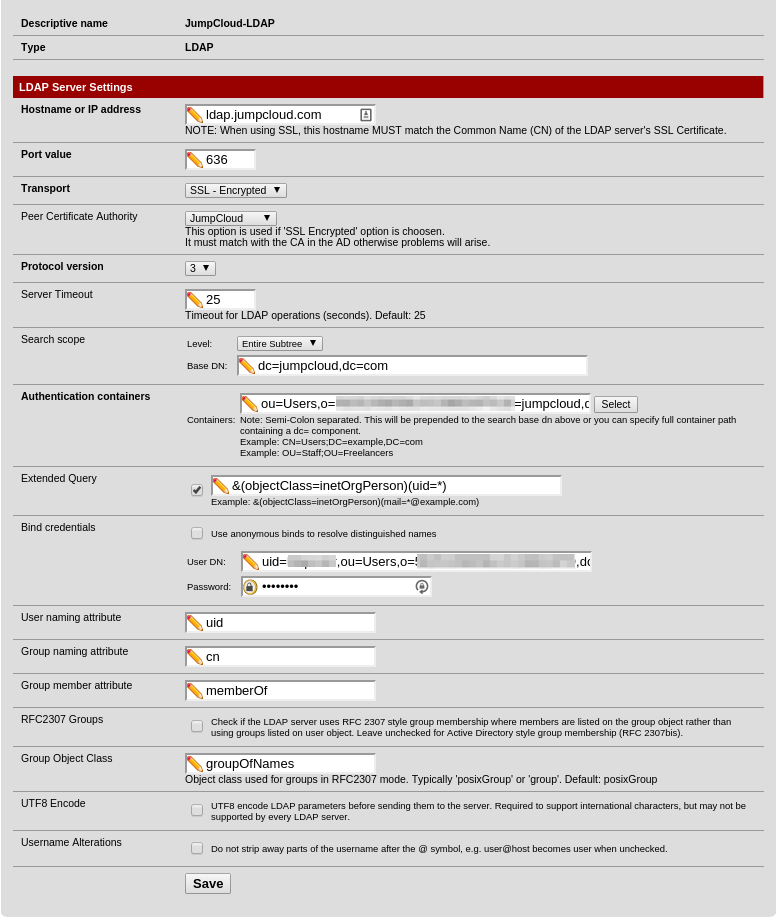
LDAP Server Settings
When using pfSense's VPN LDAP integration, here are the basic settings to configure authentication with JumpCloud's hosted LDAP server:
- Type: LDAP
- Hostname or IP Address: ldap.jumpcloud.com
- Port Value: 636
- Transport: SSL - Encrypted
- Peer Certificate Authority: JumpCloud LDAPS SSL Client Certificate
- Protocol Version: 3
- Search Scope - Level: Entire Subtree
- Search Scope - Base DN: ou=Users,o=YOUR_ORG_ID,dc=jumpcloud,dc=com
- Authentication Containers: ou=Users,o=YOUR_ORG_ID,dc=jumpcloud,dc=com
- Extended Query: &(objectClass=inetOrgPerson)(uid=*)
- Bind Credentials - User DN: uid=,ou=Users,o=YOUR_ORG_ID,dc=jumpcloud,dc=com
- Bind Credentials - Password: <ldap-binding-user's-password>
- User Naming Attribute: uid
- Group Naming Attribute: cn
- Group Member Attribute: memberOf
- Group Object Class: groupOfNames
Was this information helpful?