Configure Palo Alto Networks Firewall to Use Cloud LDAP
note
This article was tested with PAN-OS 6.1, and is current as of 09/19/2016.
Prerequisites:
- See Use Cloud LDAP to obtain the JumpCloud specific settings required below.
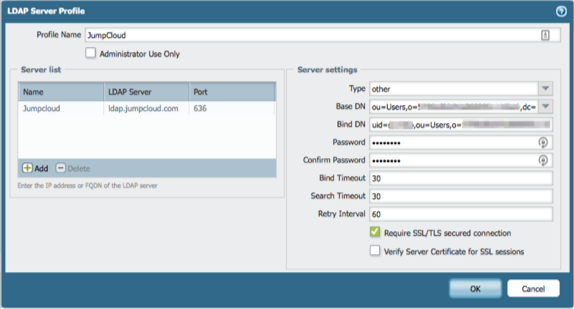
LDAP Server Profile
When using Palo Alto Networks VPN LDAP integration, here are the basic settings to configure authentication with JumpCloud's hosted LDAP service:
- Domain: ldap.jumpcloud.com
- Type: other
- Base DN: ou=Users,o=<your-organization-id>,dc=jumpcloud,dc=com
- Bind DN: uid=<ldap-binding-user>,ou=Users,o=<your-organization-id>,dc=jumpcloud,dc=com
- Password & Confirm Password: <ldap-binding-user's-password>
- Require SSL/TLS secured connection: Checked
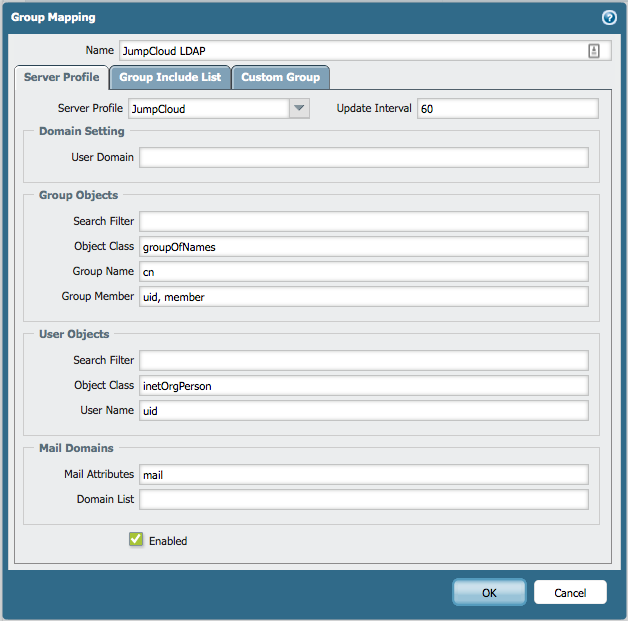
Group Mapping
Group Objects
- Search Filter: (blank)
- Object Class: groupOfNames
- Group Name: cn
- Group Member: uid, member
User Objects
- Search Filter: (blank)
- Object Class: inetOrgPerson
- User Name: uid
Mail Domains
- Mail Attributes: mail
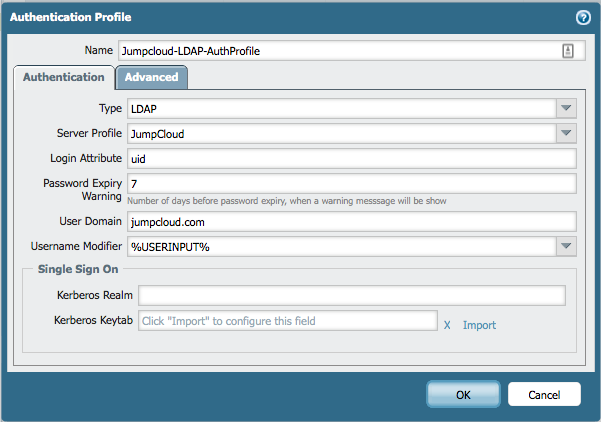
Authentication Profile
- **Type:**LDAP
- Login Attribute: uid
- User Domain: jumpcloud.com
- Username Modifier: %USERINPUT%
Was this information helpful?