



The Fall of Active Directory and the Rise of the Domainless Enterprise
With the urgent transition to remote work behind us, we must now plan for the long-term future of IT
The majority of workers indicate that they would prefer more flexibility in their work schedules, work locations, and how they get work done when their offices reopen. Although many organizations will eventually come back to their brick-and-mortar offices, it’s clear that IT leaders need to modernize their infrastructure to support remote work as seamlessly as in-office work.
This is where the Windows domain fails modern organizations. Although on-premises Active Directory was once at the cutting edge of organizational security and access management, it’s fallen behind as organizations manage burgeoning remote workforces and new cloud technologies.
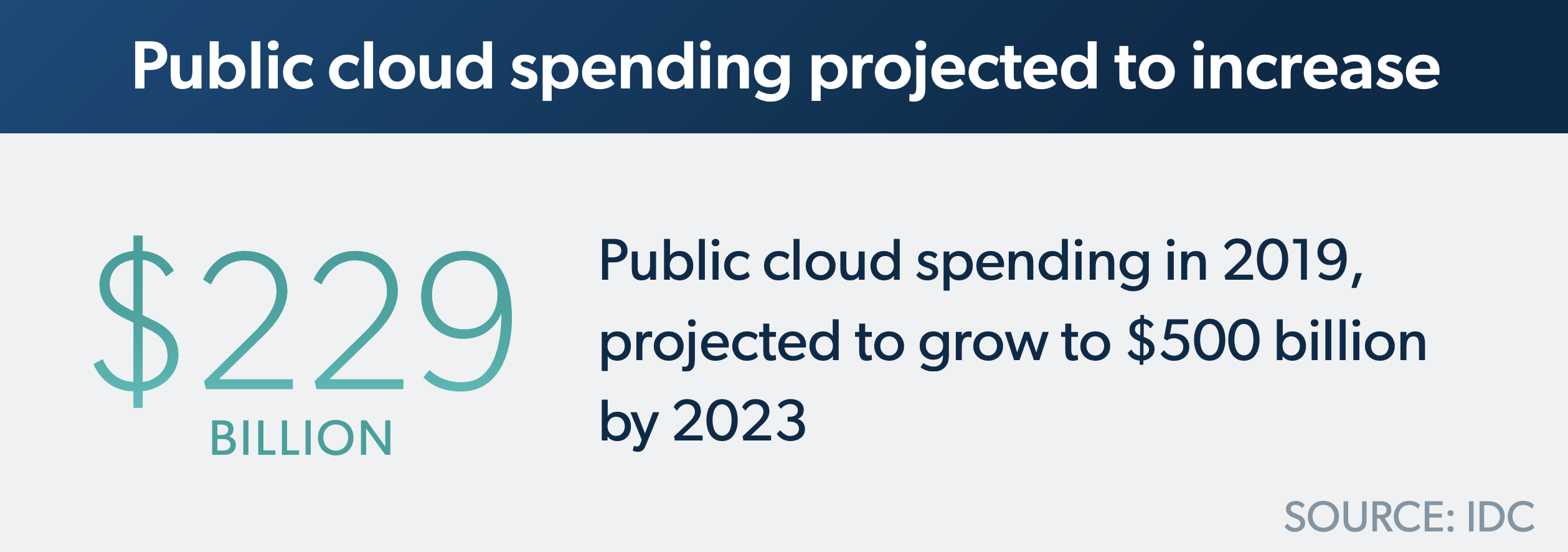
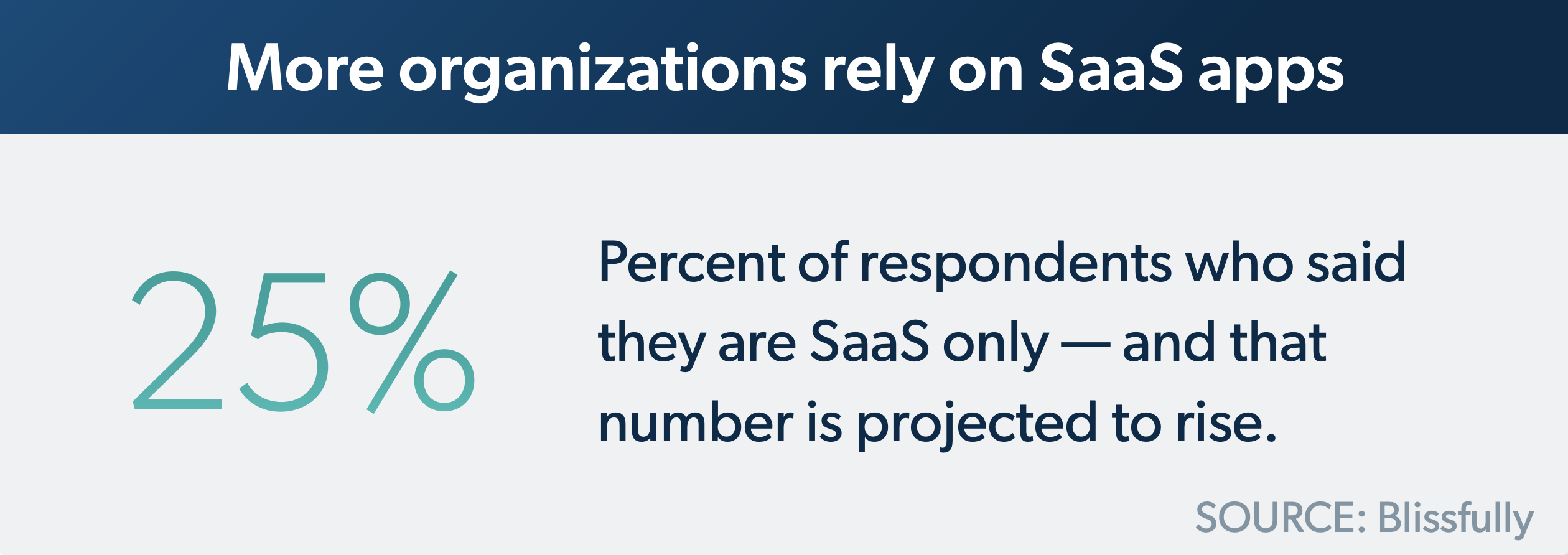
Modern users expect to work from anywhere and will require a diverse set of IT resources to do so. MacOS adoption has more than tripled in the last decade – and one in four organizations now relies solely on SaaS applications. Even amid a global crisis in which analysts project a sharp decrease in overall IT spend, those same analysts forecast an increase in public cloud spend.
An IT vision is emerging in response to these technological and cultural developments: the domainless enterprise. In the domainless era, organizations are no longer inhibited by the Windows domain and its associated on-prem directory services infrastructure. Instead, they use entirely new and dynamic infrastructure to secure users and devices no matter where they’re located, entirely from the cloud.
The Future of Work: Increased Flexibility
The COVID-19 pandemic has prompted organizations to assess whether the traditional ways of working are worth repeating. Studies show that users are more productive when they work remotely, but they can struggle with feelings of isolation. The organic collaboration they had in offices is difficult to replicate digitally.
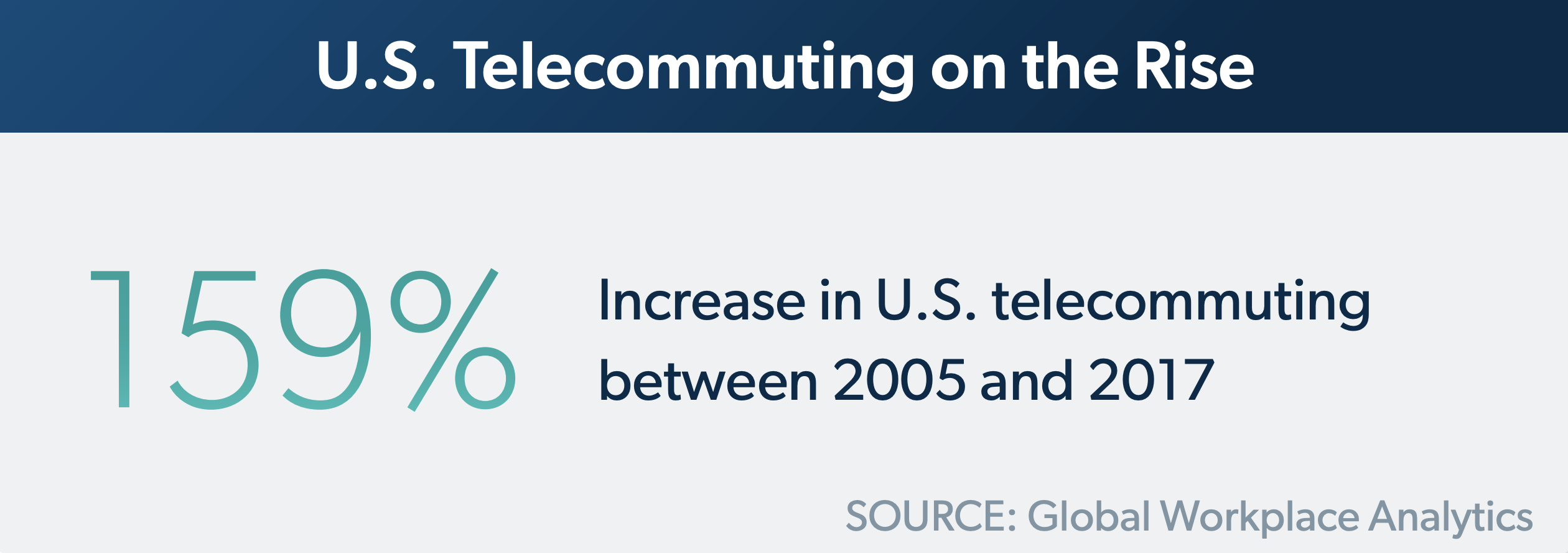
This leads organizations to explore hybrid models in which users split their weeks between remote and in-office work, or some portion of an organization’s workforce is permanently remote. Tech giants like Twitter and Facebook made headlines for moving their workforces to permanent remote work models, and other organizations will face the same kinds of decisions.
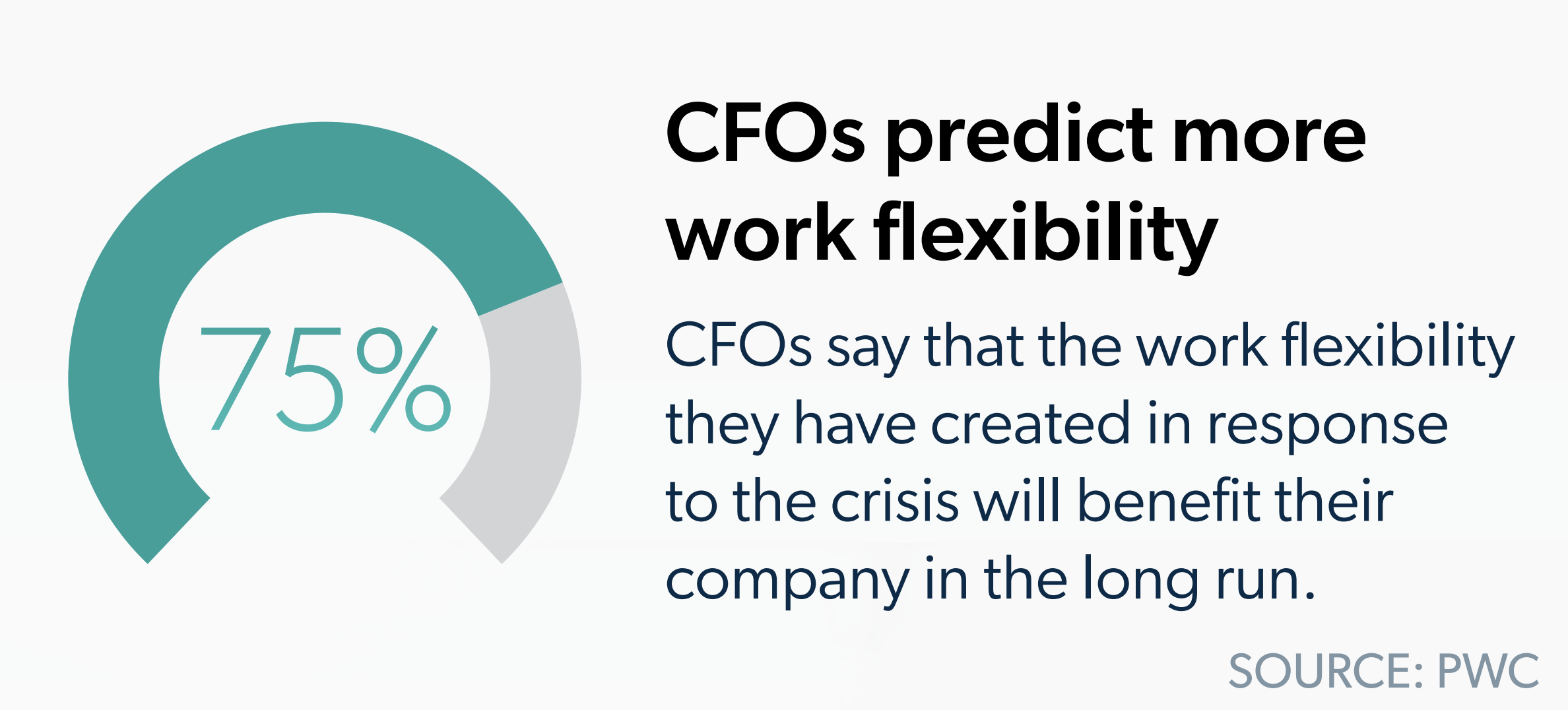
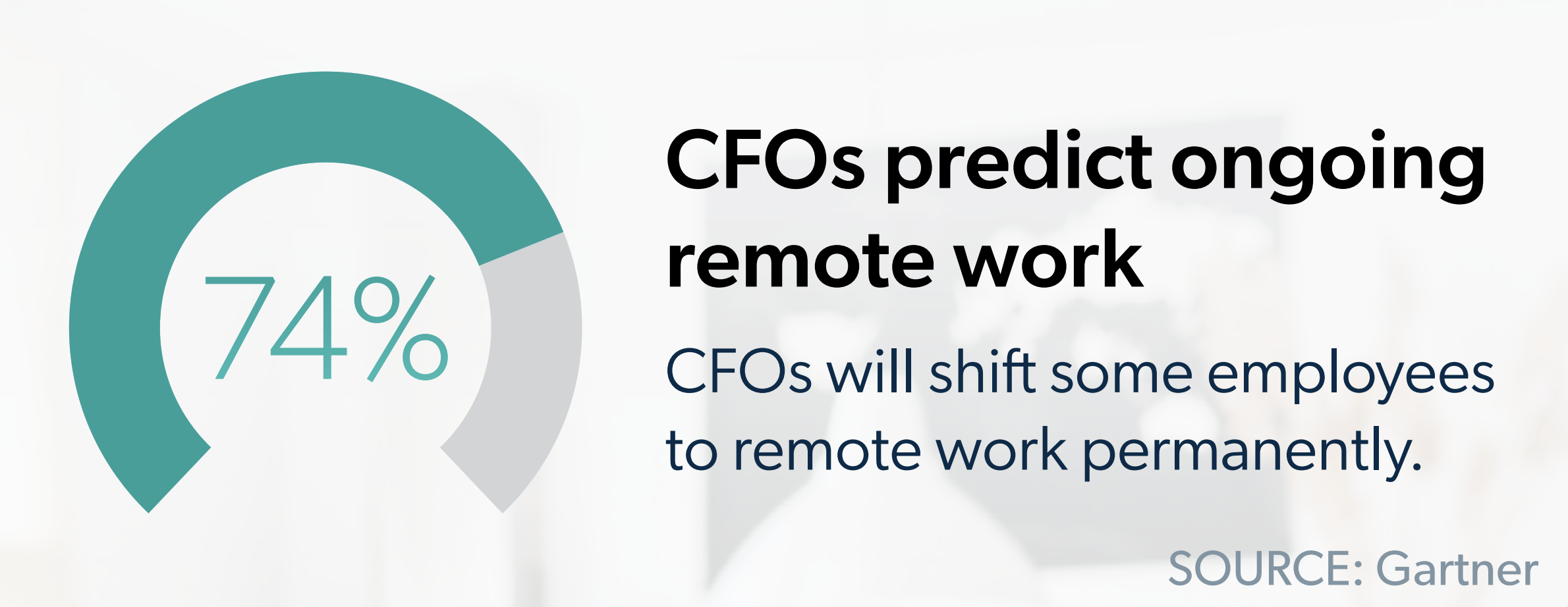
Mark Zuckerberg predicted that half of Facebook’s workforce will be remote in the next decade. The company’s leaders will focus first on hiring experienced engineers who live within four hours of an engineering hub to work remotely as they revamp their broader hiring plans. And nearly three in four CFOs in a survey said they would shift some employees to remote work permanently.
Organizations must supplement these hybrid practices with remote collaboration tools to give users a variety of ways to interact, no matter where they’re located. Whether that’s productivity suites, video conferencing tools, messaging apps, digital whiteboards, or project management software as well as emerging technologies – admins are expected to provision remote users to those tools and maintain the security of their work.
Admins need to match this increased flexibility in working conditions, which they can achieve by going domainless. In the domainless model, admins don’t sacrifice the core competencies of traditional directory services. Instead, they deliver them in a new way that doesn’t rely on an internal network or physical location for security – security is tailored to each individual user, their devices, the network, and authorization based on groups and roles.
Breaching the Perimeter: New Resources Challenge Legacy Directory Services
Even before the dramatic shift to remote work, cracks emerged in the legacy domain model. Active Directory allowed IT administrators to establish a Windows domain in which they managed users, provisioned them to Windows-based resources, and tightly controlled the machines they used to access those resources. Users went to brick-and-mortar offices each day, logged into their Windows machines, and accessed domain-bound IT resources via those machines. They worked within the secure perimeter of the office, and admins guarded that perimeter with the four walls of the office in conjunction with firewalls and other on-prem security equipment.
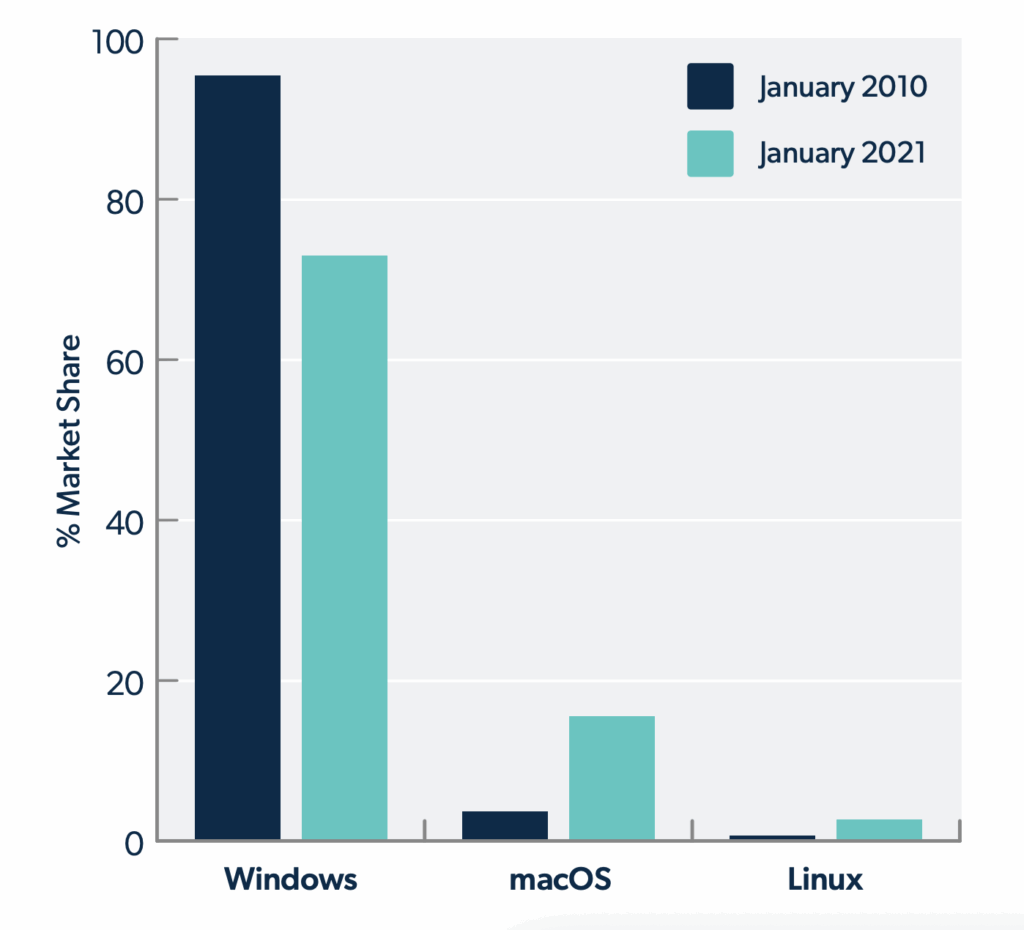
With the rise of alternative operating systems, including macOS and Linux, and web-based applications and cloud servers, admins no longer had all the tools they needed in AD to maintain complete control over their environments. They sought identity bridges and third-party vendors to manage new machines and federate core AD identities to new resources.
Admins can supplement their AD instance with Active Directory Federation Services, Azure Active Directory, or third-party vendors, but these approaches deviate from the initial purpose of AD: to be a central point of command and control to manage user access and devices. AD’s inability to accommodate new resources has begun to outweigh its benefits.
Beyond that, the solutions needed to extend the internal network to remote users – including RDP ports, VPNs, and jump servers – in the traditional model and its perimeter.
There is a better way. Instead of being forced to continually retrofit their infrastructure in response to new technological developments, admins can go domainless and implement a cloud directory service, designed from the outset with the modern environment in mind.
Defining the Domainless Enterprise
In the domainless model, admins don’t sacrifice the core competencies of traditional directory services. Instead, they deliver them in a new way that doesn’t rely on an internal network or physical location for security – security is tailored to each individual user, their devices, the network, and authorization based on groups and roles.
Key Requirements
The domainless enterprise model has three key requirements to function:
Each user has one authoritative identity they use to access all their IT resources, whether they’re logging into their laptop, SaaS apps, productivity suites and email, or networks. IT manages this core user store and federates the identities everywhere they’re needed.
The core directory uses a wide variety of protocols (LDAP, SAML, RADIUS, SSH, SCIM, OAuth, and others) to standardize identity across the infrastructure. Admins can also synchronize other directories – such as those needed for G Suite, Microsoft 365, and HR systems – with the core directory to import and export users.
In a perfect world, IT is able to configure and manage all the devices, no matter which OS is being used, through which users access resources. Because devices serve as the gateway to organizational data, those devices must be tightly controlled and secured with credentials and multi-factor authentication, among other security settings.
IT deploys GPO-like policies and commands to configure the machines, control which applications are installed, and institute other security measures, like full disk encryption. This extends beyond Windows machines to macOS and Linux so that IT has the same level of control regardless of the operating systems at play.
IT uses integrated monitoring tools to get a $360^{\circ}$ view across their environment, including users’ devices and authentications. Admins use these logs to take proactive measures to assess machine health and guard against potential vulnerabilities, identify threats such as unrecognized authentication attempts, and meet compliance requirements.
The Domainless Enterprise in Action
The core of the domainless enterprise is a cloud directory service, from which admins can provision users directly to their IT resources, secure their devices, and monitor their activity. This model works the same whether users are in the office, at home, or cycling between locations. Each user has a core identity to log into virtually all their IT resources, which they do through a secured machine and with a second form of authentication.
This approach differs from the domain-bound enterprise because users have custom access permissions, and they assert their identity at each access point either overtly or transparently through passwordless or certificate mechanisms. Unlike in the Windows domain, all user activity is treated as untrusted until they verify their identity to log into their workstations, applications, networks, and servers. This zero-trust security approach ensures that even if a user’s identity is compromised, their credentials don’t lay an organization’s critical data bare.
Authentication and authorization happen securely and easily for users, wherever they are. They’re delivered consistently and uniformly across the environment.
Key Benefits
The domainless enterprise model offers benefits in returning centralized control to IT, as well as increasing security and ease of access.
-

Centralized Control: This model no longer relies on an internal network, but it still affords admins centralized control over users and resources from the cloud directory service. Rather than relying on firewalls, admins oversee point-to-point transactions and ensure each transaction between users, their devices, and IT resources is secure and encrypted.
-
Security: This model treats all users as untrusted and requires them to assert their identity to access each resource. Admins can require multi-factor authentication at high-value access points to ensure an added layer of security, and they can quickly revoke a user’s access across the entire infrastructure if their identity is compromised or if they leave the organization.
-
Simplicity: Users need to remember only one set of credentials to access their resources, and their process to access their IT resources is the same regardless of where they’re located. They don’t require a VPN to access the internal network or change their passwords. Instead, they change their passwords directly on their machines, which automatically write back changes to the central directory and onward to applicable IT resources.

Transitioning from Perimeter Security to Dynamic Security
Even amid a global pandemic and recession, organizational leaders are prioritizing digital transformation, cybersecurity, and public cloud services. This demonstrates how essential these categories are to continued business success.
As part of this transformation, IT can examine strategies to go domainless. Current AD admins can stand up a cloud directory service to run in parallel to AD and begin to transition to a cloud-based model. A cloud directory service can serve as an all-in-one identity bridge to federate AD identities to the resources it struggles to manage, and organizations can begin to reap the benefits of the domainless enterprise model without wholesale disruptions to their current environment.
Extend AD with a Cloud Directory Service
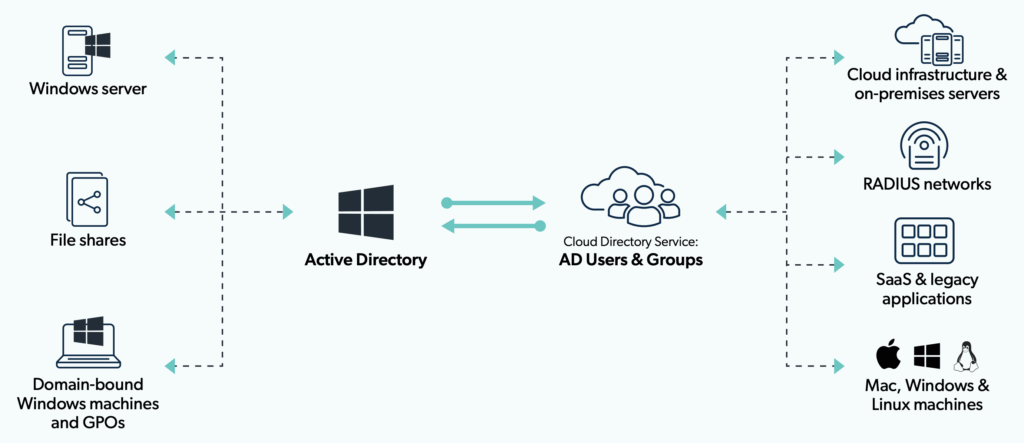
Ultimately, such a service can stand on its own to serve as the complete access control and device management platform for an organization. When organizations reach this stage, they reduce or eliminate on-prem infrastructure entirely and deliver seamless IT from anywhere.
If you’d like to read a step-by-step guide to implement cloud-based access control and device management, read our Roadmap to the Domainless Enterprise.
Sources
- “Desktop Operating System Market Share Worldwide.” StatCounter. Accessed June 24, 2020. https://gs.statcounter.com/os-market-share/desktop/worldwide/#monthly-200901-202001
- Diaz, Ariel. “The 3 Biggest SaaS Trends in 2020. Blissfully. Accessed June 24, 2020. https://gs.statcounter.com/os-market-share/desktop/worldwide/#monthy-200901-202001
- “Worldwide Public Cloud Services Spending Will More Than Double by 2023, According to IDC.” IDC. Accessed June 24, 2020. https://www.idc.com/getdoc.jsp?containerld=prUS45340719
- “What If Working From Home Goes on… Forever?” New York Times Magazine. Accessed July 7, 2021. https://www.nytimes.com/interactive/2020/06/09/magazine/remote-work-covid.html
- Porterfield, Carlie. “Facebook Will Allow Nearly All Employees To Work Remotely Post-Pandemic Forbes. Accessed July 7, 2021. https://www.forbes.com/sites/carlieporterfield/2021/06/09/facebook-will-allow-nearly-all-employees-to-work-remotely-post-pandemic/?sh=3f681fe026a7
- “Gartner Forecasts 51% of Global Knowledge Workers Will Be Remote by the End of 202.” Gartner. Accessed July 7, 2021. https://www.gartner.com/en/newsroom/press-releases/2021-06-22-gartner-forecasts-51-percent-of-global-knowledge-workers-will-be-remote-by-2021
- “The Future of Work Is Remote. But What Does That Really Mean?” JumpCloud. Accessed July 9, 2020. https://jumpcloud.com/blog/future-remote-work
- “Moving Off-Prem in the Domainless Enterprise.” JumpCloud. Accessed July 9, 2020. https://jumpcloud.com/blog/move-off-prem-domainless-enterprise
Audit-Ready in Half the Time
Proving your security posture doesn't have to be a manual nightmare. JumpCloud® gives you the visibility and reporting you need to meet compliance standards without the extra legwork. Secure your business and stay ahead of the curve.
Try Jumpcloud for Free