



Simplify Zero Trust Security from the Cloud
-
Today’s IT environments require a security model as dynamic as they are. With increasing numbers of remote users, different device types, and cloud-based resources (alongside existing on-premises resources), IT administrators must be able to secure access from anywhere.
Instead of relying on traditional perimeter security with internal corporate networks and firewalls, admins need to secure each transaction between users and resources. Although that access must be secure, it must also be convenient enough to keep users productive. In this white paper, we’ll define a modern Zero Trust security model and give you the tools you need to implement it in your own environment.
The 2020 shift to work-from-home was the final straw for admins who used perimeter security. Here’s what comes next.
Defining Zero Trust Security
With a Zero Trust security model, each access transaction in your environment is secured and no user or activity is trusted by default.
In this model, your core directory platform must have the mechanisms in place to confirm that a user is who they say they are, that they’re using a secure network and device, and that they have the correct access permissions for their role.
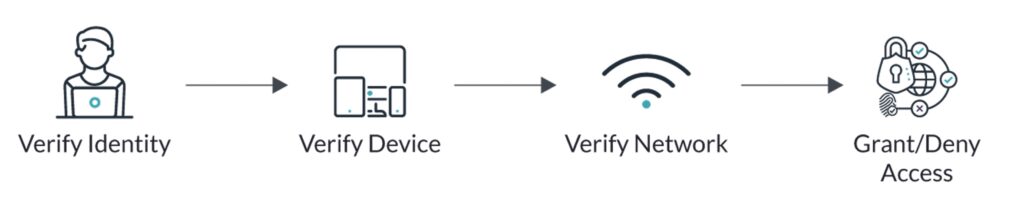
It must also have the mechanisms in place to respond to an individual user’s conditions. For example, if a user works on an unmanaged (i.e., personal) device, you should be able to specify (or deny) their access to resources, including sensitive applications. Similarly, you should be able to specify whether they can access resources from untrusted networks or need to use a trusted network like a VPN.
The Department of Defense likened perimeter-secured IT environments to houses with one set of keys for entry — while today’s Zero Trust IT environments function as apartment buildings:
-
In an apartment building, there are many more points of entry and a longer list of people with access, which decreases your familiarity with other access holders and increases the risk of unauthorized access. For this reason, you likely lock the door to your apartment instead of just relying on the perimeter security of the apartment building, because you have less certainty that every person in the building has authorization to be there.
Instead of the static nature of perimeter security, in which users logged into their in-office workstations and traversed the internal corporate network, a Zero Trust security model enables a much more dynamic approach to access control. You can give your users the freedom to work outside the traditional perimeter — by verifying their identity, device, and network and by establishing rules of least privilege to grant them access only to the resources they need to do their jobs and nothing more.
Zero Trust & The Future of Passwords
In a Zero Trust security model, you can ensure your users have secure access to the resources they need by:
Provisioning them with authoritative identities and credentials
Using varied forms of multi-factor authentication (MFA), including token keys and biometrics like f ingerprint readers
Accounting for individual users’ conditions, such as the devices and networks they work on
Granting them access to apps, files, servers, devices, and networks via least privileged principles
This model enforces least privilege but still allows for users to work securely from wherever they and their devices happen to be located. They’ll be challenged for verification of their identity when the conditions of their authentication attempt are abnormal, as well as uniformly at high-value access points, including MFA. Contextual factors, like the device they use, can improve the user authentication experience without compromising security.
This model also reduces your reliance on passwords alone to protect organizational data and resources. Forrester’s analysts noted in a report that passwords are among the most compromised data points and are falling out of favor in the identity and access management market. The report states: “Passwords hinder security, and vendors want to hasten their death.” By incorporating verification methods like biometrics and conditional access policies, you increase security and move toward a passwordless future.
This form of security isn’t just for corporations either: It’s important for all organizations, including small businesses, which account for more than one in four breaches.
28%
of breaches involved small business victims
Source: Verizon 2020 Data Breach Investigations Report
So the question is not whether to implement a Zero Trust security model, but rather how to do so in a way that’s most cost efficient and simple to manage for IT and most straightforward for your users.
Implementing Zero Trust Security with a Cloud Directory Platform
The key to implementing a Zero Trust security model in your environment is a core directory platform that can comprehensively manage user identities and their devices, along with the required condition-based access controls that account for their individual conditions, wherever your users work.
The JumpCloud Directory Platform is purpose-built to serve at the center of your environment and federate authoritative user identities to virtually all resources, as well as configure and secure Mac, Windows, and Linux devices. Managed entirely from a web-based console, you can onboard and offboard users, secure their devices, and grant or restrict access to resources across your environment.
-

Centralize Identity and Access Management
Import users from another identity provider or HR system, or create new users directly in JumpCloud, and establish an authoritative identity to federate to devices, applications, networks, servers, and other resources via industry-standard protocols such as SAML, LDAP, and RADIUS. This includes productivity suites like Google Workspace and Microsoft 365; SaaS apps like Salesforce, GitHub, Jira, and Slack; cloud infrastructure providers like AWS, Azure, and GCP; LDAP-backed resources like file servers and legacy applications, and RADIUS networks like VPNs.
Provision users through group-based workflows, along with setting password complexity requirements and requiring MFA at access points. Apply granular access permissions based on role and group so users only have access to the resources they need to do their jobs. Secure those users’ devices, regardless of operating system, with industry-standard Configurations (Policies) like full-disk encryption. Further manage those devices with custom commands and scripts delivered remotely. Across your environment, you can then monitor user authentications, activity, and device health with built-in telemetry features from this same central point of command.

-
Control and Verify User Access
Using JumpCloud, you can control access to any resource in your environment, but these security controls won’t hinder the user workflow. This model boils down to four key components, which enable you to establish a comprehensive verification scheme when users attempt to access resources:
- Identity Trust: JumpCloud’s core directory securely manages your user identities, including all credential control and revocation, two-factor verification (MFA), and contextual data to ensure appropriate levels of permission when they access resources. In short, JumpCloud ensures that a user is who they say they are.
- Device Trust: JumpCloud’s Device Trust ensures that users only access organizational resources from devices that are under your organization’s management and secured through JumpCloud’s MDM and agent-based management functions. JumpCloud’s Conditional Access policies add the ability to more granularly define what constitutes a trusted device and prevent or allow authentication based on policy and context.
- Network Trust: JumpCloud’s Network Trust enables you to ensure authentication requests are only allowed from specific IP addresses or ranges of addresses. This restricts traffic to resources only from locations you know or otherwise trust.
- Authorized Access: The final component involves verifying whether a user is authorized to access a specific resource. Through granular, role-based access controls, JumpCloud controls authorization rights on devices, applications, file servers, and networks.
You can tie these identity, device, network, and authorization functions together with simple-toimplement access control policies. These policies provide a customizable and layered approach and enable you to enforce second factors of verification (MFA) when users’ conditions — such as device or network type — deviate from your specified gating policy.
-
Implement Conditional Access Policies
Organizations can implement JumpCloud’s Conditional Access policies to control who can access what resources based on factors such as their device and network, among other factors.
These policies can be applied organization-wide or to specific User Groups. For each policy, you set a condition and an action based on that condition. For example, you can set a policy — applied to a User Group — that the members of that group must work on a trusted device (condition) to be granted access to their sensitive applications (action). You can also require that users authenticate with MFA before granting access to their resources, such as their SSO portals.
Conversely, you can relax conditions and grant streamlined access to users who work on trusted devices and networks. If a user works on a managed device and logs in from the in-office WiFi network or organizational VPN, for example, you can allow them to access their applications without requiring MFA again.
-
Convenient But Secure User Workflow
Let’s follow this workflow for a new hire: A DevOps engineer has just joined your organization. You provision that engineer from JumpCloud to their resources via User Groups. For example, you can add them to an organization-wide group for resources like Google Workspace and Slack, as well as add them to a more tailored DevOps group for access to resources like AWS and LDAP infrastructure. Then, extend their identity to their new MacBook and enforce controls via JumpCloud’s Apple MDM.
Once this engineer is onboarded, they have one identity to access their resources, including their workstation and applications. They log into their MacBook with their core credentials and MFA, such as a TOTP token from Google Authenticator.
If they try to access sensitive applications via their User Portal from a personal and unsecured device, you can set a Conditional Access policy to deny their access and require them to access only through their organization-issued Macbook.
Alternatively, you can relax the MFA requirement with adaptive MFA. For example, if the engineer is working on both a trusted device and a trusted network, such as an in-office WiFi network, you can grant them access to their User Portal more easily.
This workflow is straightforward for users because they only need to remember one set of secure credentials to access virtually all their resources — yet more secure because you have centralized control over those credentials and the conditions by which they’re granted access.
Transitioning to JumpCloud
You can use built-in tools to import existing users and take over the accounts on their devices to begin managing them in JumpCloud, or create new users and devices in the platform. Tools like the Active Directory Migration Utility and bulk import features enable you to automate many of the time-consuming tasks in your migration.
You can also take a phased approach to mitigate disruptions to your tech stack or user experience. Once you’ve implemented JumpCloud in full, because it’s a comprehensive directory platform, you can begin to eliminate point solutions you previously used for targeted identity or device management. You no longer need an identity provider and a separate Apple MDM and a separate SSO environment.
Instead, your cloud directory platform serves at the core of your environment and unifies identity, access, and device management.