Vault: Conduct a Live Session Audit
Vault's premium connector allows you to conduct live session audits for both Websites and Servers, giving you real-time visibility into user activity.
Auditing a Live Session
- Log in to the Vault platform.
- Navigate to the dashboard of a specific functionality you wish to monitor, such as Websites. A list of all available websites is displayed.
- In this list, active sessions are designated with an In-use status. You can use the filter icon to display these sessions.
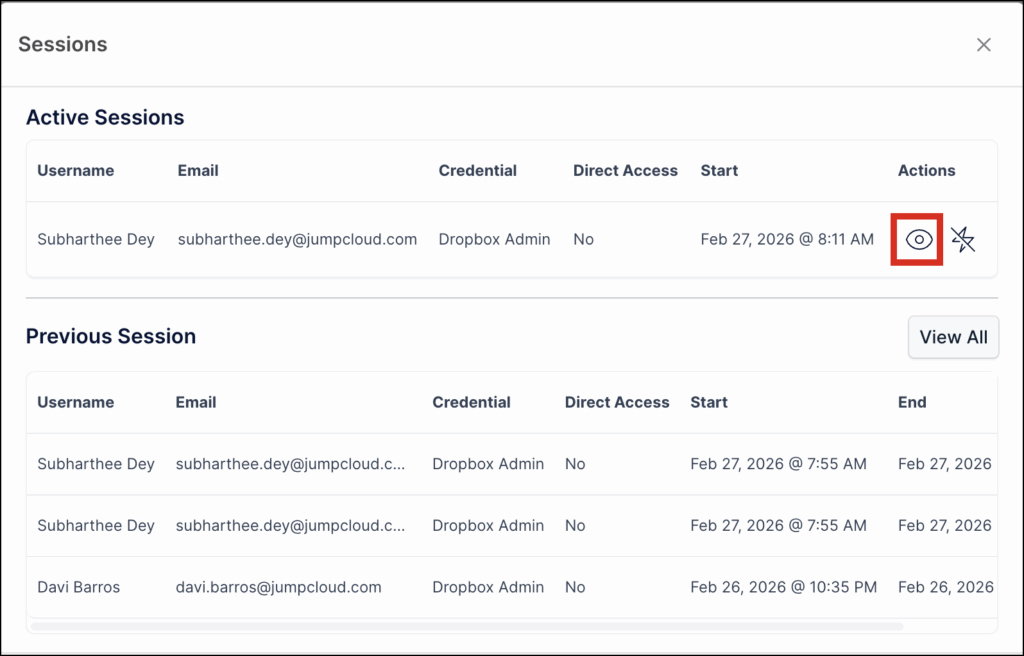
- Select a desired website and select Sessions present under Actions. The Sessions window contains a list of all your active and past sessions.
- In the Active Sessions section, click Watch under the Actions column.
note
You can also access these options directly from the list of active connections within the Vault Connector interface. The ability to disconnect a user is available both directly from the connections list and from within the live session video screen
Disconnecting an Active Session
- Log in to the Vault platform.
- Navigate to the dashboard of a specific functionality you wish to monitor, such as Websites. A list of all available websites is displayed.
- In this list, active sessions are designated with an In-use status. You can use the filter icon to display these sessions.
- Select a desired website and select Sessions present under Actions. The Sessions window contains a list of all your active and past sessions.
- In the Active Sessions section, click Disconnect under the Actions column.
Was this information helpful?