Users: Understand AI & SaaS Management
JumpCloud® AI & SaaS Management helps secure access to the web based SaaS applications you use for work. When SaaS Management is enabled by your admin, the JumpCloud Go™ browser extension works behind the scenes to ensure the sites you visit are approved by your company. This helps your IT admin secure and streamline access to the apps you use.
What are AI and SaaS Apps?
SaaS apps are standard software applications used for work, such as Salesforce or Slack. Generative AI apps are tools that create new content, such as ChatGPT or Gemini. JumpCloud AI & SaaS Management monitors these applications whether you access them in your web browser or install them directly on your device.
Monitor Usage of Apps
JumpCloud AI & SaaS Management provides visibility and oversight into the applications used for work across your org. To ensure your work environment remains compliant with your org's policies, JumpCloud tracks application activity in the following ways:
- In your browser: The JumpCloud Go browser extension ensures the sites visited are approved by your org while an active work session is established.
- Private Preview - On your device: The JumpCloud Agent identifies applications installed and used directly on your computer to ensure they meet the security standards of your org.
- Through SSO and Connectors: JumpCloud integrates with existing SSO apps and connectors to streamline access and protect company data within the applications used across your org.
Unapproved App Behavior
AI & SaaS Management helps keep you and your company safe by ensuring you’re using the correct apps for work. When you access a site that’s not approved by your admin, you might notice several things:
- You may be warned that the app isn’t authorized and be directed to use another app. This warning appears as a yellow banner at the top of your browser.

- You may be blocked from using the app entirely. This appears as a blocking page in your browser. Your admin may also direct you to another app that is approved for use.
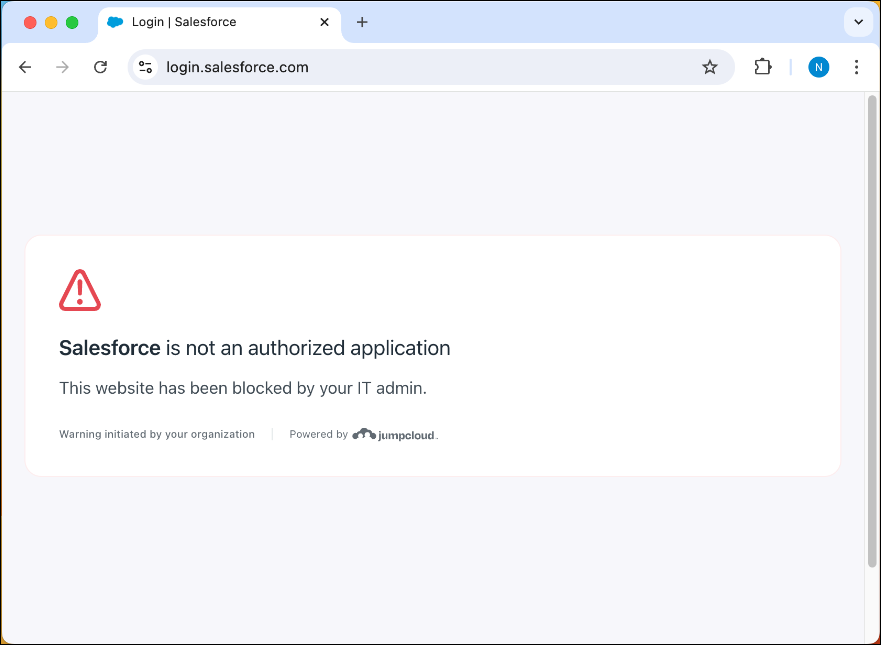
If you’re warned or blocked while accessing an app that you need, contact your admin to report it.
Privacy
JumpCloud only monitors activity in your browser related to AI and SaaS apps. Further, your admin can configure AI & SaaS Management to limit monitoring to specific email addresses, such as your organizational email. This ensures that AI and SaaS apps accessed with a personal email aren’t reported to JumpCloud.
What AI & SaaS Management Does
- Ensures you’re using approved apps for work by tracking access to SaaS apps.
- Helps your admin secure company information and prevent unauthorized access.
- Reports on your daily SaaS app usage.
What AI & SaaS Management Can’t Do
- Read or store your passwords.
- Report any personal information other than your email address or username used for authentication.
- Track apps or websites that aren’t categorized as SaaS apps, for example news, entertainment, and social media sites.
Was this information helpful?