Configure AI Gateway Integrations
To securely adopt AI workflows, use the JumpCloud AI Gateway to connect your enterprise applications as trusted Model Context Protocol (MCP) servers. By pointing their AI clients to a single JumpCloud endpoint, users can access and authorize all of their MCP resources in one place without complicated configurations. This allows you to provide, manage, and audit secure access to the MCP servers you control.
Use this article to learn how to add MCP servers in JumpCloud and to find supported integrations. Jump to Connecting Supported MCP Servers to find specific setup instructions for your enterprise applications.
We recommend reviewing Get Started: AI Gateway to familiarize yourself with core concepts like Agentic AI, Model Context Protocol (MCP) servers, and the JumpCloud authentication flow before configuring these integrations.
Prerequisites:
- You must associate every MCP server with a Single Sign-On (SSO) application or bookmark so you can scope access using groups. If the application is missing, add it under SSOApplications first, then return to AIGateway. See Get Started: SSO Application and Connect Apps Using Bookmarks to learn more.
Considerations:
- An application appearing in the JumpCloud SSO list does not guarantee it natively supports MCP. Verify support with the vendor before configuration.
Adding MCP Servers
Register your enterprise applications as MCP servers in the Admin Portal. Because each application has specific prerequisite configurations, review the application’s setup guide before adding the server to JumpCloud.
To create an MCP server, an SSO application or bookmark is required. Each application listed under Access > SSO Applications also has an AI Gateway tab that lists MCP servers for that app.
Associating each MCP server with an application lets you control access with that application’s User Groups. Only users in those groups see that application’s MCP server when they authorize through the AI Gateway. Without that association, you cannot scope MCP servers by user group.
To add an MCP server from the AI Gateway:
- Log in to the JumpCloud Admin Portal.
If your data is stored outside of the US, check which login URL you should be using depending on your region. If your organization uses LDAP, RADIUS, or requires firewall allow list configuration, the Fully Qualified Domain Names (FQDNs) will also be region specific. See JumpCloud Data Centers for the URLs, FQDNs, and IP addresses.
-
Go to Access > AI Gateway.
-
Select the Servers tab.
-
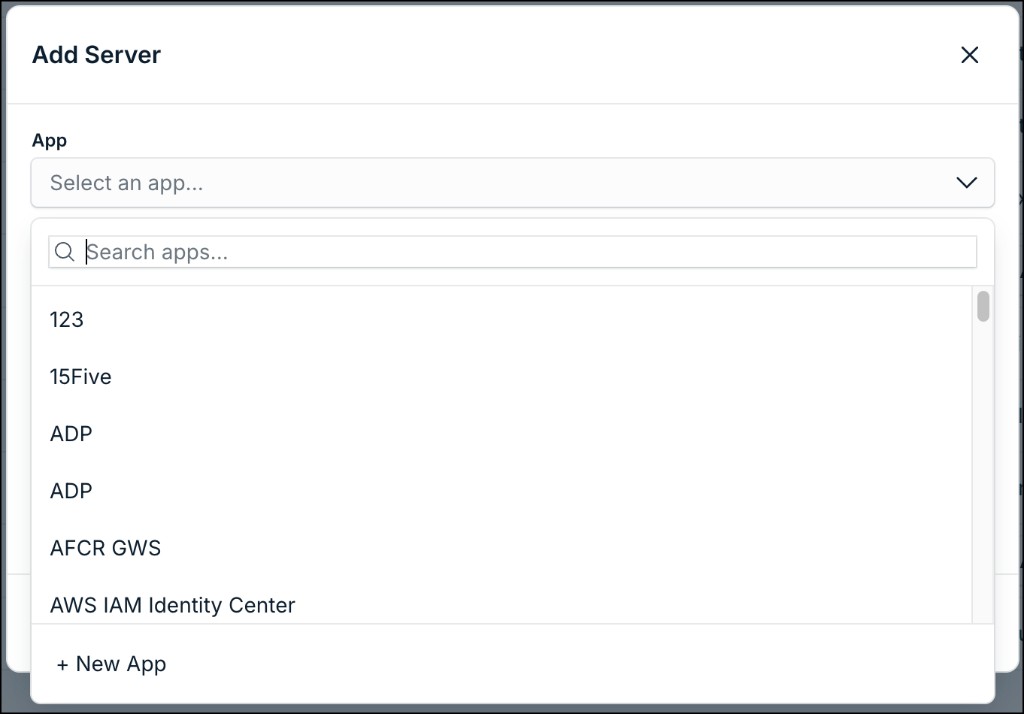
Click + Add Server. The Add Server modal appears.
-
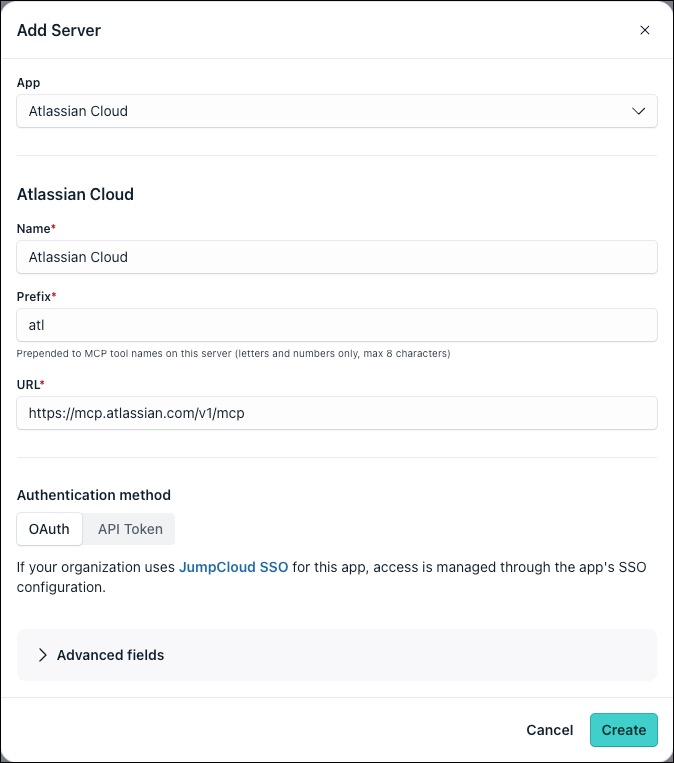
Under App, select an existing SSO application (or bookmark) in your org to control access to this server via its groups.
- If the application isn’t listed, jump to Creating an Application from the AI Gateway.
-
Enter a Name, Prefix, and URL, and choose the MCP authentication method per the application’s setup guide.
When configuring an MCP server with OAuth authentication, if the server requires the Client ID to be specified, use the service managed client\_id, not the corresponding JumpCloud SSO app’s client\_id. Some enterprise applications require specific configurations to generate this.
Creating an Application from the AI Gateway
If the SSO application doesn’t exist yet, create it before you finish MCP server setup.
- In Add Server, open the App dropdown, then click + New App. You’re redirected to the Add New SSO Application wizard.
- Select one of the following options depending on your requirements:
- See SSO using Pre-Built Application Connectors to configure a prebuilt SSO application.
- See SSO using Custom SAML Application Connectors to create a custom SSO application.
- See Connect Apps Using Bookmarks to create a bookmark for an application that doesn’t require SSO. This lets you scope access with User Groups without configuring SSO.
You can hide applications from the User Portal if you're not using them for SSO. See Hiding Applications in the User Portal to learn more.
- Assign the appropriate user groups to the application to control which users see this MCP server in the AI Gateway. See Authorize Users to an SSO Application to learn more.
- After completing the application setup, go to the AI Gateway tab of the application and click + Add Server. You’re redirected to the AI Gateway with the App field prefilled.
- Jump to Adding MCP Servers for steps to complete MCP server setup for this application.
Assigning an Application to an Existing MCP Server
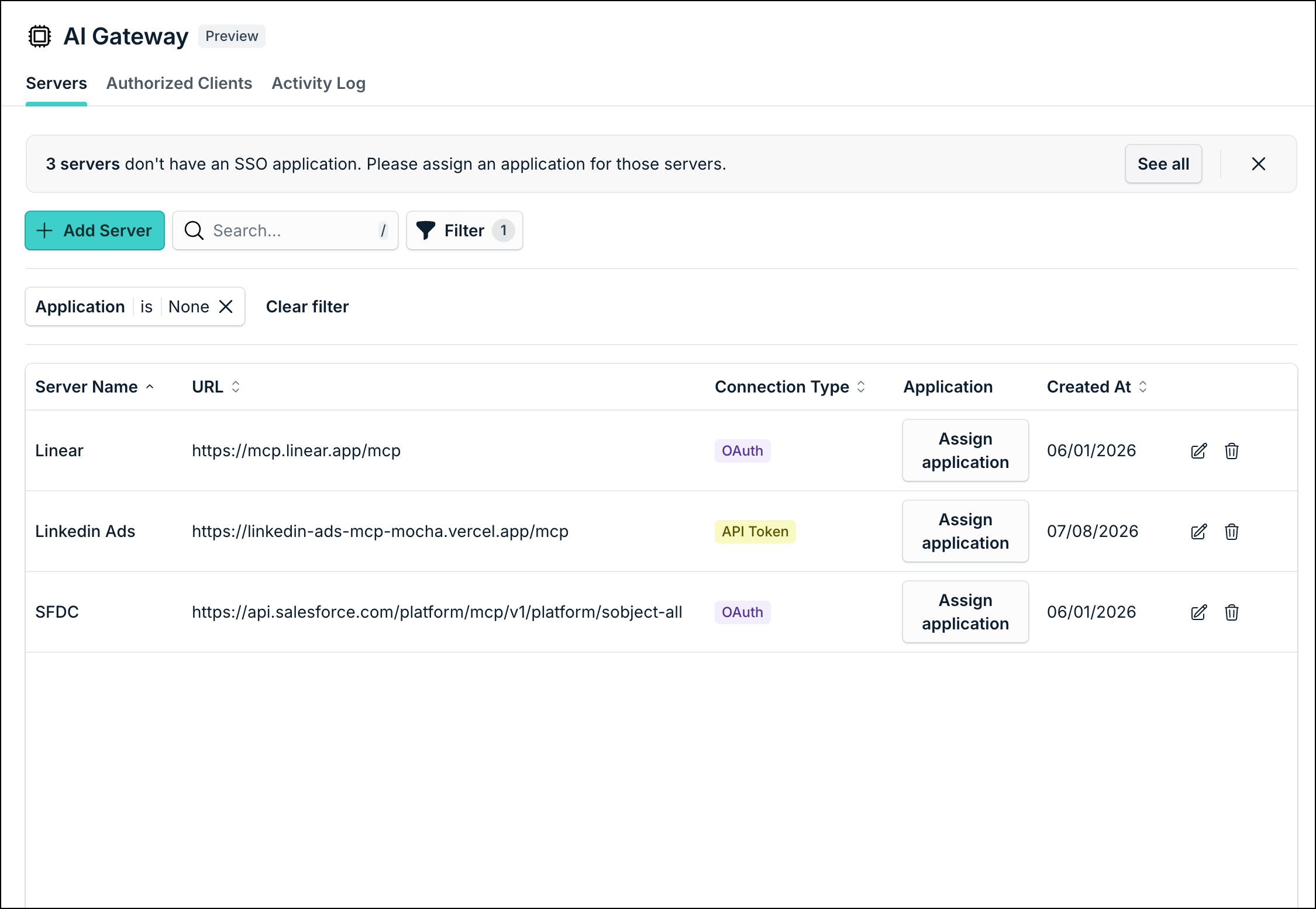
If you created MCP servers before application association was required (for example using Custom App), you're prompted to associate these servers with an application. Until you assign one, access is not scoped by the application's User Groups, and all users can see those MCP servers listed in the AI Gateway.
To assign an application to an MCP server:
- Go to Access > AI Gateway.
- Select the Servers tab. If servers need an application, a banner appears.
- Click See all on the banner. Alternatively, you can filter the server list to show only servers without application associations. Click Filter on the server list, then select None under Application.
- For each server, under the Application column, click Assign application.
- Select the SSO application or bookmark to associate with this server to control User Group access. If the application does not exist yet, create it first in Access > SSO Applications, then return here to assign it.
- Repeat these steps until the banner is cleared.
- Verify the user group associations on that application to ensure the correct users can authorize the MCP server.
Connecting Supported MCP Servers
Configure these enterprise applications in the Admin Portal as trusted MCP servers. Because each application has unique requirements, configuration steps vary. Use the directory below to find the specific setup guide for your integration. Once configured, your users can authorize each individual MCP server through the AI Gateway.
Chat and Communications
Cloud Computing
- Configure Cloudflare for the AI Gateway
- Configure Netlify for the AI Gateway
- Configure Vercel for the AI Gateway
Collaboration
CRM
- Configure Attio for the AI Gateway
- Configure HubSpot for the AI Gateway
- Configure Zoho for the AI Gateway
Databases
- Configure BigQuery for the AI Gateway
- Configure Databricks for the AI Gateway
- Configure Supabase for the AI Gateway
Development Tools
- Configure Atlassian Rovo for the AI Gateway
- Configure GitHub for the AI Gateway
- Configure GitLab for the AI Gateway
- Configure Postman for the AI Gateway
Identity and Access
Monitoring
- Configure Datadog for the AI Gateway
- Configure Mixpanel for the AI Gateway
- Configure PagerDuty for the AI Gateway
- Configure Sentry for the AI Gateway
Payments
Productivity
- Configure Airtable for the AI Gateway
- Configure Calendly for the AI Gateway
- Configure Google Workspace Apps for the AI Gateway
- Configure Granola for the AI Gateway
- Configure Notion for the AI Gateway
- Configure Zapier for the AI Gateway
Project Management
- Configure Asana for the AI Gateway
- Configure Linear for the AI Gateway
- Configure monday.com for the AI Gateway
Sales
Security
Connecting AI Clients
After you configure MCP servers, users must connect their specific AI clients to the AI Gateway to access them.
See Connect AI Clients to the AI Gateway to learn more.
Was this information helpful?