SIEM Integration in Directory Insights
SIEM Integration lets IT Admins pull JumpCloud identity events into an external Security Information and Event Management (SIEM) platform and export historical Directory Insights events for compliance and investigation. In the JumpCloud Admin Portal, Directory Insights Premium Admins use the dedicated Historical Data Export page for asynchronous historical exports. For continuous ingestion, Admins configure their SIEM or collector to poll the Events API with an existing JumpCloud API key.
This article covers the following topics:
- Events API pull (raw and Open Cybersecurity Schema Framework (OCSF) responses)
- The Historical data Export experience on Admin Portal
- The event catalog
JumpCloud does not replace a SIEM. Alerting, correlation rules, threat intelligence, and long-term SIEM operations remain in your downstream platform. Existing Directory Insights search and export behavior is unchanged, including its current 90-day and 10,000-result constraints.
Prerequisites:
- Your organization must be enabled for Directory Insights Premium. Orgs without Directory Insights Premium do not see the Historical data download page and cannot use SIEM Events API pull or historical data Export APIs.
- An admin account with access to the JumpCloud Admin Portal and permission to use Directory Insights / Historical data download.
- For Events API pull: An existing JumpCloud API key for unattended access.
Considerations:
- API pull is the available ingestion model.
- Historical data Export is a separate surface from Directory Insights search/export. Directory Insights search/export limits (90 days / 10,000 results) do not change.
- Each historical data Export job covers up to seven days by default. You can place that window anywhere within the retention lookback.
- The per-job maximum date range is organization-configurable (
max_export_window_days; default seven days). The date picker enforces the cap for your org. - You can choose a duration of up to 7 days within the retention window. You can use multiple jobs for longer ranges. All the data from September 7, 2026 will be retained and can be downloaded for 13 months.
- Export jobs run asynchronously. When a job is ready, JumpCloud sends an email notification with download access (presigned download link or links).
- Authentication for v1 uses your existing customer API key. Per-integration credentials and scoped machine-to-machine tokens are not part of v1.
Understanding SIEM Integration
What SIEM Integration Provides
SIEM Integration gives Directory Insights Premium customers a supported, SIEM-agnostic path to use JumpCloud identity events outside the Admin Portal:
- Pull events through the Events API for ongoing SIEM ingestion.
- Map event fields using a public OCSF data catalog (event definitions, JumpCloud-to-OCSF mappings, and sample payloads).
- Create asynchronous historical exports from the historical data Export page for focused seven-day windows within the retention lookback.
Key Capabilities
- Events API pull — Your SIEM or collector polls JumpCloud on a schedule using an existing API key. Raw events and OCSF-normalized responses are available where supported.
- OCSF data catalog — Canonical field mapping and examples for in-scope event types, hosted on the JumpCloud support site at Public Preview / GA.
- Historical data Export — Dedicated Admin Portal page to select event types, date range, schema (OCSF or RAW), format (JSON or CSV), and an email notification channel; review job history on the same page.
- Historical backfill — Export a focused window of up to seven days (default) from anywhere within the retention lookback instead of one continuous multi-month job.
- Deduplication support — Events include a unique, immutable
event_idso SIEMs can deduplicate at-least-once API results.
Accessing Historical Data Export
-
Log in to the JumpCloud Admin Portal.
-
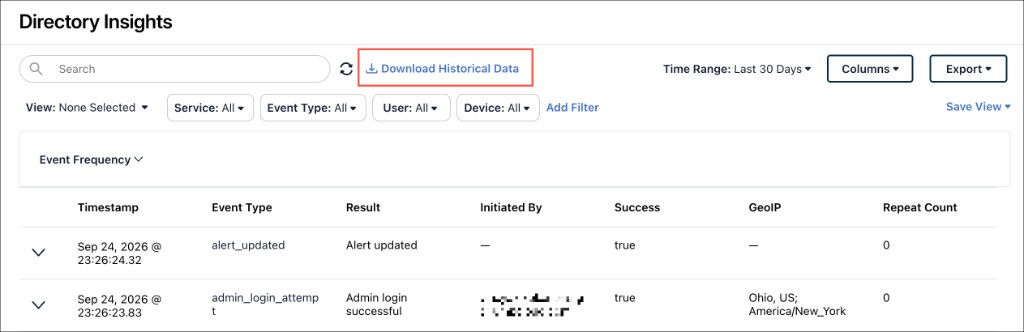
Go to Insights > Directory Insights.
-
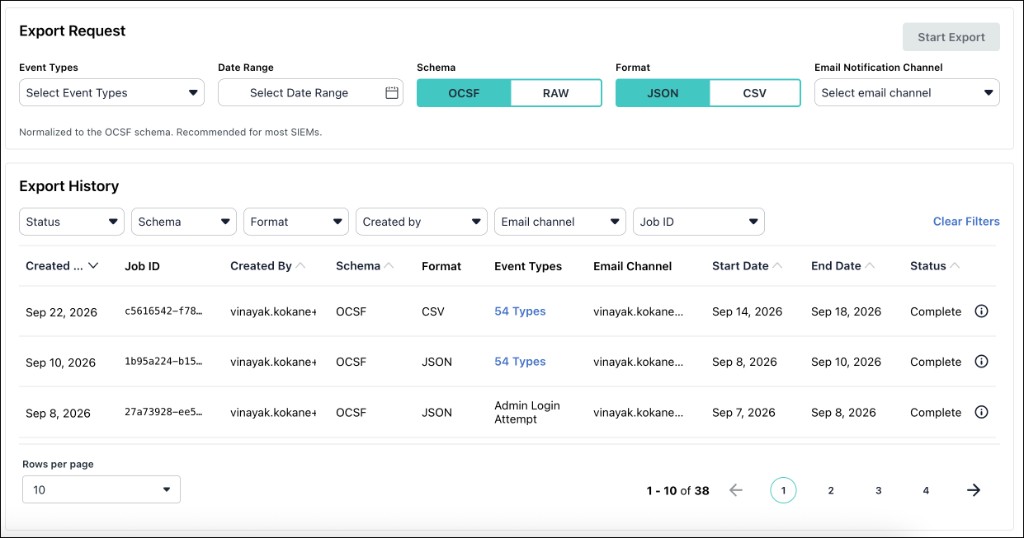
Next to the searchbox, click Download Historical data. The Historical DI data page is displayed.
-
Under Event Types, click Select event types. Search or browse by service, then select one or more event types.
-
(Optional) Select the Select all checkbox to select all visible types.
-
Under Date Range, select an appropriate date range. You can select a date range of maximum 7 days at a time in the retention window.
-
Under Schema, select OCSF or RAW.
-
Under Format, select JSON or CSV.
-
Under Email Notification Channel, select the required channel.
-
Click Start Export.
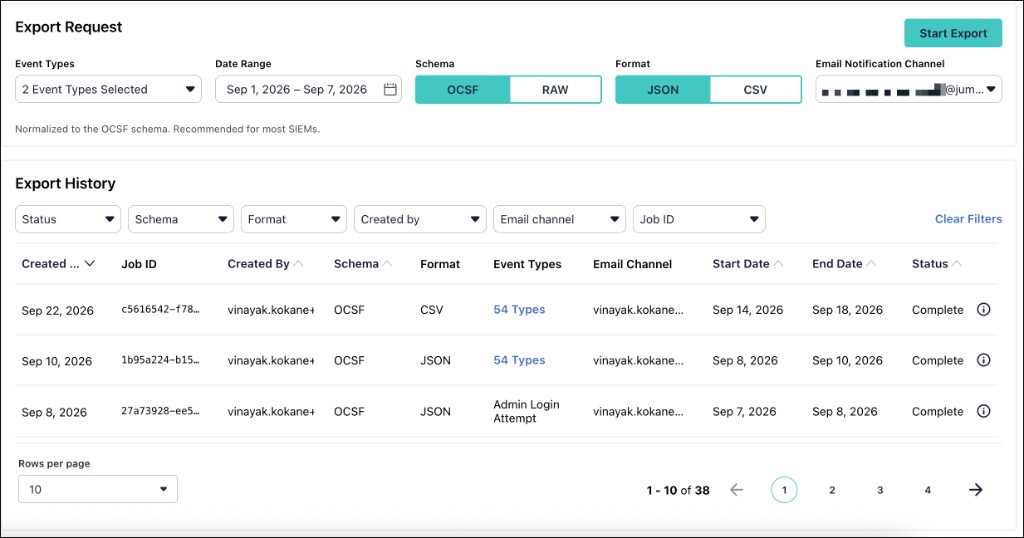
Schema (raw or OCSF), event type, date range, and notification email are required to start an export job. The date picker maximum reflects max_export_window_days for your organization (seven days by default).
Event Types
Event types are grouped by Directory Insights service. In the Export Request section, the available service groups are:
- Directory
- Password Manager
- Reports
- SSO
- Systems
You can search the event types to filter the list. Click the Select all checkbox to select all available event types.
Schema and Format Options
| Control | Options | Description |
|---|---|---|
| Schema | OCSF | Normalized to the OCSF schema. Recommended for most SIEMs. |
| Schema | RAW | Raw event payloads as stored in JumpCloud. |
| Format | JSON | NDJSON — one event per line. Best for programmatic processing. |
| Format | CSV | Flat CSV with column headers. Opens directly in Excel or Google Sheets. |
Email Notification Channel
Select the channel that should receive the notification email with download access when the export job finishes.
Working with Export History
The Export History section lists export jobs for your organization.
Filtering Export History
Use the toolbar filters:
| Filter | Options |
|---|---|
| Status | All statuses, Open, Closed, Error |
| Schema | All schemas, OCSF, RAW |
| Format | All formats, JSON, CSV |
| Created by | All users, or a specific admin who created a job |
| Email channel | All channels, or a specific notification channel |
| Job ID | Select a single or multiple job IDs |
| Search | Free-text search. Placeholder: Date, user, event type… |
Click Clear filters to reset all filters.
Export History Columns
| Column | Description |
|---|---|
| Created Date | When the export job was created. Sortable. |
| Job ID | Job ID number |
| Created by | Admin who started the job. Sortable. |
| Schema | OCSF or RAW. Sortable. |
| Format | JSON or CSV. Sortable. |
| Event Types | Event types included in the job. Sortable. |
| Email Channel | Notification channel selected for the job. Sortable. |
| Start Date | Start of the export job date window. Sortable. |
| End Date | End of the export job date window. Sortable. |
| Status | Job status: Queued, Running, Complete, Failed |
Existing Directory Insights search/export is separate from this history table and keeps its own limits and behavior.
Using the Events API for SIEM Ingestion
Use the Events API when you want continuous or scheduled SIEM ingestion rather than a one-time Bulk Export file.
- Obtain or use an existing JumpCloud API key for unattended access.
- Confirm your organization is enabled for Directory Insights Premium. The API rejects non–Directory Insights Premium orgs for SIEM pull.
- Configure your SIEM or collector to poll the Events API on a schedule.
- Choose raw events or OCSF-normalized responses where supported.
- Paginate using
next_cursoruntil absent. Use immutableevent_idfor deduplication (at-least-once delivery). - Use replay to retrieve events from any point in the supported retention window.
There is no SIEM setup wizard in v1. Use the support-site data catalog and your SIEM’s API/collector documentation to map the parsers.
Events API Behaviors (v1)
- Authentication: Existing customer API key.
- Retention / replay: Identity events are retained for up to 13 months; API pull supports retrieval from any point within that window.
- Delivery semantics: At-least-once; never silently omit events from the response window. Deduplicate on
event_id. - Throughput expectations (platform constraints): Designed to sustain high enterprise event volumes with batched responses and per-org rate limits.
Using the Event Catalog
The public event catalog can be found here.
For each in-scope event type, the catalog includes:
- Event name and description
- OCSF class and JumpCloud-to-OCSF field mapping
- Field definitions
Was this information helpful?