Release Notes 2026
This page provides a comprehensive list of everything we’ve built so far in 2026.
Interested in previous release notes? See last year's feature releases: Release Notes 2025. Alternately, see our List of Bug Fix Reports or List of JumpCloud Agent Release Notes, updated weekly.
October
October 14th, 2026
New: Agent Uninstall Protection
Feature: Device Management
Prevent unauthorized removal of the JumpCloud agent so your devices stay managed. Agent Uninstall Protection is on by default for all devices running JumpCloud agent v2.179.2 or later. Uninstalling the agent with standard methods on macOS, Windows, and Linux now requires a per-device maintenance token.
- Directory Insights Events: Directory Insights logs failed uninstall attempts, successful uninstalls, and exemption policy changes, identifying the device and the user.
- Maintenance Tokens: Admins with Manager role permissions or higher can view a device's maintenance token from the device details. Tokens work without network connectivity and automatically rotate 60 minutes after they're viewed if the agent remains installed.
- Exemption Policies: Use the Disable Agent Uninstall Protection policy for macOS, Windows, or Linux to remove the token requirement from specific devices during agent maintenance, troubleshooting, or imaging.
- Protection Status: View each device's protection status (On, Off, or Failed) from the device details or the Devices list.
Deleting an active device from the Admin Portal or the JumpCloud API still removes the agent without a maintenance token.
Available in the Admin Portal: Go to Device Management > Devices > Settings > Agent Uninstall Protection.
Learn More
- Get Started: Agent Uninstall Protection
- Create a Device Level macOS Disable Agent Uninstall Protection Policy
- Create a Device Level Windows Disable Agent Uninstall Protection Policy
- Create a Device Level Linux Disable Agent Uninstall Protection Policy
- Install or Uninstall the JumpCloud Agent
October 13th, 2026
Enhancement: AI Agent Management APIs
Feature: Agent Identities
JumpCloud now provides REST APIs for managing AI Agents and Agent Groups, enabling administrators and developers to automate agent identity management and integrate it into existing workflows.
With these APIs, you can:
- Manage AI Agents: Register, retrieve, update, suspend, activate, and delete agent identities programmatically.
- Manage Agent Credentials: Create, retrieve, update, and delete credentials associated with AI Agents.
- Manage Agent Groups: Create, update, and delete groups to organize agents and simplify access management.
- Manage Group Memberships and Application Assignments: Add or remove agents from groups, manage group application assignments, and retrieve applications assigned to individual agents.
For more information, see the API documentation:
New: Custom Messaging
Feature: User Portal
Create login dialogs and announcement banners for users in the User Portal. Choose who sees each message by user group, set the severity or message type so the right alerts stand out, and publish when you’re ready.
Available in the Admin Portal: Go to Settings > User Portal > Custom Messaging.
See Get Started: Custom Messaging to learn more.
September
September 30th, 2026
Enhancement: Automatic registration for JumpCloud Go
Feature: JumpCloud Go
JumpCloud Go™ automatic device registration is now available. Managed Windows, macOS, and Linux devices bound to a user automatically register for JumpCloud Go after user sign-in, removing the need for manual browser registration prompts. Admins can control device eligibility using device exclusion groups and fall back to manual registration if automatic registration fails.
See Use JumpCloud Go™ to learn more.
New: Custom Banned Password List
Feature: Password Policies JumpCloud now supports a Custom Banned Password List, allowing organization administrators to block specific words, terms, and phrases from being used in user passwords.
See Custom Banned Password List to learn more.
New: User Portal Folders
Feature: User Portal
Let end users organize assigned applications into personal folders on the All Applications page. Users can create folders and add applications from the Folders tab. They can also add an application to a folder from its card on All Applications.
Folders are private to each user. Other users and IT admins cannot see or manage another user’s folders, and applications stay available on All Applications.
Available in the User Portal: Go to All Applications > Folders.
Learn More
New: App Settings Privacy Policies for Apple MDM
Feature: Policy Management
JumpCloud now supports App Settings Privacy policies for Apple MDM. Recommend privacy permission defaults for one or more applications so that when a matching app launches, users see a consent prompt with your organization justification and can allow those defaults or continue with the standard prompts.
New Apple Policies
- User Level macOS App Settings Privacy — Recommend privacy permission defaults for matching applications on supervised Mac computers running macOS 27 or later. Assign the policy to users or user groups. Supported permissions include Accessibility, Bluetooth, Camera, Dictation, Local network, Location, and Microphone.
- Device Level iOS and iPadOS App Settings Privacy — Recommend privacy permission defaults for matching applications on supervised iPhone and iPad devices running iOS 27 or later or iPadOS 27 or later. Assign the policy to devices or device groups. Supported permissions include Bluetooth, Camera, Dictation, Local Network, Location, Location Accuracy, and Microphone.
See Create a User Level macOS App Settings Privacy Policy and Create a Device Level iOS and iPadOS App Settings Privacy Policy to learn more.
New: User Portal Asset Visibility and Acknowledgement
Feature: Asset Management
Give end users visibility into assets assigned to them in the User Portal, and let admins request acknowledgement from the asset owner when an asset is assigned or reassigned. Each request and response is recorded in Asset History, and email notifications keep admins and users informed.
- Enable the feature: Go to Device Management > Asset Management > Settings and Fields > General Settings. In the User Portal section, enable Asset Visibility and Asset Acknowledgement.
Learn More
New: JumpCloud MCP Server for Users
Feature: JumpCloud MCP Server for Users
The Model Context Protocol (MCP) Server for Users enables JumpCloud users to connect their preferred AI clients directly to supported User Portal capabilities using OAuth sessions. This allows users to perform routine tasks without leaving their AI tools.
- Admin Controls: Go to Settings > JumpCloud AI and toggle on MCP Server for Users to enable the feature. You can review active client sessions and revoke them manually, or configure an automatic expiration window.
- User Visibility: Users can view and revoke their own active sessions by going to Security > JumpCloud MCP in the User Portal.
See Get Started: JumpCloud MCP Server for Users to learn more.
New: Custom Risk Policies
Feature: Access Risk
Tailor risk detection for Admin Portal, User Portal, device, and SSO application logins. Create policies for specific user groups or SSO applications, choose which risk factors to monitor, and adjust their score contributions. Set policy precedence when multiple policies apply; the Default Policy provides coverage for logins outside your custom policies.
See Configure Custom Risk Policies to learn more.
September 29th, 2026
New: Android Policy Expansion
Feature: Policy Management
JumpCloud has expanded Android policy management with new policies for display, autofill, work account authentication, and default app handling, plus enhanced Bluetooth controls. These policies help you enforce security and productivity settings on managed Android devices enrolled in JumpCloud EMM.
New Android Policies
- Display Settings — Control screen brightness and screen timeout. Choose whether end users configure display settings themselves, or enforce fixed brightness and timeout values on supported devices.
- Autofill — Control system autofill for forms in apps and websites. Allow users to choose an autofill service, or disable autofill and lock the setting on Android 8.0 and later.
- Work Account — Configure whether device management requires a Google authenticated enterprise account, and optionally require a specific Google Account email during setup.
- Default App and Intent Handling — Set an approved managed app as the default handler for selected Android activities, such as opening web links or dialing phone numbers, so Android opens the configured app instead of the app chooser.
Enhanced Android Policy
- Bluetooth Restrictions — In addition to disabling Bluetooth, blocking Bluetooth configuration, and preventing work contact sharing, you can now control outbound Bluetooth file sharing. On company-owned devices with a work profile, you can also restrict Bluetooth sharing on the personal profile through the Work & Personal Usage policy.
See Configure Settings for Android Policies to learn more.
September 25th, 2026
Enhancement: Dormant Application Access Detection
Feature: Access Risk
Dormant Application Access now detects when a user signs back into an SSO application after a period of inactivity that meets your configured threshold, instead of flagging first-time access. You can set the dormant application threshold in Access Risk > Configuration. First-time access to an application does not trigger this factor, which reduces noise from newly provisioned apps.
See Configure Access Risk Detection to learn more.
September 24th, 2026
New: Patch Management Dashboards
Feature: Patch Management
JumpCloud Patch Management now includes a unified dashboard experience plus dedicated Windows and Apple views in the Admin Portal. From Device Management > Patch Management, you can monitor fleet-wide update posture, drill into KB compliance on Windows devices, and track Apple OS rollout progress against active update policies.
Unified Patch Dashboard
- Cross-platform overview: Review patch compliance for Windows and Apple devices together on the Overview tab.
- Fleet update summary: See pending updates by severity, devices with pending updates, devices with update failures, and the age of missing updates.
- Platform switcher: Move between Overview, Apple, and Windows tabs from one page.
Windows Overview and Patch List
- Patch and device insights: View patch coverage, missing patches by severity and age, device compliance, and critical patch exposure in one dashboard.
- Global severity filter: Focus the dashboard and KB list on the severities that matter most.
- KB-centric control: Search and filter KBs, review CVE details, approve awaiting updates, retry failed installations, and export the KB list as CSV or JSON.
- Bulk remediation: Install missing critical patches or non-compliant device updates immediately or on the policy schedule.
Apple Compliance Dashboard
- Rollout visibility: Track OS deployment progress for macOS, iOS, and iPadOS devices against effective update policy targets.
- Compliance and coverage: Review missing updates by severity, device compliance, update policy coverage, and the age of missing updates.
- Apple OS Version Listing: Filter by platform, release date, severity, and device status; drill into targeted, installed, pending, in-progress, or failed devices; and view associated CVE details.
Learn More
September 21st, 2026
New: Device Patch Report (Windows)
Feature: JumpCloud Reports
The Device Patch Report (Windows) gives IT admins per-device visibility into Windows Knowledge Base (KB) patch installation status in the JumpCloud Admin Portal. The report is auto-populated from existing patch data.
- Per-device KB status: View Installed, Pending, and Failed status for each KB on each managed Windows device.
- Preview and export: Preview up to 500 rows in the Admin Portal, or download the complete organization result set as CSV.
- No manual setup: Report data syncs from existing Windows patch inventory.
See Device Patch Report to learn more.
September 18th, 2026
Enhancement: Update Existing Application Versions in the Private Repository
Feature: Software Management
You can now update the binary of an existing custom application in JumpCloud's Private Repository instead of creating a new application for every release. Upload the new file from Update Version on the application's Details tab, and JumpCloud deploys it to devices already associated with the application.
- Consistent update process: Use the same Upload File flow for new applications and version updates, on both Windows and Apple applications.
- Fewer manual steps: Skip re-creating the application, reassigning devices, and rebinding device groups for each new version.
- Windows EXE updates: Enter an install success exit code before you deploy an EXE update, so JumpCloud can confirm the installation succeeded.
See Manage Software with the JumpCloud Private Repository to learn more.
September 16th, 2026
New: Knowledge Base Uploads for AI Assistant
Feature: AI Assistant
You can now upload internal documentation directly into a private, org-scoped knowledge base for AI Assistant. The assistant references your uploaded content to answer questions about organization-specific processes, runbooks, SOPs, and policies. Supported formats include PDF, TXT, DOCX, and MD (10 MB maximum per file, 25 files maximum per org). When a response uses your uploaded documentation, AI Assistant clearly attributes the source document in the chat.
See Get Started: JumpCloud AI Admin Assistant to learn more.
Enhancement: AI Gateway Dashboard
Feature: AI Gateway
The AI Gateway now includes a Dashboard tab with org-wide visibility into MCP server usage, tool call volume, and error rates. Summary cards, trend charts, and rankings for top servers, clients, and users help you monitor adoption and investigate failures. Click an MCP server to drill into server-specific metrics.
See Get Started: AI Gateway to learn more.
Enhancement: Agent Client Authentication Type
Feature: Agent Identities
You can now configure the client authentication type for an agent's OAuth credentials. On the agent's Authentication tab, choose how the agent platform sends the client ID and secret when requesting a token from JumpCloud:
- Client secret basic: Sends credentials in the authorization header. This is the default option.
- Client secret post: Sends credentials in the request body.
This ensures you can match the exact authentication method required by your external platform's OAuth configuration, such as Amazon Bedrock AgentCore.
See Get Started: Agents to learn more.
September 9th, 2026
New: Password Vault in JumpCloud Protect app
Feature: Password Vault
JumpCloud Protect now includes Password Vault, so users can access work credentials on mobile from the same app they already use for Push and TOTP MFA. After the user authenticates, Password Vault credentials are retrieved from JumpCloud. JumpCloud Protect TOTP codes continue to be stored locally on the device. With JumpCloud Protect, users can:
- View secrets for credentials stored in Password Vault (based on their sharing permissions).
- Autofill credentials into mobile apps.
- Launch websites and autofill credentials in the mobile browser.
Password Vault items that are shared with the user, including items in shared folders, appear in the Password Vault tab of JumpCloud Protect. See Get Started: Password Vault to learn more.
New: Password Vault in Admin Portal
Feature: Password Vault
JumpCloud Password Vault provides a unified, cloud-first solution to secure, and manage shared company credentials. With a scalable architecture, it eliminates identity and tool sprawl and reduces the risk of credential-based attacks across the organization.
Through the Admin Portal, administrators can:
- Enable Password Vault and assign vault access to other users and user groups.
- Enroll user groups, manage permissions for shared resources, and revoke access.
- Create, manage, and share organizational websites and credentials; personal credentials cannot be accessed by the Admin.
- Group websites and credentials in personal and shared folders with Connect, View, Edit, and Manage access permissions.
- Monitor password health from a centralized Overview dashboard.
- View Password Vault audit logs in Directory Insights.
See Password Vault: Admins to learn more.
New: Password Vault in User Portal
Feature: Password Vault
Password Vault enables your team to securely manage and share credentials and website applications. After logging in the JumpCloud user portal, users can find the Password Vault in the left navigation.
Through the User Portal, users can:
- See an overview of password vault statistics for credentials and websites that are owned and shared by the user.
- Configure and manage non-SSO website applications, add multiple passwords to the same website, and launch and autofill using linked credentials.
- Manage and share organizational and personal passwords, keys, and other traditional credentials.
- Share credentials with Connect, View Secret, View Detail, and Manage permissions, and websites with Manage, View Detail, and Connect permissions.
- Group websites and credentials in personal and shared folders with Connect, View, Edit, and Manage access permissions.
- Bulk import credentials using a CSV or Excel file.
See Password Vault: Users to learn more.
New: Password Vault Browser Extension
Feature: Password Vault
Password Vault autofill capabilities are available using the JumpCloud Go extension. The JumpCloud Go browser extension is required to use Password Vault and provides password management without requiring device registration.
Through the JumpCloud Go Browser extension, users can:
- Launch and autofill Non-SSO Website application passwords and 2FA codes.
- View secret of credentials stored in Password Vault.
- Save passwords during Login/Update/Signup.
See Get Started: Password Vault to learn more.
September 7th, 2026
Enhancement: Organization Profile, Security, and Features tabs in Settings
Feature: Admin Portal
You'll see a refreshed look on the Organization Profile, Security, and Features tabs, with shorter labels and helper text that's easier to scan. Your settings on these tabs work exactly as before. They're just easier to find and update.
See Settings in the Admin Portal to learn more.
AUGUST
August
August 31st, 2026
New: Agent Identities (Public Preview)
Feature: Identity Management
Agent Identities introduces dedicated, non-human identity management to govern AI agents independently from employee user accounts. By establishing clear ownership, OAuth-based authentication, and group-based access control, you can precisely manage what resources an agent can access throughout its lifecycle. This ensures agent access can be continuously audited, safely updated, or fully revoked without impacting human credentials or interrupting operational workflows. With Agent Identities you can:
- Register an agent: Go to Identity Management > Agents and click + Add. Enter the agent name, owner, and company email on the Details tab.
- Configure authentication: On the agent’s Authentication tab, generate OAuth client credentials for the JumpCloud AI Gateway.
- Assign application access: Under Identity Management > Agent Groups, create an Agent Group, add agents to the group, and assign SSO applications. Agents inherit available applications from their group memberships.
- Connect to AI Gateway: On the agent Applications tab, use Manage connections to authorize MCP servers on behalf of the agent.
See Get Started: Agent Identities to learn more.
August 28th, 2026
New: MCP Connection Status and AI Gateway Connection
Feature: AI & SaaS Management
MCP servers discovered on your managed devices now appear in AI & SaaS Management with their AI Gateway status, so you manage MCP connections in the same place you manage the rest of your SaaS applications. From the Applications tab, you can see which apps have discovered MCP servers and connect them to AI Gateway without switching tools.
- See MCP status: Go to Access > AI & SaaS Management > Applications. The MCP Connection column shows Discovered, Connected, or Not Available for each app.
- Add a server in AI Gateway: Click the status to review the discovered MCP servers, then click Add MCP Server.
- Open MCP details from an app: Select an application and click View next to MCP Connection in the right-hand menu.
See Configure AI & SaaS Management to learn more.
August 26th, 2026
Enhancement: SCIM Group Management & Custom Activation Validation
Feature: SSO Applications (SCIM)
We are expanding SCIM (prebuilt and custom) group management and custom activation validation to give admins granular control over downstream group structures and pre-activation testing. With a dedicated mapping UI that mirrors existing user export patterns, admins can easily configure name overrides, map extended schemas, and preview object transformations side-by-side before going live. The update also enhances custom SCIM activation validation by replacing rigid hard-coded defaults with flexible test data selection—allowing admins to specify custom group names and choose representative test users and groups—while automatically logging all sync rules and activities to Directory Insights for complete compliance visibility.
Key Benefits
- Unlocks Complex Tech Stacks: Fits JumpCloud into any target application's unique group requirements, eliminating rigid platform constraints, custom scripts, and brittle workarounds.
- Eliminates Setup Failures & Saves Admin Time: Custom validation context and live previews catch mapping errors upfront and prevent false integration test failures, ensuring smooth, predictable setups.
- Streamlines Security & Compliance Audits: Centralized Directory Insights logging gives CISOs and security teams immediate, verifiable proof of group access changes.
See Improved SSO and SCIM Applications Experience and Integrate with Custom SCIM to learn more.
New: Access Risk Detection is now generally available
Feature: Access Risk
JumpCloud Access Risk Detection identifies suspicious authentication activity across the Admin Portal, User Portal, managed device logins, and SSO applications by learning normal login behavior and surfacing meaningful deviations.
Key capabilities include:
- Behavior-based risk detection: Detect unusual locations, impossible travel, unfamiliar devices or browsers, unusual applications and login times, dormant accounts, and abnormal login volumes.
- Automatic MFA-based resolution: Automatically resolve risky activity when the user successfully verifies the login with MFA.
- Intelligent suppression: Uses contextual heuristics to recognize expected activity—such as logins through corporate VPNs and security gateways—and avoid unnecessary detections.
- Customizable risk factors: Choose which risk factors to monitor and tune thresholds to match your organization’s environment.
- Email, Slack, and webhook notifications: Send severity-based notifications to the appropriate channels for faster response.
For configuration details, see Configure Access Risk Detection.
August 21st, 2026
Enhancement: Alert trigger conditions in insights rule
Feature: Alerts
You can now configure alerts based on event frequency, allowing for more precise monitoring and reduced alert noise. Instead of triggering an alert for every single event, you can define specific criteria for when an alert should fire.
See Create an Insights Rule to learn more.
Enhancement: MCP Server to Application Association
Feature: AI Gateway
AI Gateway MCP servers now require a direct association with a Single Sign-On (SSO) application or bookmark. This enables you to scope and manage MCP server access using groups. Previously, all MCP servers were available to all users without granular control. This update changes the following:
- Mandatory application association: When adding a new MCP server, you must select an existing SSO application or bookmark from the App dropdown.
- Streamlined app creation: We removed the custom app creation option from the Add MCP Server dialog. To create a new application during server setup, click + New App to open the standard Add New SSO Application wizard.
- Manage existing servers: If you previously created an MCP server without an associated application, you are prompted to assign one in the AI Gateway. Access is not scoped by User Groups until an application is assigned.
See Get Started: AI Gateway to learn more.
August 20th, 2026
Enhancement:Create admin access requests directly from the JumpCloud Menu Bar (Tray app)
Feature: Access Requests
Users can now create admin access requests directly from the JumpCloud Menu Bar (Mac) or the JumpCloud Windows Tray app, removing the need to access the full User Portal to initiate requests. See Users: Create Access Requests from the JumpCloud Menu Bar (Tray App) to learn more.
August 19th, 2026
New: MCP Discovery and Token Cost Tracking
Feature: AI & SaaS Management
Discover MCP servers connected to supported AI tools and track token usage and estimated cost from supported AI coding tools on managed devices. Both options use the same device agent discovery you already rely on for desktop apps.
To enable discovery, go to Access > AI & SaaS Management > Settings. Under Enhanced Discovery Options, select MCP Discovery and Token & Cost Tracking.
Supported tools on managed Windows and macOS devices:
- Cursor
- Claude Code
- OpenCode
- Codex
- VS Code
- Copilot CLI
Learn More
- See Get Started: AI & SaaS Management to learn more.
- See Configure AI & SaaS Management to learn more.
August 17, 2026
Enhancement:Device Trust for Third-Party Managed Mobile Devices
Feature: Device Trust
Admins can now enable device trust and configure conditional access policies for mobile devices managed by third-party MDMs (e.g., Jamf, Kandji, Google Workspace EMM). This capability allows orgs to enforce security policies and utilize JumpCloud Go on mobile devices without requiring JumpCloud to be the primary MDM provider. By registering these devices via a shared secret and configuring an SSO Extension profile in the existing MDM, admins can ensure that only trusted, registered mobile devices can access protected JumpCloud resources.
See Register Third-Party Managed Devices for Device Trust and Conditional Access Policies to learn more.
New:Custom Query Builder
Feature: Reports
Custom Query Builder provides full control over your organization's data reporting. Move beyond prebuilt templates and create tailored, actionable reports that surface the exact insights you need to manage your IT landscape effectively. Here are a few benefits of using the custom query builder:
- Tailored Reporting: Create custom reports by selecting primary/secondary entities, defining filter conditions, and choosing display columns.
- Flexible Creation: Build via Manual Report Builder for precise control or the AI Assistant for natural-language queries.
- Advanced Filtering: Use operators like Equals, Contains, and Is Null to isolate specific records.
- Report Management: Access, edit, export (CSV/JSON), and schedule reports directly from the Insights > Reports section.
See Custom Query Builder to learn more.
August 13, 2026
New:Self Service App Catalog for macOS and Windows
Feature: Software Management
The Self Service App Catalog is now GA, expanding the capabilities of Software Management to let users manage their apps directly on their devices. You can now make JumpCloud App Catalog applications available for self service on macOS and Windows. Approve and assign apps once in Software Management, then let users install, update, and uninstall those apps from the JumpCloud macOS Menu Bar App or Windows Tray App without waiting for admins to manage each install.
- Flexible Delivery: This release introduces the App Delivery Method setting to JumpCloud App Catalog apps. Choose Auto to use the existing behavior and force install an app, or Self Service to make it available in the user's catalog.
- New User Experience: Users open the catalog from the JumpCloud macOS Menu Bar App or the Windows Tray App to manage their assigned applications without admin intervention.
- Visibility Controls: By default, the catalog is visible to users even if no self service apps are assigned to them. To hide the catalog on specific devices, apply a device level macOS or Windows Self Service App Catalog policy.
Learn More
- Get Started: Self Service App Catalog
- Users: Manage Apps Using the Self Service App Catalog
- Use the JumpCloud App Catalog for Windows
- Use the JumpCloud App Catalog for macOS
- Create a Device Level Windows Self Service App Catalog Policy
- Create a Device Level macOS Self Service App Catalog Policy
During the initial general availability (GA) rollout, Self Service App Catalog availability is delayed for some organizations based on their current JumpCloud Windows Tray App/macOS Menu Bar App and Device Password Sync configurations. JumpCloud will contact impacted customers directly.
August 10th, 2026
New:HR-Driven Provisioning Advanced Custom Controls
Feature: HRIS Integrations
JumpCloud released an update to its Custom REST API Import Connector, giving IT admins granular control over HR-driven user provisioning and directory synchronization. The release introduces custom attribute mapping via a familiar UI, upgrades the transformation expression engine from GO to EXPR, adds flexible sync scheduling from hourly to weekly intervals, and supports custom API header pairs for vendor-specific security tokens.
Key Benefits
- Familiar & Low-Maintenance: Eliminates custom scripting by leveraging a modernized SCIM/GWS mapping experience.
- Flexible Sync Control: Eliminates directory drift with precise, configurable execution timing.
- Custom Field Fidelity: Seamlessly captures unique organization-specific data from HR providers.
- Broader API Compatibility: Integrates smoothly with non-standard HR vendor APIs via custom request headers.
See Improved HRIS Provisioning Experience and Integrate with HR Directories (Custom API Import) to learn more.
New:Monitor Mode for Conditional Access Policies
Feature: Conditional Access Policies
You can now safely test and validate your Conditional Access Policies (CAPs) before enforcing them using the new Monitor Mode.
Key Benefits:
- Audit-Only Evaluation: Deploy policies in an 'audit-only' state to observe behavior against real-world organizational traffic without impacting user access.
- Impact Analytics: Use the dedicated Impact Analytics dashboard to visualize which policies would be applied versus skipped, allowing you to assess overall impact before going live.
- Simulated Outcomes: View granular event details where actions are simulated—such as "Would be denied" or "Would be allowed with password"—enabling you to troubleshoot misconfigurations and refine scope, conditions, or exclusions prior to enforcement.
See Monitor Mode and Impact Analysis to learn more.
JULY
July
July 31st, 2026
New:macOS User-Centric MDM Policies
Feature: Devices
JumpCloud has introduced macOS user-centric Mobile Device Management (MDM) policies. JumpCloud detects the active logged-in Mac User and delivers personalized policies. You can assign policies to user groups so each person on a shared Mac receives their own certificates, Wi-Fi profiles, and VPN configurations instead of one device-level configuration for every User.
You can also pair user-level SCEP Profiles and WiFi Configuration policies with your JumpCloud Remote Authentication Dial-In User Service (RADIUS) servers for certificate-based Wi-Fi. User-centric policies tie certificates and Wi-Fi profiles to the verified logged-in Mac User, so shared workstations can enforce per-user network access instead of one device-level Wi-Fi configuration for every User.
Learn More
- Get Started: Policies
- Create a User-Level macOS SCEP Profiles Policy
- Create a User-Level macOS WiFi Configuration Policy
- Create a User-Level macOS VPN Policy
- Create a User Level macOS Install Certificate Policy
New:SMS MFA Configuration
Feature: Multi-Factor Authentication
We’ve introduced SMS-based Multi-Factor Authentication (MFA), allowing you to leverage Twilio Verify via a Bring Your Own Telephony (BYOT) architecture. This feature enables users to receive One-Time Passwords (OTPs) via SMS as a secondary or backup authentication factor. It offers an additional layer of flexibility for your organization's access policies. See SMS MFA Configuration to learn more.
Enhancement:Multi-Factor Authentication (MFA) Enrollment Settings for Organizations
Feature: Multi-Factor Authentication
Administrators can now mandate primary MFA factor enrollment with configurable grace periods to ensure organizational security. This update allows for an optional SMS backup factor to facilitate account recovery. See Multi-Factor Authentication (MFA) Enrollment Settings for Organizations to learn more.
July 30th, 2026
Enhancement:New API docs: Unified API Pages and operationId Standardization
Feature: API Documentation
We are introducing the following updates to our API documentation and standardizing operation ID generation.
- Unified API Pages:
- API documentation has been simplified by combining versioned pages into single, consolidated pages (e.g., all Console endpoints, both V1 and V2, are now on one page at https://docs.jumpcloud.com/new).
- The API documentation interface is migrating from ReDoc to Scalar to enhance the user experience.
- Legacy documentation (https://docs.jumpcloud.com) remains available until the official final cutover, allowing time for testing and adaptation.
- operationId Standardization:
- A new naming convention for operation IDs in OpenAPI specs is being implemented: HTTP Method + Host-Root Path (e.g., getApiV2Systemgroups instead of groups_system_list). See Migrating to Standardized OpenAPI Operation IDs to learn more.
- The x-tagGroups attribute has been removed from API specifications to eliminate duplicate endpoints/operations in the documentation.
For further details, please refer to the FAQs: New API Docs and Operation ID Migration.
July 28th, 2026
Enhancement:MFA Selection for Admin Portal
Feature: Conditional Access Policies
Admins can now enhance Admin Portal security by enforcing specific MFA factors (e.g., JumpCloud Go, Push, WebAuthn) through Conditional Access Policies, which guide users through necessary enrollment or verification steps during login.
See Configuring Conditional Access Policies For Admin Portal to learn more.
July 23rd, 2026
Enhancement:Admin Portal Homepage
Feature: Admin Portal
We've redesigned the Admin Portal Homepage so you can see what needs attention and take common actions from one place.
- Organization Health: Shows critical, warning, and healthy signals. Examples include expired passwords, MFA not enrolled, and agents offline.
- Quick Actions: Shortcuts to add a user, add a device, add an SSO app, create a command, and update an LDAP certificate.
- Data Widgets: Summaries for users, devices, passwords, MFA, OS versions, and AI & SaaS apps. Use View Details to open the related area.
- Custom widgets: Build widgets with the Custom Widget Builder. Choose a data category — Users, Devices, or Applications — then define rules.
- Personal layout: Reorder sections with Edit Layout View. Layout changes apply to your Home view only.
- My Activity Log: Review your recent Directory Insights actions from the Home tab.
See Admin Portal Homepage to learn more.
July 16th, 2026
Enhancement: OAuth Session Management and Expanded Tools
Feature: JumpCloud MCP Server for admins
The JumpCloud MCP Server for admins has been rewritten from the ground up, bringing improvements such as tripling the amount of available tools, adding OAuth session management, auto revocation, and more granular controls.
You can now monitor and manage all active OAuth sessions connected to the JumpCloud MCP Server. You have a dedicated view to see who created each session, immediately revoke individual sessions, and configure an auto-revoke duration to expire stale sessions automatically. Additionally, this update relocates the JumpCloud AI configuration out of the Settings > Features tab and into its own dedicated JumpCloud AI tab.
See Get Started: JumpCloud MCP Server for Admins to learn more.
July 15th, 2026
Enhancement: iOS and iPadOS Wallpaper Policy for Apple MDM
Feature: Policy Management
The new Wallpaper Configuration policy lets IT Admins enforce consistent branding, add informational backgrounds (for example, contact information or asset tags), and restrict end user customization on selected iOS and iPadOS devices and device groups.
- Wallpaper Source: Upload a JPEG or PNG image up to 5 MB. The policy validates file type and size on upload and shows an image preview.
- Wallpaper Location: Apply the image to the LockScreen, the HomeScreen, or both. At least one location must be selected when an image is uploaded.
- Immediate apply: The wallpaper is applied when the device receives the policy or at the next check-in.
- iOS 16 and iPadOS 17 first-time behavior: On the initial MDM wallpaper application, both the Lock Screen and Home Screen are updated together. In subsequent policy updates, either location can be set independently.
- Enrollment support: Requires a supervised iOS or iPadOS 8.0 or later device that is Device-Enrolled or Auto-Enrolled. Does not apply to User-Enrolled devices.
Learn More
July 2nd, 2026
Enhancement: Add Notes to Alerts
Feature: Alerts
You can now add internal comments and context directly to alerts within the Alert details in the Admin portal making alert management more collaborative and contextual.
See Use the Alerts Dashboard to learn more.
New: User Inactivity Detection Rule
Feature: Alerts
We’ve now added a User Inactive detection rule template to help you automate user lifecycle management. You can configure this rule to proactively detect and alert on users who have had no qualifying activity (signed in to the platform or SSO apps or managed devices) for a configured time window.
Key Features
- Automated Inactivity Monitoring: Automated daily checks to scan your directory for users who haven't logged in or shown activity.
- Configurable Inactivity Windows: Fully customize your alert thresholds (like 30, 60, or 90 days) and set custom rule priorities.
- Noise Reduction Filters: A new toggle allows you to exclude already suspended users so you can focus exclusively on active, unmonitored risk areas.
See Understand Rule Templates for Alerts to learn more.
Enhancement: Time Bound Elevated Device Privileges
Feature: Access Requests
JumpCloud Access Requests now supports on demand time bound elevated device privileges. Users can request elevated privileges on their bound devices when needed, instead of creating a new ticket every time, while allowing Admins to revoke standing admin rights.
This helps organizations reduce persistent elevated access, shrink their attack surface, and meet stricter compliance requirements while keeping day-to-day work efficient.
Learn more: Users: Access Requests
July 1st, 2026
Enhancement: Policy Management
Feature: Devices
JumpCloud has introduced Windows user centric Mobile Device Management (MDM) policies.The JumpCloud Agent detects the active logged-in Windows user and delivers personalized policies in real time. You can assign policies to user groups so each person on a shared Windows workstation receives their own certificates, Wi-Fi profiles, and VPN configurations instead of one device-level configuration for every Windows user.
You can also pair user-scoped SCEP and Wi-Fi policies with your JumpCloud Remote Authentication Dial-In User Service (RADIUS) servers for certificate-based 802.1X Wi-Fi. User centric policies tie certificates and Wi-Fi profiles to the verified logged-in user via UPN or SID, so shared workstations can enforce per-user network access instead of one device-level Wi-Fi configuration for every user.
Learn More:
- Get Started: Policies
- Create a Policy
- Create a User-Level Windows Install Certificate Policy
- Create a User-Level Windows SCEP Profile Policy
- Create a User-Level Windows VPN Policy
- Create a User Level Windows WiFi Configuration Policy
- Configuring User SCEP and Enterprise Wi-Fi Policies for Zero Touch Network Access
JUNE
June
June 30th, 2026
Enhancement: Memory Engine and Global Rules
Feature: AI Assistant
The AI Assistant already helps streamline and automate your administrative workflows. This release adds additional customizability, including Global Rules and a Memory Engine:
- Global Rules: Enforce specific behavioral instructions across your entire organization.
- Memory Engine: Securely retains your individual conversation context, active threads, and administrative preferences across sessions to provide highly personalized, session-aware assistance.
See Get Started: JumpCloud AI Admin Assistant to learn more.
New: Automated Accessory Discovery via Agent
Feature: Asset Management
Automatically detect accessories like monitors, keyboards, and headsets connected to your managed Windows and macOS devices by enabling accessory discovery. The JumpCloud Agent automatically discovers these connected accessories, reducing manual tracking and helping you maintain a complete record of your hardware assets.
- Enable accessory discovery: Go to Device Management > Asset Management > Settings and Fields to toggle Accessory Discovery to On and select the accessory types you want to automatically discover.
- Review and classify accessories: Review newly discovered items in Asset Management > Accessories and assign an ownership type, such as Company-owned, BYOD, or Ignored.
- View connected accessories: See which accessories are connected to specific devices under the Connected Accessories tab within the device details page.
Learn More
June 22nd, 2026
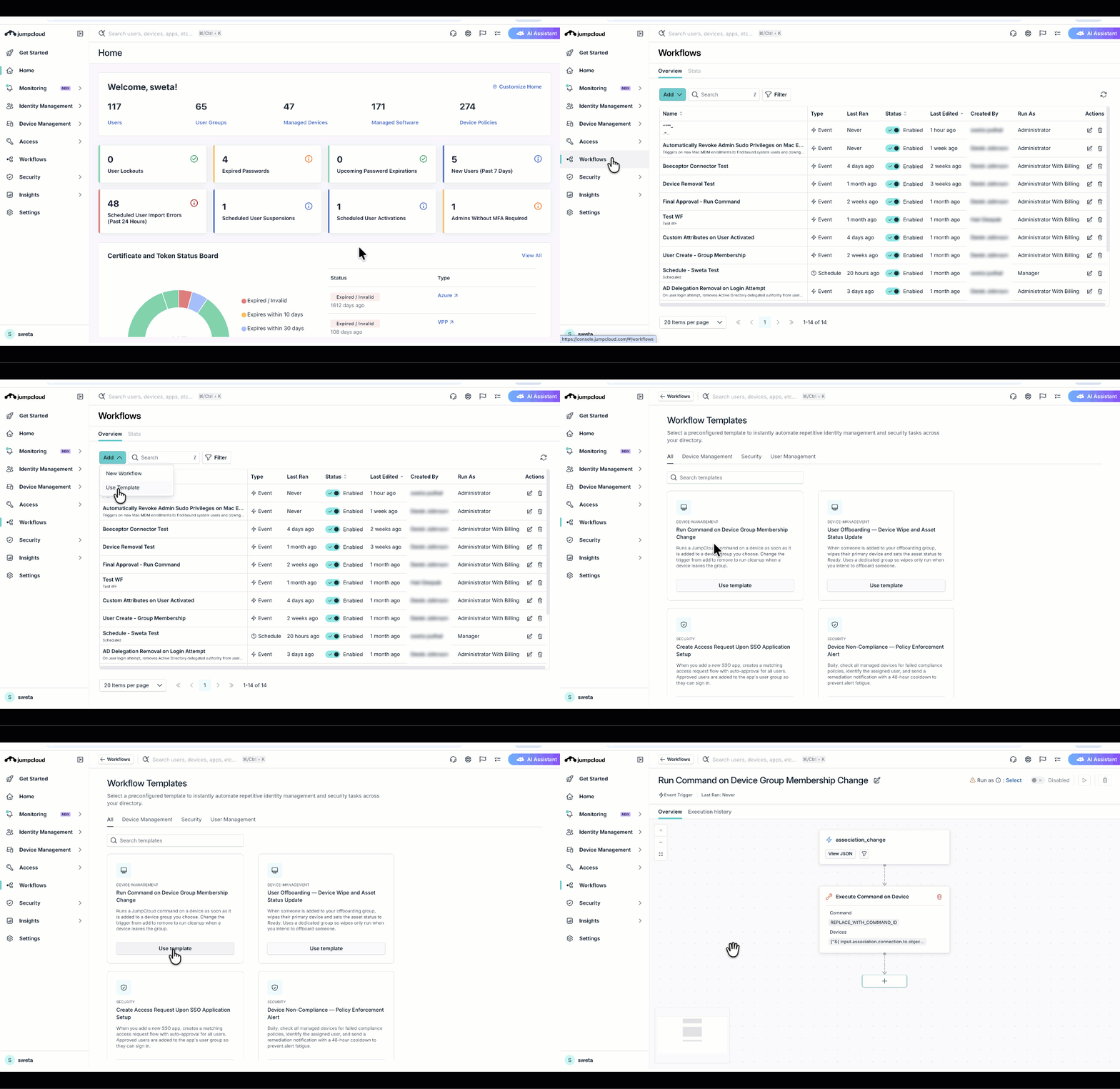
New:Introducing JumpCloud Workflows!
Feature: Workflows
JumpCloud Workflows is a centralized automation feature in your Admin Portal that is designed to replace complex manual scripting and scattered processes. Automate common identity, device, and access tasks using a visual drag-and-drop canvas with workflows. You can now build consistent, repeatable automations that react instantly to changes across your environment.
Key Capabilities
- Visual Canvas: Design and execute custom automations entirely from a drag-and-drop user interface that requires no scripting or developer experience.
- Prebuilt Templates: Get started in minutes with ready-to-use templates for common use cases like employee onboarding/offboarding, managing inactive users, or enforcing device compliance.
- Centralized Management: Enable, disable, edit, and review the history/status of all your automations from a single, unified view in the Admin Portal.
See Get Started: Workflows to learn more.
June 17th, 2026
New:AI Assistant GA and Help Center Integration
Feature: AI Assistant
AI Assistant is now generally available (GA) within the Admin Portal, featuring a native Help Center integration. This conversational interface uses natural language to answer questions, retrieve directory data, generate dynamic device groups and commands, and execute single or bulk administrative workflows across your org. The assistant also resolves procedural or how to questions by analyzing support documentation to synthesize accurate responses. The UI displays sources with inline links below the text block.
The AI Assistant helps you streamline daily operations across these core functional areas:
- Commands: Generate, review, and execute automated commands across your fleet.
- Device Management: View device inventory details, push system updates, and trigger remote lock, erase, or restart commands.
- Group Management: Generate dynamic user and device groups using natural language prompts.
- User Management: Retrieve user lists, view deep account details, suspend or reactivate identities, and manage password and MFA configurations.
- Visibility and Reporting: Extract Directory Insights (DI) event logs, list active administrators, and audit configurations for applications and system policies.
See Get Started: AI Admin Assistant to learn more.
June 8, 2026
Enhancement: EXE and DMG Files Support in JumpCloud's Private Repository
Feature: Software Management
Admins can now upload and deploy EXE and DMG files besides the existing MSI and PKG formats to JumpCloud's Private Repository.
As Windows EXE files are non-standardized, we recommend admins to use the Test-to-Production workflow mentioned in the KB article to ensure a 100% success rate.
Learn More
June 4, 2026
Enhancement: Usage tracking of desktop apps
Feature: AI & SaaS Management
Expand your app visibility by discovering locally installed desktop apps and tracking their active usage directly from managed macOS, Windows, and Linux devices. To use this feature, ensure Device Agent Enabled is toggled on in AI & SaaS Management > Settings > General Settings.
- Track active usage for all desktop apps: Monitor when discovered desktop applications are open and active to identify underutilized software and optimize spend across your org.
- Monitor individual Microsoft Office 365 apps: View desktop-installed Microsoft Office 365 apps — like Word, Excel, PowerPoint, and Outlook — as distinct entries in your inventory instead of a bundled suite to better assess license value.
Learn More
June 4, 2026
New: AI Application Connectors
Feature: AI & SaaS Management
Identify shadow IT and monitor enterprise AI adoption by connecting directly to your org's AI service providers. These direct API integrations expand your discovery coverage beyond web browsers to capture user accounts, application associations, and usage metrics across your org.
- Connect leading AI applications: Add direct API connectors for Claude, Cursor, ElevenLabs, Fal.ai, Gemini Enterprise, and GitHub Copilot to automatically track who has access and see your active seat allocations.
- Track token and cost analytics: Monitor your AI usage with dashboards that show token consumption or estimated costs, depending on what each app supports.
- Security insights: Monitor shadow IT and see exactly how your teams are using AI tools across your fleet.
- Manage connection health: Instantly identify configuration issues with built-in error states that prompt you to reconnect if an integration loses API access.
Learn More
- SaaS Management: Claude Connector
- SaaS Management: Cursor Connector
- SaaS Management: ElevenLabs Connector
- SaaS Management: Fal.ai Connector
- SaaS Management: Gemini Enterprise Connector
- SaaS Management: GitHub Copilot Connector
June 3, 2026
Enhancement: Help-Desk Contact Information visibility in the Admin Portal
Admins can enable help-desk contact information in the user portal for users that are experiencing login issues. See Settings in the Admin Portal to learn more.
June 2, 2026
Enhancement: Create a Policy to Install JumpCloud Go Extension in Selected Browsers
Feature: Policy Management
Admins can now create a policy to install the JumpCloud Go extension in your browsers on Windows, Mac, and Linux devices that use the JumpCloud agent. See Create a Policy to Install JumpCloud Go Extension in Selected Browsers to learn more.
June 1, 2026
Enhancement: SCIM User Attribute Inheritance from Groups
Admins can now drive application-specific roles and licenses by using user group custom attributes or group membership. This release allows for group-based attribute inheritance, ensuring users automatically receive the correct entitlements in downstream Service Providers based on their group memberships. It also allows them to map the active status value providing more control over user activation and deactivation in the service provider.
- Group-Sourced User Attributes: Admins can specify a group resource when selecting custom attributes for SCIM user mappings.
- Inherited Custom Attributes: Define attributes like
licenseTierorroleat the group level to be automatically inherited by all members. - Advanced Expression Logic: Use JumpCloud EXPR functions to evaluate group membership and drive specific user attribute values.
- Status Mapping: Control the logic used for the activating and deactivating the user in the Service Provider app by modifying the default logic for the
activeattribute mapping - Manual Resync: Trigger an immediate “Sync Now” action at the application level to reconcile metadata and memberships for all users and groups.
Key Benefits
- Simplified Operations: Automates license and seat assignments for apps like Zoom, Figma, and Snowflake, eliminating the need to update individual user records.
- Enhanced Data Governance: Centralizes entitlement management within JumpCloud groups to ensure consistent access control across the SaaS portfolio.
- Immediate Application of Changes: Sync changes instantly without waiting for user or user group updates or doing manual workarounds.
MAY
May
May 27, 2026
Enhancement: Approve Access Requests via Direct Messages in Slack
Feature: Access Requests
Admins can now select whether approval notifications are sent to a Slack channel or as direct messages (DMs) when configuring an approval flow, providing greater flexibility in routing approvals. Non-admin approvers can now approve or deny access requests directly from Slack without logging into the User Portal.
Depending on your existing configuration, additional setup may be required. See Create Approval Flows to learn more.
Key updates:
- Non-Admin Slack DMs: Designated non-admin approvers now receive and act on access requests right in their direct messages.
- Timed Access via Slack: Admin and non-admin approvers can now review and approve time-based access requests directly from Slack.
- Flexible Routing: Admins can choose whether approval notifications are sent to a public or private Slack channel, or directly to a user's DMs.
Learn More
New: Alerts for Devices Without Policies
Feature: Device Monitoring and Alerting
We’ve now added a new Device With No Policy rule template that proactively monitors and detects devices in your organization that lack policy coverage.
Key Features:
- Device With No Policy rule template — A poll-based monitoring rule that runs on a daily schedule to identify devices with zero policy bindings in your organization.
- Device group targeting — Scope the rule to specific device groups so you only get alerted about the devices that matter to you.
- Full alert management — View, acknowledge, and resolve alerts from the Alerts Dashboard in the Admin Portal or the MTP, just like any other alert.
See Understand Rule Templates for Alerts to learn more.
May 26, 2026
Enhancement: Device Alert Notifications to Primary Users
Feature: Device Monitoring and Alerting
You can now configure alert rules to automatically send an email notification to the primary user of the affected device when an alert is triggered. This eliminates the need for IT admins to manually identify device owners and reach out, enabling faster remediation directly by the end user.
When creating a rule using the rule templates, use the Notify Primary User option. This is available to configure in the following rule templates:
- Battery Health Monitoring
- Device Offline Monitoring
- Device Uptime Monitoring
- Disk Use Monitoring
See Configure Rules for Device Monitoring and Alerting to learn more.
May 14, 2026
Enhancement: Directory Insights Event Links in Alert Notifications
Feature: Device Monitoring and Alerting
We have now added a Source Event link to Slack and email notifications. Clicking the link will take you directly to the Directory Insights (DI) page for the specific event that triggered the alert.
See Viewing Alert Notifications in Slack to learn more.
May 13, 2026
Enhancement: Vault: PAM Connector v27
Feature: Connectors
This update delivers critical stability enhancements to container infrastructure and further optimizes the unified JumpCloud experience introduced in v26. Additionally, it includes essential security patches across all system components to ensure maximum environment integrity.
Key Improvements
- Container Infrastructure Stability: Optimized Nginx configurations and advanced container health monitoring to ensure high-availability and consistent performance across all remote session types.
- General Security Updates: This release incorporates essential security patches and dependency updates across all Connector components to ensure a consistently hardened security posture.
See Update PAM Jump Server to learn more.
May 08, 2026
Enhancement: macOS Custom PKG Deployments
Feature: Software Management
We’ve introduced a new validation layer for macOS custom .pkg deployments. This update enables support for Apple’s Managed App lifecycle, allowing JumpCloud to assert lifecycle ownership of applications. This provides tighter security and better software governance.
Key Features & Benefits
- App Takeover: Seamlessly transition unmanaged applications to managed status. If a user has already installed an app manually, JumpCloud can now assume management of that application without requiring a reinstall.
- Automatic Removal on Unenrollment: Strengthen your security and licensing compliance. When an MDM profile is removed from a device, any associated managed apps are automatically deleted.
- Enhanced App Governance: By leveraging the Managed App lifecycle, you can gain more granular control over the deployment, updates, and removal of business-critical software.
See Manage Software with JumpCloud Private Repository to learn more.
May 07, 2026
Enhancement: Automate Your Insights with Scheduled Reports
Feature: JumpCloud Reports
We’ve introduced Scheduled Reports to help you automate report generation and delivery. This feature eliminates manual exports, ensuring your team receives the data they need, exactly when they need it.
See JumpCloud Reports to learn more.
Enhancement
Feature: AI Assistant and AI Search
We’ve refreshed JumpCloud AI Search with a new and improved user experience and added functionality to the JumpCloud AI Assistant:
- AI Search: A streamlined design lets you quickly perform searches for objects in your org, or use AI to generate lists and reports. For more complex queries, you can continue conversations in AI Assistant to perform further actions. See Get Started: JumpCloud AI Search to learn more.
- AI Assistant: Added command and dynamic group generation functionality with artifact functionality, letting you quickly edit the objects you’re working on (such as commands, devices, groups, and users) directly within the interface. See Get Started: AI Admin Assistant to learn more.
APRIL
April
April 30, 2026
New: User Management has been changed to Identity Management
To align with the introduction of Agentic Identity and Access Management, User Management has been changed to Identity Management.
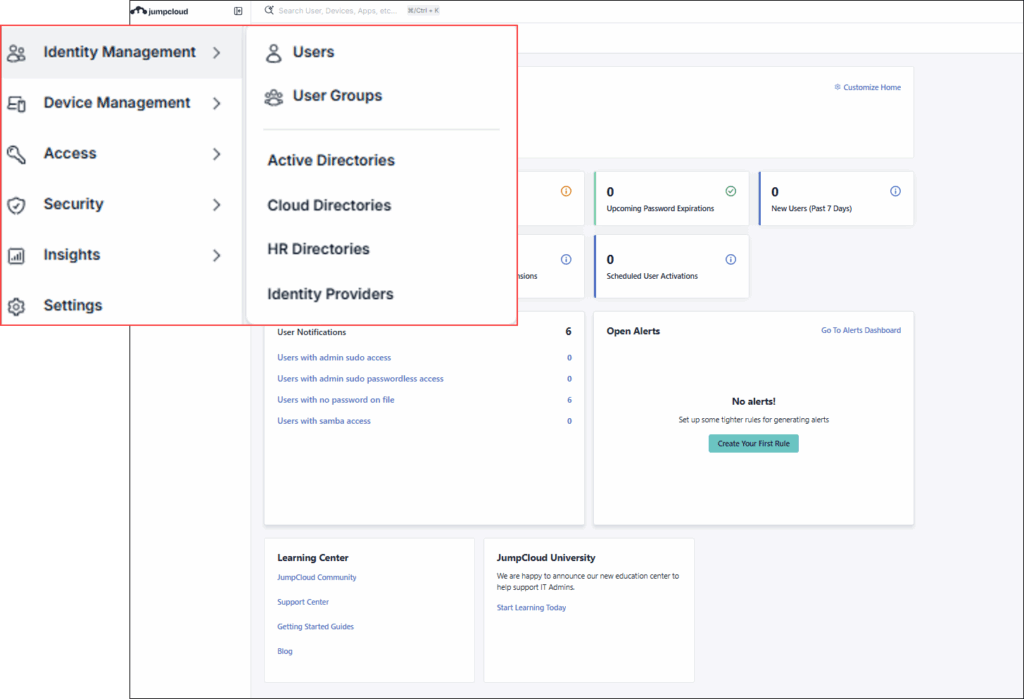
See Updated Admin Portal Left Navigation to learn more.
New: SCIM Identity Management has been changed to Provisioning
As result of the change from User Management to Identity Management, to avoid any confusion, Identity Management has been changed to Provisioning in SSO Applications.
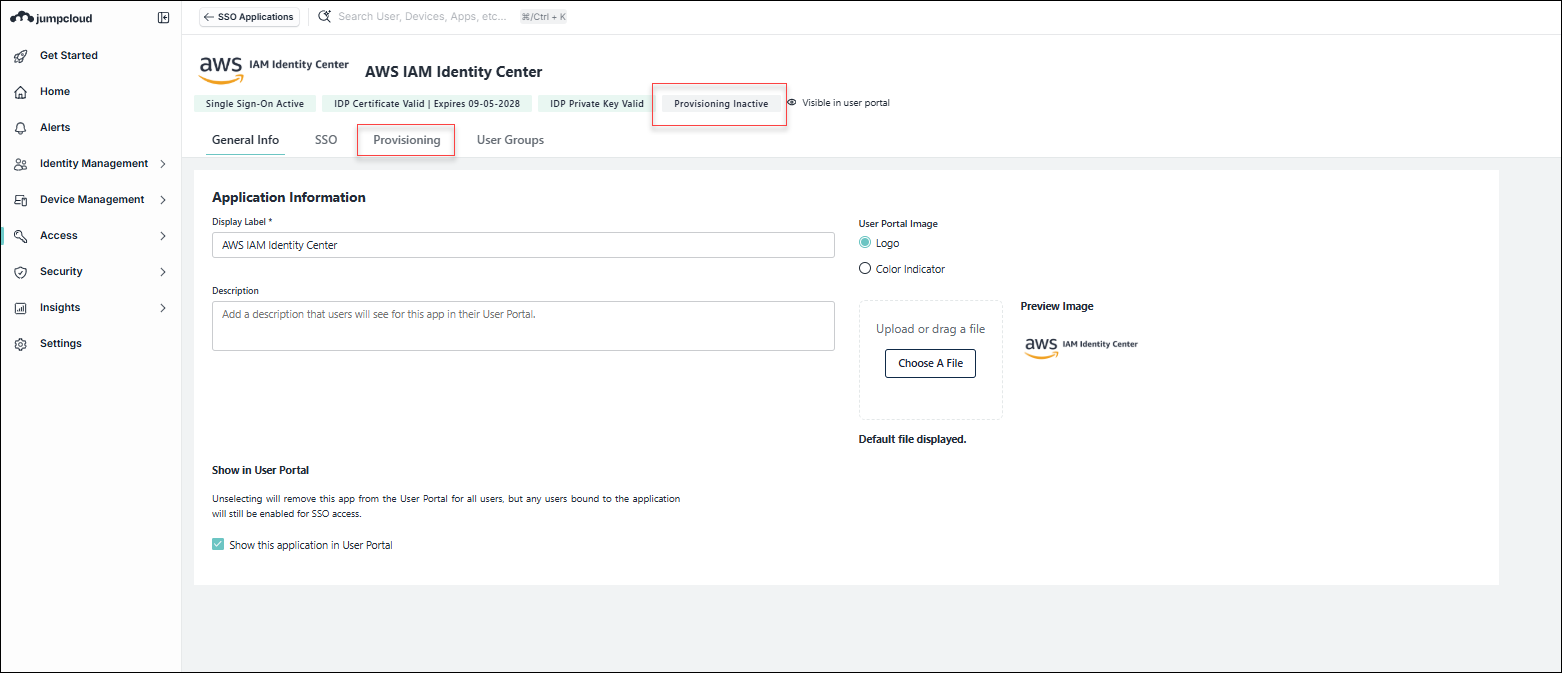
See Improved SSO and SCIM Applications Experience
New: AI Gateway (Public Preview)
We’ve launched the public preview of the JumpCloud AI Gateway to provide a secure authentication and routing layer for your AI-driven environment. It acts as a governed MCP gateway for your configured enterprise applications and AI clients. By validating, monitoring, and logging MCP interactions in real time, the AI Gateway ensures your agents operate securely within your established guardrails.
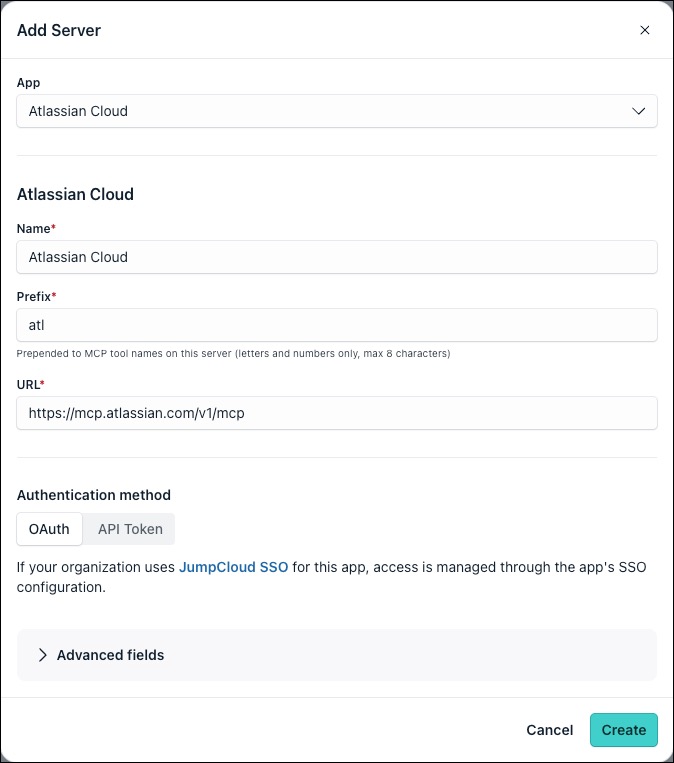
See Get Started: AI Gateway to learn more.
New:India Data Center Is Launched
We have launched a dedicated data center in India. This update ensures that users residing in India can now benefit from localized data residency, enhanced security protocols, and compliance with local regulatory requirements. See JumpCloud Data Centers: Login URLs and Service Endpoints and FAQ: JumpCloud Data Center (India) to learn more.
April 29, 2026
ENHANCEMENT:View Triggering Events Directly Within Alert Details
Feature: Device Monitoring and Alerting
You can now view the exact Directory Insights (DI) event that triggered an alert directly within the Alert Details page. For detailed analysis of the event, you can click the event link and jump directly to the Directory Insights page.
See Use the Alerts Dashboard to learn more.
April 23, 2026
NEW:Proactive Certificate Expiry Alerts
Feature: Device Monitoring and Alerting
You can now use the Certificate Expiring Soon rule template to create monitoring rules to help you proactively manage certificate lifecycles and avoid unexpected outages.
- Configurable Thresholds: Trigger alerts at desired intervals (for example, 90, 60, or 30 days before expiry).
- Multi-Channel Delivery: Send notifications directly to Slack, webhooks, or email notification channels.
- Daily Alerts for Expired Certificates: Once a certificate expires, receive daily alerts until it is renewed.
Learn More
- Configure Certificate Expiring Soon Rule
- Understand Rule Templates for Alerts
- Get Started: Device Monitoring and Alerting
April 10th, 2026
NEW: DI Event Enhancements for CAPs
Feature: Directory Insights
We have introduced enhanced DI events for Conditional Access Policies. Admins can view detailed conditional access policy results to see exactly why the conditions passed, failed, or remained unevaluated.
April 8th, 2026
NEW: Apple MDM Policy Expansion
Feature: Devices
We have enhanced and introduced the several macOS and iOS policies. This expansion focuses on Modern Identity (ACME), Enterprise Networking (Private 5G), and Data Leakage Prevention (Bluetooth/AirPlay).
New and Enhanced macOS Policies
- Enhanced Energy Settings - Granular power management, including Wake-on-LAN, Power Nap, and fine‑tuned sleep controls to extend MacBook fleet battery life and reduce energy costs.
- ACME Certificate - Modern certificate enrollment for 802.1X Wi‑Fi and VPN, replacing legacy SCEP with scalable, automated certificate management.
- Enhanced Firewall - Stealth Mode and granular inbound controls to harden endpoints, especially on untrusted networks.
- Printing Policy - Predefined, managed printers and restricted driver installation to reduce helpdesk load and ensure secure print destinations.
- Bluetooth File Transfer (Bluetooth Settings) - Admin control over Bluetooth object push and file sharing to close a common data exfiltration path.
- AirPlay (macOS) - Control over AirPlay sender/receiver behavior to prevent streaming to unauthorized devices during sensitive sessions.
New iOS & iPadOS Policies
- ACME Certificate - Automatic certificate issuance and renewal for identity and network access, eliminating manual cert handling.
- Managed Mail - Zero‑touch configuration of corporate mail accounts with enforced encryption so users are productive immediately on enrollment.
- AirPlay Control - Whitelisting of approved AirPlay targets and password requirements to protect on‑screen content.
- Cellular Configuration - Centralized control of APN and roaming behavior to maintain connectivity while avoiding excessive data costs.
- Cellular Private Network - Configuration for private 5G/LTE deployments in environments where public cellular is restricted or unsuitable.
- Google Account (OAuth) - Native OAuth-based integration with Google Workspace for improved security and a streamlined sign‑in experience.
- Subscribed Calendars - Push of read‑only calendars (for example, holidays or shift schedules) to keep key dates visible to users.
- CardDAV & CalDAV - Automated setup of corporate contacts and calendars so caller ID and scheduling work out of the box.
See Get Started: Policies to learn more.
ENHANCEMENT:Windows Tray App Redesign
Feature: Devices
The JumpCloud Windows tray app has a new look! This update improves the readability and usability of existing functions, such as password management and User Portal access, while laying the technical foundation for future functionality.
- Improved User Experience: A cleaner, more intuitive interface improves the usability of supported functions like password management and resets.
- Consistency with the User Portal: The redesign aligns the end-user experience on Windows devices with the modernized interface of the JumpCloud User Portal.
- Future-Ready Architecture: Built on modern components, the updated app is ready to deliver expanding capabilities in future releases.
See Get Started: JumpCloud Windows App to learn more.
April 6th, 2026
NEW: Dynamic Variables for Commands
Feature: Commands
We’ve now introduced dynamic Variables to make it easier for JumpCloud admins to manage reusable configuration values and secrets across commands. Admins can use platform variables to automatically populate contextual data or define custom variables that can be reused across multiple commands.
With this, you can now:
- Create and manage organization-specific variables for values you can reuse across commands in the JumpCloud admin portal.
- Store sensitive values like API keys and tokens as secure variables instead of embedding them directly in scripts.
- Eliminate copy-paste mistakes and manual updates caused by hardcoded values.
See Get Started: Command Variables to learn more.
April 1st, 2026
NEW: User Portal
We are excited to introduce a modernized experience for the JumpCloud User Portal. Following our recent updates to the Admin Portal, this update brings a fresh, responsive design to your user portal. Key benefits include:
- New Codebase and Design System — A clean foundation for the org to build upon.
- Improved User Experience — The legacy User Portal was built on outdated designs and information architecture that limited what we could do. The new portal modernizes everything.
- Consistency with the Admin Portal — We've been investing heavily in the Admin Portal UX. It was time to do the same for end users.
End Users will have all of the same capabilities as the legacy portal — accessing applications, managing security enrollments, updating profile attributes, and managing access requests — now with a significantly improved experience.
NEW: AI Assistant is now Public Preview!
Streamline your daily workflows with the new JumpCloud AI Assistant. Built directly into the Admin Portal, this conversational interface allows you to use natural language to ask questions, pull data, and execute single or bulk administrative tasks without ever switching tabs.
AI Assistant helps you manage the following areas of your organization:
- Identity Management: List users, view details, suspend or reactivate accounts, and manage passwords and MFA.
- Device Management: View device details, lock, erase, restart, and push device updates.
- Visibility & Reporting: Pull Directory Insights (DI) events, list administrators, and view details for applications and device policies.
- Commands: List and execute commands across your fleet.
See Get Started: AI Admin Assistant to learn more.
MARCH
March
March 31st, 2026
NEW: Windows KB Patch Management Dashboard
We are introducing a comprehensive, interactive dashboard that shifts Windows update management from a device-level view to a structured, patch-centric approach. This unified experience brings together fleet-wide visibility, precise control, and enhanced security context to seamlessly manage Windows updates at scale.
- Fleet-Wide Visibility: Gain a centralized view of all Windows updates (KBs) across your device fleet. Easily track statuses (Installed, Pending, and Failed) and drill down into specific KBs to see device distribution.
- Granular KB Control: Approve and deploy specific updates to selected devices, or apply bulk actions across multiple KBs. You can instantly retry failed updates directly from the dashboard and choose whether to execute installations immediately or follow policy schedules.
- Vulnerability Insights: KBs are now enriched with associated CVE data and severity levels, allowing administrators to easily prioritize critical security updates.
This enhancement delivers improved visibility, precise control, and stronger security context for managing Windows updates across the fleet.
Learn More
March 26th, 2026
NEW: Dedicated India AWS Region for JumpCloud Vault
The JumpCloud Vault platform is now deployed within the JumpCloud India AWS account, establishing a fully supported, localized data center region. This foundation provides Indian customers with secure credential management and privileged access tailored to their regional needs.
- Simplified Compliance: This localized foundation is critical for helping organizations easily meet strict local data residency and privacy requirements.
- Exclusive Local Storage: All Vault data, secrets, and session recordings are stored exclusively within Indian borders.
- Supported Products: Full regional support for JumpCloud Password Manager and Privileged Access Management (PAM).
- Improved Performance: Localized infrastructure means lower latency and faster performance for all Vault tenants in the region.
March 25th, 2026
NEW: Device-Based Discovery
Feature: AI & SaaS Management
Identify SaaS and AI applications installed directly on user devices by leveraging existing JumpCloud agent data. This enhancement expands your discovery coverage to include desktop-based applications across macOS, Windows, and Linux endpoints, providing a centralized view of your organization's software inventory within AI & SaaS Management.
- Discover desktop applications: Use the JumpCloud Agent to detect locally installed applications and utilities on managed devices. Go to AI & SaaS Management > Settings > General Settings to toggle this discovery method on or off at any time.
- Automated inventory updates: Your application inventory is updated every 30 minutes to ensure you have the latest information on newly installed and active software across your fleet.
- Identify users and accounts: Automatically attribute application activity to JumpCloud users. Accounts where specific credentials cannot be resolved appear as Unknown.
Learn More
NEW: QR and Barcode Support
Feature: Asset Management
Generate and print standardized QR or barcode labels directly from the JumpCloud Admin Portal to identify and track physical hardware. These labels link physical devices to their digital records in Asset Management, supporting onsite audits and inventory checks.
- Generate physical asset labels: Configure and print labels in small, medium, or large sizes for macOS, Windows, and Linux devices. Set your preferences in Device Management > Asset Management > Settings and Fields > Labels.
- Scan to verify assets: Use the labels to instantly access corresponding asset records in the field and validate devices during audits and handoffs.
- Bulk label printing: Save time during setup by selecting multiple devices from your asset list and printing labels in a single action.
NEW: Lenovo Warranty Sync
Feature: Asset Management
Automate hardware lifecycle tracking by syncing warranty information for Lenovo devices directly from the manufacturer.
- Sync Lenovo warranty details: Automatically populate asset records with real-time warranty status and expiration dates. Go to Device Management > Asset Management > Settings and Fields > General Settings and toggle Lenovo Warranty Sync to On to enable the feature.
See Configure Asset Management to learn more.
March 24, 2026
ENHANCEMENT: Fully customizable Identity Management (SCIM) Attribute Mapping is in Public Preview
Admins can now fully edit and add attribute mappings in both pre-built and custom integrations.
- Define Source and Destination: Precisely specify which JumpCloud attribute feeds into which attribute in the Service Provider.
- Map Manager and Custom Attributes: Send data from the user's manager field or any custom attributes you've defined in JumpCloud.
- Add New Mappings: Create mappings for any attributes supported by the Service Provider's SCIM schema.
- Utilize Expressions: Manipulate data, such as formatting dates, using expressions before it's transmitted to the Service Provider.
- Preview Mappings: Review a snapshot of your configured mappings before saving to ensure accuracy.
NEW: Custom Admin Roles in Service Accounts
Feature: Service Accounts
Admins can now link custom admin roles to a service account. Admins can select these custom roles while creating a new service account.
March 18, 2026
NEW: Recovery Lock Policy for Mac
Feature: Policies
The new Recovery Lock policy secures access to macOS Recovery on Mac computers with Apple silicon. By requiring a password, this policy ensures the physical security of your managed Mac computers by preventing unauthorized user access to macOS Recovery and its associated functions, such as the startup options menu and security settings.
Key Features
- Flexible Password Management: Choose to specify a single static password for all Mac computers bound to the policy, or automatically generate a unique Recovery Lock password for each Mac. Automatically generating passwords unlocks the following capabilities:
- Automated Password Rotation: Enhance security by automatically rotating generated passwords on a specified interval (between 1 and 365 days).
- Secure Access and Retrieval: Securely view the generated Recovery Lock password for a specific device directly from the Admin Portal when access is needed.
- Ongoing Security: Automatically generated passwords rotate 60 minutes after an administrator views them in the Admin Portal.
See Create a Mac Recovery Lock Policy to learn more.
March 17th, 2026
NEW: Vault Connector v26
Vault Connector v26 delivers a fully unified JumpCloud experience across all remote session types, introduces a critical Bastion access control enhancement, and includes routine system security updates.
What's New & Improved
- Unified JumpCloud Branding: The Connector now consistently displays the JumpCloud identity across all modules including Web Shield, DB Shield, and Bastion. This includes updated logos, icons, CLI prompts, and interface text for a seamless user experience.
- Stricter Bastion Access Control: To reinforce the principle of least privilege, the Bastion service has been updated to exclusively return servers that a user is explicitly authorized to access.
- Web Shield Chrome Update: The Chrome engine embedded within the Web Shield container has been upgraded to the latest stable version for enhanced performance and security.
- General Security Updates: This version includes essential security patches and dependency updates across all Connector components to maintain an optimal security posture.
March 4th, 2026
ENHANCEMENT: Upgrade to Managed Google Domain
Feature: Android EMM
JumpCloud now supports upgrading your Android Enterprise from Managed Google Play Accounts to Managed Google Domains. This recommended upgrade provides advanced management capabilities and greater visibility into Android Enterprise setup.
Key Features
- Enterprise Type Visibility: The Admin Portal now displays the specific Enterprise Type (Managed Google Play or Managed Google Domain).
- Seamless Migration: Admins can initiate a direct upgrade to a managed Google domain via a migration banner in the Device Management > MDM > Google tab.
See Upgrading to an Enterprise Google Admin Account to learn more.
March 3rd, 2026
NEW: Send JumpCloud Notifications to Slack
Feature: Notifications
You can now add the JumpCloud Slack App to your Slack workspace and send real time alerts and access requests directly to your configured channels, thus accelerating response times.
Key Features
-
Streamline Alerts: Route configurable JumpCloud alerts and events, such as security incidents, directory changes, and system events, directly into appropriate Slack channels for teams to see and act on issues in real time where they already work.
-
Interactive Notifications: Alerts delivered to Slack include actionable buttons that admin can use to Mark as Acknowledged or Mark as Resolved for alerts without leaving the Slack interface.
-
In-Channel Access Request Approvals: Integrated with the new Access Request approval flows, admins can now approve or deny access requests via interactive actions directly in Slack.
Learn More
ENHANCEMENT: Manage Access Requests Directly from Slack
Feature: Access Requests
Admins can now create Approval Flows that send access requests directly to configured Slack channels by adding the JumpCloud Slack App to a Slack workspace. You can also approve or deny access requests via interactive actions without leaving the Slack interface.
Learn More
March 2nd, 2026
Member Of attribute
The Member Of attribute allows you to add users to a dynamic user group based on membership in another group. An alternative to nested groups, this approach creates direct memberships and permissions in the intended group instead of indirect relationships. This reduces privilege creep. Also, centralized rule logic is maintained in a few foundational groups.
FEBRUARY
February
February 28th, 2026
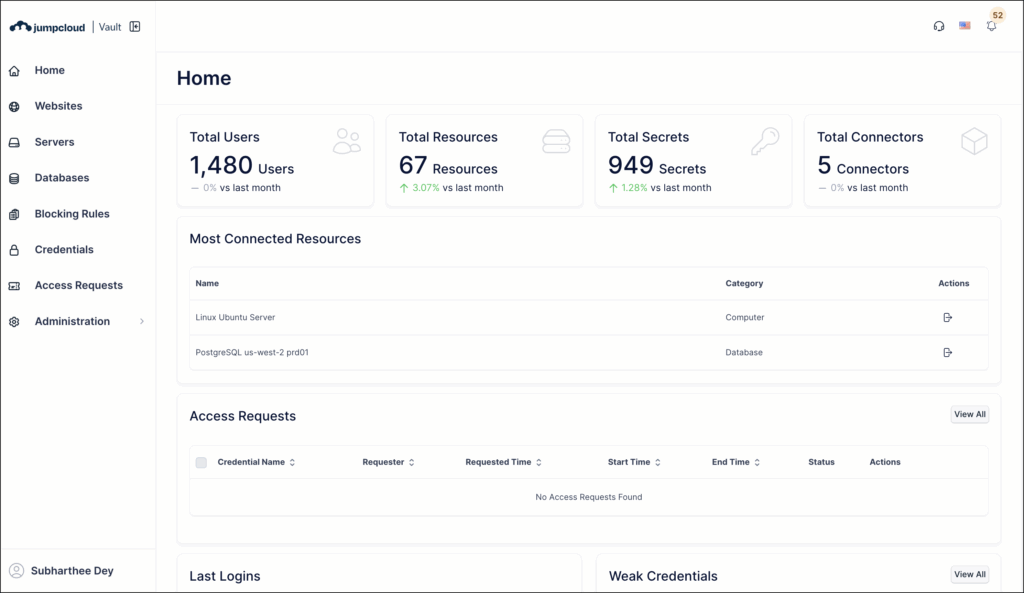
NEW: JumpCloud Vault
Feature: Access
The Vault Engine has been upgraded from ASP.NET Zero v8 → v14.3.0 in a single cutover, modernizing to .NET 9, Angular 20, ABP 10.3 and Metronic 8.2.8. This removes legacy CVEs/deprecations, improves performance and developer velocity, and restores supportability.
New Features
- Access Request Workflow: A modernized, streamlined interface for requesting, approving, and auditing privileged access.
- Resource Duplication: Admins can now duplicate existing resources to significantly speed up environment setup and management.
- Blocking Rules Menu: Introduced a dedicated, modernized menu for Blocking Rules, establishing the foundation for upcoming website and server restrictions.
UI/UX Enhancements
- Platform Redesign: Rebuilt from the ground up to align with JumpCloud design standards. Enjoy a faster, more intuitive, and consistent experience across Websites, Servers, and Databases.
- Modernized Session History: A dedicated Session History menu providing a full audit trail for all resource types—now featuring integrated video recordings and keystroke logs.
- Standardized Timestamps: Implemented a unified date and time format across the entire platform for improved reporting accuracy.
See JumpCloud Vault to learn more.
February 26th, 2026
NEW:Windows Delivery Optimization (DO) Policy
Feature: Devices
We’ve optimized network performance with smart P2P technology for Windows updates. Instead of every device downloading the same assets individually, a single machine can now securely share update files with other local peers.
- Saves Bandwidth: Stops the office internet from slowing down on "Patch Tuesday" !!!
- Speeds up Deployment: Updates and apps install much faster because they are pulled from local peers.
- Complements Windows Patching: This is the perfect partner for our Windows Patch Management and Patch Dashboard. While the dashboard tells them which devices need updates, this policy ensures those updates download efficiently without crashing the network.
See Windows Delivery Optimization (DO) Policy to learn more.
February 20th, 2026
ENHANCEMENT: Modernized Commands Experience
Feature: Commands
We’ve updated the entire Commands page to make it easier and more reliable to create, edit, and manage commands at scale. The new experience replaces the old side drawer view with a full-page Commands workflow.
- The previous side drawer for creating and editing commands is now a full-page view.
- This gives you more room to work with longer scripts, additional options, and more complex configurations, all in a single layout.
See Create a Command to learn more.

You will also see a refreshed Commands List page with clearer spacing and hierarchy, making it easier to scan commands, understand their purpose, and review key details at a glance.
February 17th, 2026
NEW: Feature Requests Portal and Customer Portal Enhancements
Feature: Customer Portal
Improve how you manage technical issues and provide product feedback through the updated portal experience.
- New Feature Requests Portal: Submit and track ideas for new or enhanced features in a dedicated portal. This centralized space allows you to monitor the progress of your requests over time.
- AI Assist: Enable AI Assist when creating a support case to receive an instant response based on thousands of proven solutions. This automates troubleshooting and can potentially resolve issues without waiting for a manual review.
- Expanded Product and Category Options: Select from a more detailed list of options in the Product and Category fields. These help you better categorize and track your requests while ensuring they are accurately routed to the correct teams.
- Profile Management: Update your individual contact details and set your working hours time zone directly within your profile settings.
- Multi-Tenant Visibility: Use the new Accounts tab in the main page of the Customer Portal to quickly view cases for specific tenant organizations.
Learn More
- Request Features
- Contact JumpCloud Support
- Manage support cases in the Customer Portal
- Support in the MTP
- Best Practices for Submitting Support Tickets
M365 / Entra Id Last User Sync Results
We’ve improved the M365 / Entra ID Cloud Directory Sync experience by adding real-time synchronization insights. Admins can now monitor and troubleshoot user-level sync issues without digging through system logs.
Key Enhancements:
- New "Sync Status" Column: Instantly identify the health of your integration with visual success and failure indicators for every connected user
- Detailed Tooltips: Hover over any status icon to access critical metadata, including:
- Last Attempt: The exact date and time the last sync was attempted
- External ID: The unique identifier from Microsoft, confirmed for successful syncs
- Direct Error Messages: For failed syncs, the specific error returned from Microsoft is displayed alongside the external ID
- Simplified Troubleshooting: Instead of searching through logs, admins can instantly identify why a user failed to sync and take corrective action based on Microsoft's direct feedback
ENHANCEMENT: Support for Notification-Only Rules in Alerting
Feature: Device Monitoring and Alerting
Alert rules no longer have to create an in-console alert. You can now configure a rule to send notifications only, create an in-console alert only, or do both, giving you more control over noise and escalation paths.
See Configure Rules for Device Monitoring and Alerting to learn more.
ENHANCEMENT: Granular Attribute Filtering for Directory Insights Event Monitoring Rule
Feature: Device Monitoring and Alerting
We’ve enhanced the Directory Insights Event Monitoring ruleto provide more control over your event triggers. You can now go beyond broad event categories and apply specific attribute filters to refine your notifications.
- Expanded Event Library: We’ve expanded the range of supported Directory Insights (DI) events when creating the Directory Insights Event Monitoring rule. You can now quickly create alert rules for a much wider array of events. See Insight Alert Events to learn more.
- Attribute-Level Filtering: You can now get granular with your alerts. Define specific criteria based on event attributes to ensure you only trigger alerts for the events that actually matter. See Configure Event Attribute Filters to learn more.
February 13th, 2026
Patch Management: DDM Support for macOS and iOS
We have expanded Patch Management to support Apple’s Declarative Device Management (DDM). This update introduces new policies with enhanced capabilities for managing and enforcing updates on both macOS and iOS devices.
New Features
- iOS Support: Patch Management now fully supports iOS devices, a capability previously unavailable in legacy MDM policies.
- New Policy Types: You can now configure the following DDM-based policies to manage your Apple devices:
- Automatic Updates: Automatically enforces the latest available OS version based on your configured deferral and grace period settings. For macOS, DDM-based policies supersede legacy MDM patch policies, offering improved performance and reliability.
- Software Update Enforcement: Allows you to manually enforce a specific target OS version.
Learn More
- Create a DDM-based macOS Patch Policy
- Create a DDM-based iOS Patch Policy
- Create a Mac Software Update Enforcement Policy
- Create an iOS Software Update Enforcement Policy
February 5th, 2026
SAML SSO MFA Configuration
Admins can now configure a SAML SSO integration to send the MFA Claim in the AuthnContext within the SAML assertion, providing verifiable proof of MFA. This change helps customers meet strict access requirements for high-security applications like Salesforce, PayPal, and Epic/Impravata while eliminating no access or the "double MFA" friction for end-users.
- MFA Configuration Section: New section in SAML SSO integrations featuring a read-only AMR option and a selectable AuthContext sub-section
- Flexible Mapping Modes: 3 options for how the MFA claim will be sent in the AuthnContext
- Custom Factor Mapping Table: A new mapping table for mappingJumpCloud-supported factors (such as Push or TOTP) to specific strings, URLs, or URNs required by the SP
Full API Support: Configuration for these claims can be doe via the API
See SSO using Custom SAML Application Connectors to learn more.
ENHANCEMENT: AI Search and AI Filtering Support
Feature: Asset Management
- JumpCloud AI Search now supports Asset Management data, letting you quickly find and generate reports on all of your assets.
- We've also added an AI-powered filtering widget within Asset Management to help filter your list of assets using natural language queries.
See Configure Asset Management and Get Started: JumpCloud AI Search to learn more.
JumpCloud Go
We have updated JumpCloud Go extension permissions for Vault users to improve password management. This update prevents your browser's native password manager from displaying password saving prompts and ensures that sensitive credentials remain private.
JANUARY
January
January 29th, 2026
Windows Users Can Now Preserve Credentials After Remote Password Changes
We’ve introduced a new password sync flow on Windows devices to preserve the Credential Manager and related application access after remote or off-device password resets.
- For the best experience, we recommend users reset their password directly in the JumpCloud Tray App on their device.
- If users reset their password off-device (for example in the User Portal or Admin Portal) they are prompted on their next login to sync their previous and current passwords. This preserves saved credentials and access to Windows applications.
- This change is being rolled out in phases and may not be immediately available in your organization.
See Manage Windows Password to learn more.
January 22nd, 2026
Advanced OIDC Configuration Settings
A new Advanced Settings section is available for OIDC SSO applications, giving IT admins granular control over session security and token architecture. This update enables per-app customization of token lifetimes, token formats (JWT vs. Opaque), and audience scoping, allowing customers to meet strict compliance mandates and complex integration requirements without relying on global system defaults.
- Granular Token Lifetimes: Admins can now manually set distinct expiration windows for ID, Access, and Refresh tokens within validated ranges (from 10 minutes up to 90 days).
- Access Token Strategy: A new toggle allows admins to choose between Opaque and JWT formats for access tokens to ensure compatibility with any resource server.
- Additional Audience Configuration: Support for up to 5 additional access token audiences to facilitate complex microservices integrations or to specify the target API to receive the access token as part of the audience claim.
See SSO with OIDC to learn more.
January 19th, 2026
NEW: Timed Access Requests are here!
Feature: Access Requests
We have now added timed access to our Access Requests feature. Using this, admins can configure workflows to allow users to request access for a specific duration (one day, 15 days, 30 days, and so on).
You can now replace permanent permissions with timed access to ensure users have the right level of permissions exactly when they need it—and never longer.
See Manage Approval Flows to learn more.
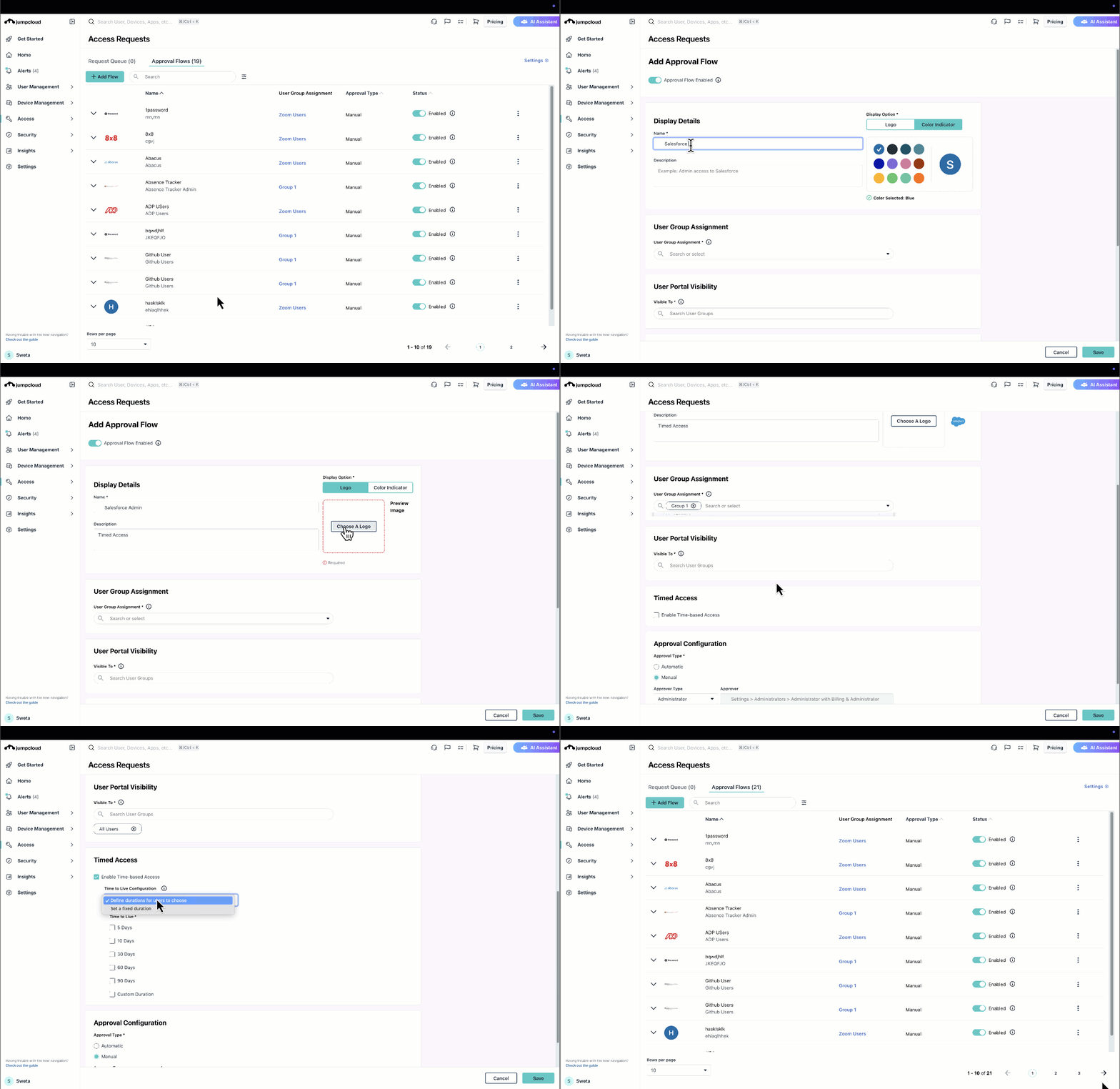
January 6th, 2026
Multi-factor Authenticators Selection in Conditional Access Policies
Admins can configure and enforce specific Multi-factor authenticators while configuring conditional access policies. The Admin can select from a number of available factors such as JumpCloud Go, TOTP, etc. See Choosing Multi-factor Authenticators in Conditional Access Policies to learn more.
Was this information helpful?