Integrate Agent Delegated Access with Your APIs
Agent Delegated Access lets an AI agent authenticate with its own JumpCloud-managed identity while acting on behalf of a user or another supported subject. JumpCloud issues a signed JSON Web Token (JWT) that identifies:
- The user or agent represented by the token
- The agent performing the action
- The JumpCloud organization that issued the token
- The API or resource for which the token was issued
- Optional group memberships
Use this guide to learn how developers can request these tokens, validate them in customer-controlled APIs, and use their claims when making authorization decisions.
Prerequisites:
- An agent registered in JumpCloud
- OAuth client credentials for that agent
- A customer-controlled API that accepts JumpCloud-issued JWTs
- The API’s resource identifier configured as an allowed audience for the agent
- For user delegation, a JumpCloud OIDC application trusted by the agent
See Get Started: Agents for information about registering an agent and generating its client credentials.
See Get Started: Agent Delegated Access for information about enabling delegation, selecting a trusted OIDC application, and configuring allowed audiences.
How Agent Delegated Access Works
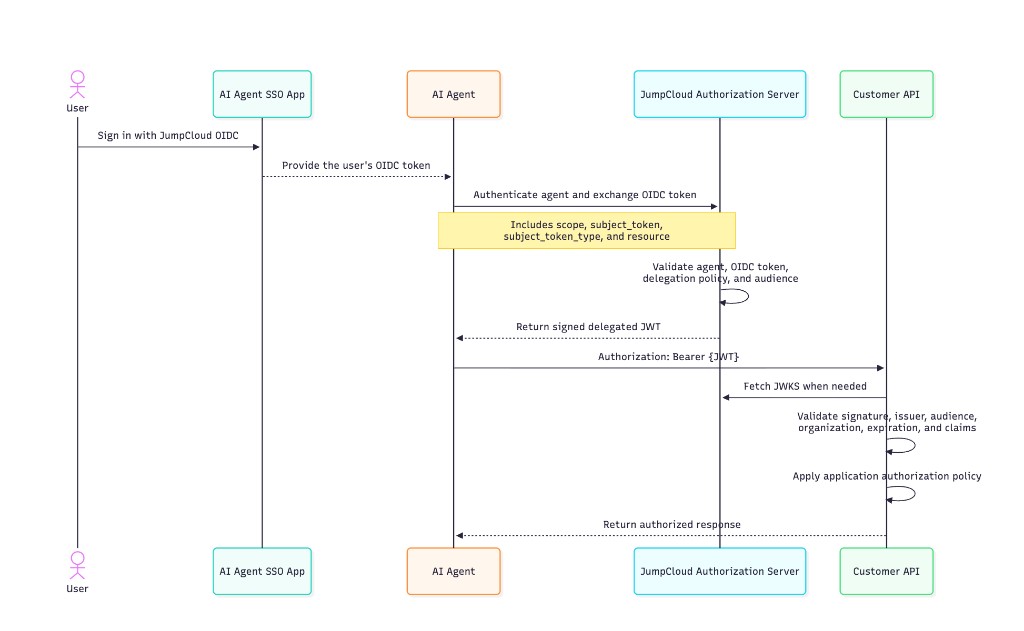
The customer application first obtains a user identity token through JumpCloud OIDC. The agent then authenticates with its own client credentials and exchanges that identity token for a delegated access token.
The agent presents the delegated token directly to the customer API. API traffic does not need to pass through the JumpCloud AI Gateway.
JumpCloud Authorization Server
| Purpose | URL |
|---|---|
| Issuer | https://ai.jumpcloud.com |
| Well-known endpoint | https://ai.jumpcloud.com/.well-known/oauth-authorization-server |
| Token endpoint | https://ai.jumpcloud.com/oauth/token |
| JSON Web Key Set | https://ai.jumpcloud.com/.well-known/jwks.json |
Request an Agent Token
Use the OAuth 2.0 Client Credentials grant when an agent is acting as itself.
The request must include:
- The agent’s client ID and client secret
- The
agentidscope - The
groupsscope if group claims are required - A
resourcevalue identifying the receiving API
The resource value must exactly match one of the agent’s configured allowed audiences.
cURL Example
curl --request POST \
  --url https://ai.jumpcloud.com/oauth/token \
  --user "${AGENT_CLIENT_ID}:${AGENT_CLIENT_SECRET}" \
  --header "Content-Type: application/x-www-form-urlencoded" \
  --data-urlencode "grant_type=client_credentials" \
  --data-urlencode "scope=agentid groups" \
  --data-urlencode "resource=https://api.example.com"
Successful Response
{
  "access_token": "eyJhbGciOiJSUzI1NiIsImtpZCI6Ii4uLiJ9...",
  "token_type": "Bearer",
  "expires_in": 3600,
  "scope": "agentid groups"
}
A decoded agent token resembles:
{
  "iss": "https://ai.jumpcloud.com",
  "aud": "https://api.example.com",
  "iat": 1793901600,
  "exp": 1793905200,
  "jti": "4ef95853-a3e7-4d97-997a-a43f56da4c39",
  "sub": "6a4d71ded87c10908ae1d9c4",
  "sub_type": "agent",
  "jc_org": "6a3c69386158af9ca024a23a",
  "scope": "agentid groups",
  "groups": [
    "6b82fe1c34d6920012345678"
  ]
}
Request a Delegated Token
Use OAuth 2.0 Token Exchange, defined by RFC 8693, when the agent is acting on behalf of a user or another supported subject.
The agent authenticates with its own client credentials and sends the subject’s token in the request.
cURL Example: Agent Acting for a User
curl --request POST \
  --url https://ai.jumpcloud.com/oauth/token \
  --user "${AGENT_CLIENT_ID}:${AGENT_CLIENT_SECRET}" \
  --header "Content-Type: application/x-www-form-urlencoded" \
  --data-urlencode "grant_type=urn:ietf:params:oauth:grant-type:token-exchange" \
  --data-urlencode "scope=agentid groups" \
  --data-urlencode "resource=https://api.example.com" \
  --data-urlencode "subject_token=${USER_ID_TOKEN}" \
  --data-urlencode "subject_token_type=urn:ietf:params:oauth:token-type:id_token"
Successful Response
{
  "access_token": "eyJhbGciOiJSUzI1NiIsImtpZCI6Ii4uLiJ9...",
  "issued_token_type": "urn:ietf:params:oauth:token-type:jwt",
  "token_type": "Bearer",
  "expires_in": 3600,
  "scope": "agentid groups"
}
A decoded delegated token resembles:
{
  "iss": "https://ai.jumpcloud.com",
  "aud": "https://api.example.com",
  "iat": 1793901600,
  "exp": 1793905200,
  "jti": "c3f1aa2b-38b5-45ee-962c-d8a4660e791f",
  "sub": "6a4d71ded87c10908ae1d9c4",
  "sub_type": "user",
  "jc_org": "6a3c69386158af9ca024a23a",
  "scope": "agentid groups",
  "groups": [
    "Managers",
    "Employees"
  ],
  "act": {
    "sub": "6aa2ee464a82929d09ddac80",
    "sub_type": "agent",
    "groups": [
      "6b82fe1c34d6920012345678"
    ]
  }
}
Understand the Token Claims
| Claim | Description |
|---|---|
iss | The JumpCloud authorization server that issued the token. |
aud | The API or resource for which the token was issued. |
iat | The time at which the token was issued. |
exp | The time after which the token must be rejected. |
jti | A unique identifier for the token. |
sub | The identity represented by the token. |
sub_type | Identifies the subject as user or agent. |
jc_org | The JumpCloud organization associated with the token. |
scope | The scopes granted to the token. |
groups | Optional group memberships for the subject. |
act | The agent acting on behalf of the subject. |
act.sub | The acting agent’s JumpCloud identifier. |
act.sub_type | The acting identity type. For this flow, it is agent. |
act.groups | Optional group memberships for the acting agent. |
Interpret sub together with sub_type. A user’s sub value depends on the Subject Claim configured on the trusted OIDC application. It might be a JumpCloud user ID, email address, username, or another configured attribute.
Do not assume that sub values are globally unique across subject types or trusted applications.
Group Claims
The groups scope requests group information:
groupscontains the subject’s groups.act.groupscontains the acting agent’s groups.
Was this information helpful?