Improved Google Workspace Integration Experience
Use this article to learn about enhancements to the Google Workspace (GWS) Cloud Directory integration. The first update improves the formatting of the comma-separated values (CSV) file you download after importing users. This page will expand as additional integration enhancements become available.
The new enhancements are:
- Improved Google Workspace Bulk Import Report: We've enhanced the Google Workspace bulk import report to improve the readability of the downloaded CSV file. The report now displays data correctly, without formatting issues or distorted content, making it easier to review import results.
Improved Google Workspace Bulk Import Report
We've enhanced the Google Workspace bulk import report to improve the readability of the downloaded CSV file. The report now displays data correctly, without formatting issues or distorted content, making it easier to review import results.
The import results CSV preserves quotation marks and nested data so you can read the report's contents. Previously, the export removed quotation marks from values, including structured data in the results. The resulting report was difficult to read.
The formatting update includes these changes:
- Quotation marks within values are preserved.
- Nested objects and lists retain their JavaScript Object Notation (JSON) structure, including quoted field names and text values.
- Quotation marks within a CSV cell are escaped by doubling them in the file's raw text.
- Missing values appear as empty cells.
Comparing the Previous and Updated Formatting
The following example comes from the export's test data. It illustrates the formatting of a nested object rather than a specific user's import result.
| View | Previous formatting | Updated formatting |
|---|---|---|
| Nested object value | {a:1,b:2} | {"a":"1","b":"2"} |
| Same cell in the raw CSV file | "{a:1,b:2}" | "{""a"":""1"",""b"":""2""}" |
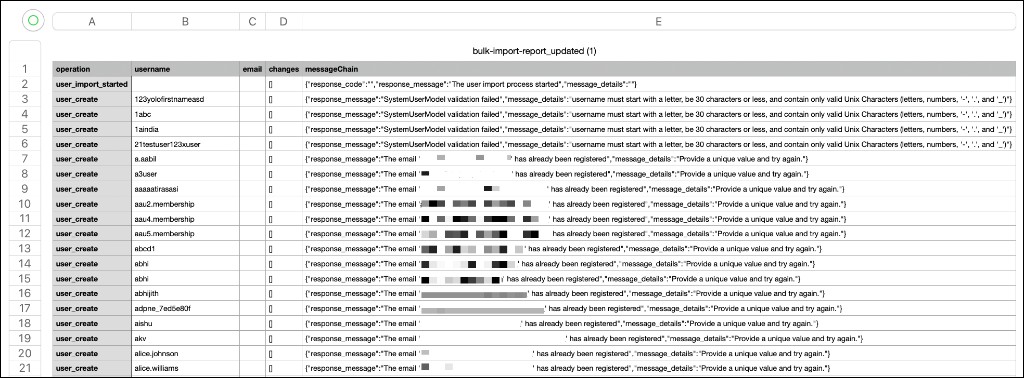
The outer quotation marks identify a single CSV cell. Doubled quotation marks inside that cell preserve the quotation marks in the JSON value. The JSON remains inside the CSV file; the download is still a CSV file.
Understanding the Result Fields
The detailed import results include the following fields. The formatting update changes how values are written to the CSV, rather than adding these fields.
| Field | Contents |
|---|---|
operation | The operation reported for the imported user. |
username | The username reported for the imported user. |
email | The destination value from an email change, when present in the result's changes. Otherwise, the cell is empty. |
changes | A list of reported changes with nonempty destination values. Nested values retain their JSON formatting. |
messageChain | The message data returned with the import result. Nested values retain their JSON formatting. |
Reviewing Your Download
- Complete a Google Workspace user import. For import instructions, see Use the Google Workspace Integration.
- Download the import results CSV.
- Open the file to review the results, including the
changesandmessageChainvalues.
If you inspect the raw CSV text, expect doubled quotation marks within cells that contain JSON. These quotation marks are part of the CSV encoding.
Was this information helpful?