Get Started: Unified Patch Dashboard
The Unified Patch Dashboard provides a consolidated view of update posture across Windows and Apple devices in one place. From Patch Management, the Unified Patch Dashboard page has three tabs: Overview, Apple, and Windows.
Accessing the Unified Patch Dashboard
- Log in to the JumpCloud Admin Portal.
- Go to Device Management > Patch Management.
- Click Unified Patch Dashboard.
- On the Overview tab, review your Fleet Update Summary: patch compliance across Windows and Apple devices in your fleet.
Overview Tab
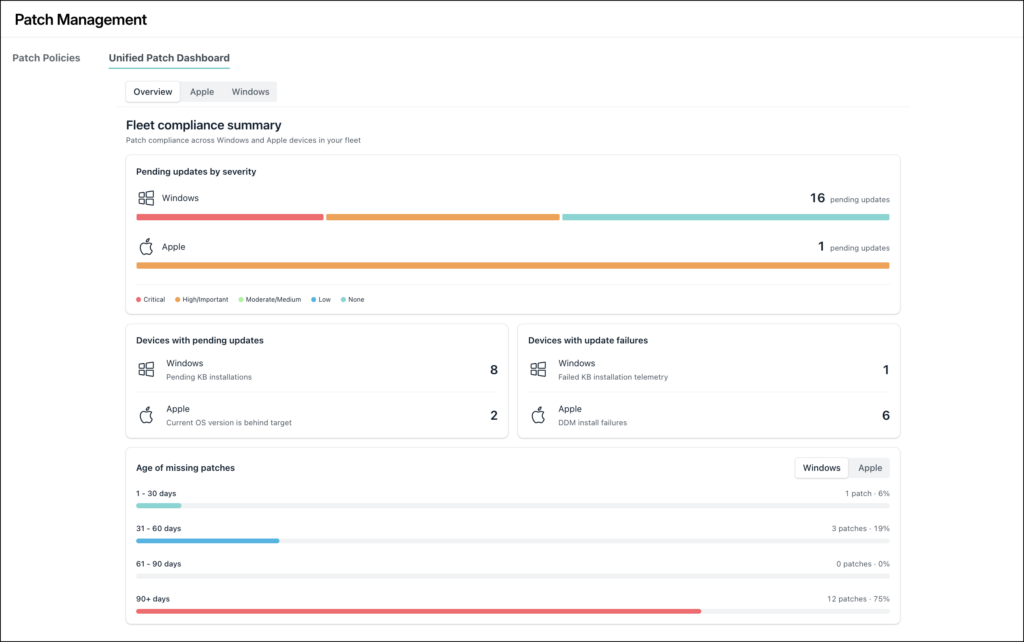
The Overview tab’s Fleet compliance summary shows four widgets:
- Pending updates by severity: Total pending updates for Windows and Apple devices, grouped by severity. Windows severity reflects the KB's severity rating. Apple severity reflects the security severity associated with the missing OS update. Severity groups: Critical, High/Important, Moderate/Medium, Low, and None.
- Devices with pending updates: The number of Windows devices with pending KB installations and the number of Apple devices whose current OS version is behind the OS version targeted by their active Apple update policy.
- Devices with update failures: The number of Windows devices with failed KB installation telemetry and the number of Apple devices with DDM install failures.
- Age of Missing Updates: Shows missing updates grouped by age: 1 to 30 days, 31 to 60 days, 61 to 90 days, and 90-plus days. Use the Windows and Apple toggle above the chart to switch which platform’s data displays.
- Windows / Apple switcher on Age of Missing Updates: Use the Windows and Apple selector to switch between the aging distribution for Windows and Apple updates.
Was this information helpful?