Distinguished Name in JumpCloud and Active Directory
This article will help clarify the basic understanding on Distinguished name in Active Directory and how they are co related to JumpCloud.
In the context of directory services like Active Directory (AD) or Lightweight Directory Access Protocol (LDAP), DN stands for Distinguished Name. It's a unique identifier for an entry within a directory tree structure. In simple words, it will give the path of the user.
How they are named in AD:
- CN = Common Name (It is the Common Name attribute of the entry, representing the name of the user. It will include the user name). This will include anything except the OU and domain. So, a container will also be represented by CN and a user will also be represented by the CN.
- OU = Organzational Unit (It is the Organizational Unit where the user is located or in which OU it belongs to)
- DC = Domain (it represents the domain as in to which domain the user belongs to)
For example:
CN = Nikhil, OU = User, DC= mydomain, DC= com
This represents the path of the user existence in Active directory. A DN must always be read from right to left. In the example above, The user name is “Nikhil” which belongs to OU named as “Users” and is in the domain named as “mydomain.com”
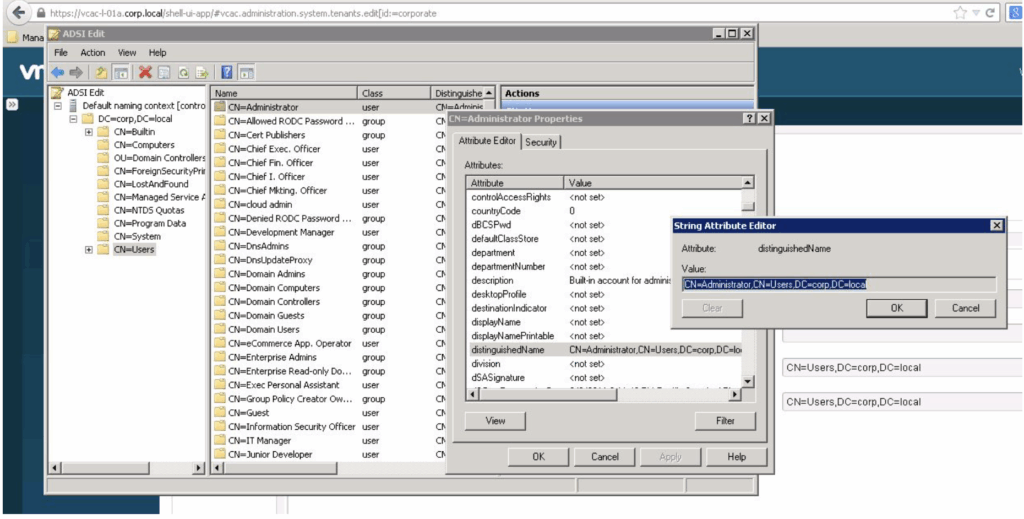
In the above screenshot we can see that a container named as “Users” and there sub container named as “Administrator” which is indeed located in domain “corp.local”
If we check the DN for Administrator then the DN would be
“CN=Administrator,CN=users,DC=corp,DC=local” (The same can be seen in the screenshot and it would be read from right to left to know the actual path of the “Administrator container”)
How the DN convention works in JumpCloud?
- uid = User ID (It represents the name of the user)
- OU = Group name in jumpcloud (It represents the group name to which the user belongs since we dont have the concept of Organizational unit in JumpCloud like in AD so OU here refers to the group)
- O = it represents the Org ID (It will remain same to all the users in an organization in JumpCloud)
- DC = Domain (It represents the domain as in to which domain the user belongs to)
Reference Screenshot below:
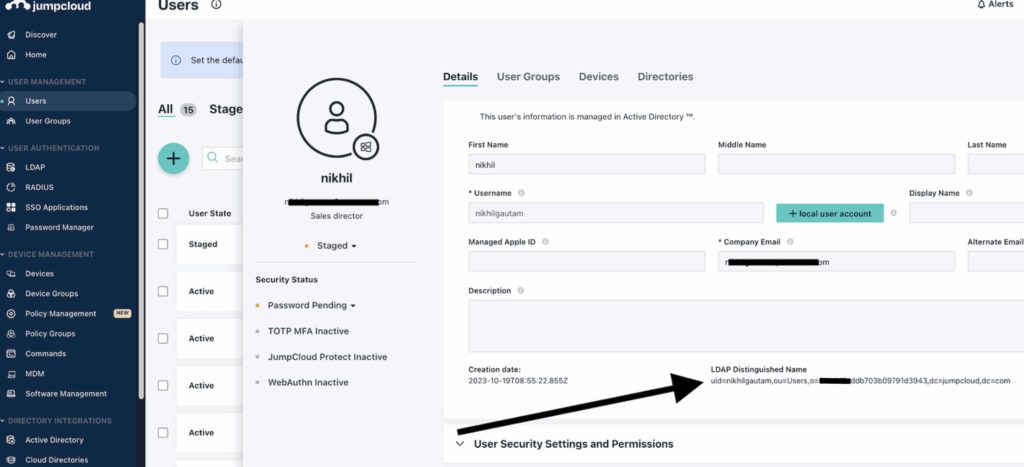
Here the DN of the user is “uid=nikhilgautam,ou=Users,o=64edd5addb703b09791d3943,dc=jumpcloud,dc=com”
This needs to be read from right to left to know the actual path of the user in an org in JumpCloud. In the screenshot above a user “nikhilgautam” is in the group named as “Users” and is in the Org with id as “*****5addb703b09791d3943” and is in the domain named as “JumpCloud.com”
Once a user is imported from the Active directory to JumpCloud through ADI then the DN of the user will change in JumpCloud according to our environment. The DN of the user in Active directory will be different from the one in the JumpCloud. The naming convention will be a different too as we discussed in the article above.
Was this information helpful?